VectorStyler
    • Categories
    • Unread
    • Recent
    • Tags
    • Popular
    • Register
    • Login

    Help creating flourishes/controlled path curves in VS

    Scheduled Pinned Locked Moved Features and Ideas
    9 Posts 5 Posters 8.5k Views 4 Watching
    Loading More Posts
    • Oldest to Newest
    • Newest to Oldest
    • Most Votes
    Reply
    • Reply as topic
    Log in to reply
    This topic has been deleted. Only users with topic management privileges can see it.
    • BoldlineB Offline
      Boldline
      last edited by Boldline

      One of the things I'd like to learn to do with precision in VS is make flourishes similar to the example image I attached below. Yes, I could literally trace over one of them with the pen tool, but that takes time and effort to get the precise curve correct. I'm wanting to do it in a more mathematical way where I can control the end point and modify the curve but still allow VS to determine the details. Perhaps this is something that could be a function of the upcoming curvature tool in phase three of the roadmap? or maybe it's better as a geometry plugin listed in phase 2?

      I'm envisioning an option to set pinpoints where nodes would go at the ver end of a curve and the top of the curve, etc, and then ask VS to determine the most perfect line that fits those parameters. I could see this being helpful when you want a space between two nodes to have a perfect curve balanced between them - so you create a path and then have the option to divide it in halves or quarters, etc... or a percentage and VS auto-creates that perfet path curve for you.

      Hopefully I'm making sense and not rambling. I can create and show more examples of what I mean. If it's already a part of VS, I'd love to utilize it asap!
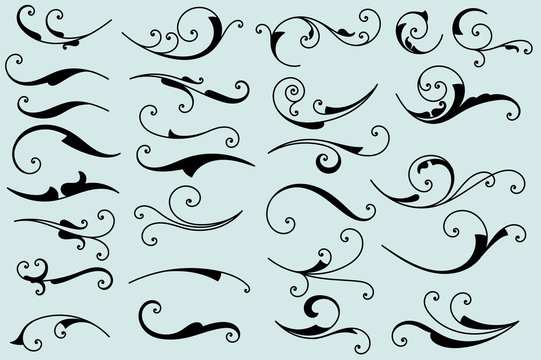
      0_1705431513511_95697b60-6894-45ee-a5a2-bc65ed6571a3-image.png

      🍎 macOS Tahoe 26.2, Mac mini (M1, 2020), Chip Apple M1, Memory 16 GB
      Cintiq 27QHD Display and LG Ultra HD Display

      VectorStylerV F 2 Replies Last reply Reply Quote 3
      • VectorStylerV Offline
        VectorStyler @Boldline
        last edited by

        @Boldline Maybe, when scripting / plugins are available.

        1 Reply Last reply Reply Quote 1
        • F Offline
          FastVector @Boldline
          last edited by

          @Boldline Maybe using the spiral tool in combination with the width tool...

          Windows 10 | 1920x1080 | 125%

          1 Reply Last reply Reply Quote 1
          • F Offline
            FastVector
            last edited by

            Here a video

            Windows 10 | 1920x1080 | 125%

            BoldlineB 1 Reply Last reply Reply Quote 3
            • BoldlineB Offline
              Boldline @FastVector
              last edited by

              @FastVector Thanks! That is a great solution for now. I'll play around with it

              🍎 macOS Tahoe 26.2, Mac mini (M1, 2020), Chip Apple M1, Memory 16 GB
              Cintiq 27QHD Display and LG Ultra HD Display

              F b77B 2 Replies Last reply Reply Quote 0
              • F Offline
                FastVector @Boldline
                last edited by FastVector

                @Boldline in the example that you've showed they used the fibonacci spiral.

                https://en.wikipedia.org/wiki/Fibonacci_sequence

                0_1705525807775_Fibonacci spiral.vstyler

                Windows 10 | 1920x1080 | 125%

                1 Reply Last reply Reply Quote 1
                • b77B Offline
                  b77 @Boldline
                  last edited by

                  @Boldline You can use the Decay parameter to get logarithmic spirals:
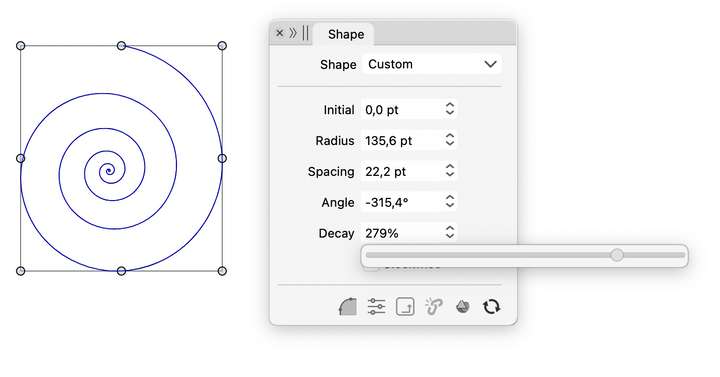
                  0_1705534998806_Screenshot 2024-01-18 at 01.40.16.png

                  MacBook Pro (Intel) running Monterey 12.6.4

                  1 Reply Last reply Reply Quote 3
                  • S Offline
                    Subpath
                    last edited by

                    @Boldline

                    Inkscape has a really nice Feature for such Designs.
                    With the Bezier tool, there is a option called Spiro Path.

                    Here a Video

                    Win 11
                    CPU: AMD Ryzen 5 9600X, 6-core.
                    GPU: Nvidia Geforce RTX 5070.

                    1 Reply Last reply Reply Quote 2
                    • F Offline
                      FastVector
                      last edited by

                      The Fibonacci spiral person... 🙂

                      0_1705562082725_Fibonacci spiral person.jpg

                      Windows 10 | 1920x1080 | 125%

                      1 Reply Last reply Reply Quote 4
                      • First post
                        Last post