VectorStyler
    • Categories
    • Unread
    • Recent
    • Tags
    • Popular
    • Register
    • Login

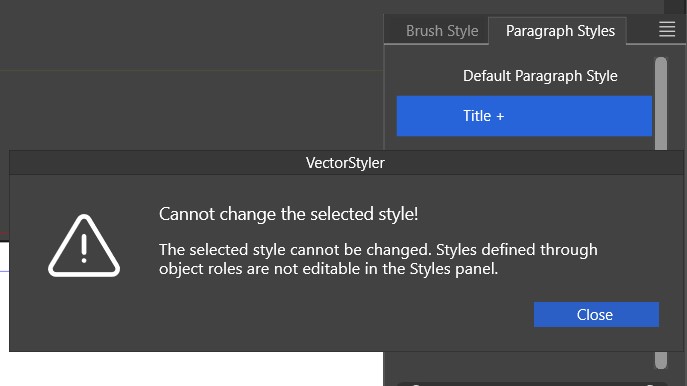
    Paragraph style - can't be changed through the panel
    Scheduled Pinned Locked Moved VectorStyler 1.2 beta
    49 Posts 2 Posters 113.0k Views 2 Watching
    Loading More Posts
    • Oldest to Newest
    • Newest to Oldest
    • Most Votes
    Reply
    • Reply as topic
    Log in to reply
    This topic has been deleted. Only users with topic management privileges can see it.
    • VectorStylerV Offline
      VectorStyler @B-Vs-V
      last edited by

      @Pat There is still work to do here.

      1 Reply Last reply Reply Quote 0
      • VectorStylerV Offline
        VectorStyler @B-Vs-V
        last edited by

        @Pat said in Paragraph style - can't be changed through the panel:

        synchronisation is not always working as it should

        Does this refer to the character panel update, or to the paragraph style creation from the "Paragraph Style" panel?

        B 1 Reply Last reply Reply Quote 0
        • B Offline
          B-Vs-V @VectorStyler
          last edited by

          @VectorStyler Paragraphe style panel.

          W11 Pro 25H2 - 12th Gen Intel(R) i7-12700K 3.61 GHz - RAM 64 Go - NVIDIA GF GTX 4070 Ti - Intuos - Dell UP3216Q / Eizo ColorEdge
          W11 Pro 25H2 - 12th Gen Intel(R) i7-12700KF 3.60 GHz -RAM 64 Go - NVIDIA GF GTX 3080 - IntuosPro- ProArt PA329C

          VectorStylerV 1 Reply Last reply Reply Quote 0
          • VectorStylerV Offline
            VectorStyler @B-Vs-V
            last edited by

            @Pat said in Paragraph style - can't be changed through the panel:

            Paragraphe style panel.

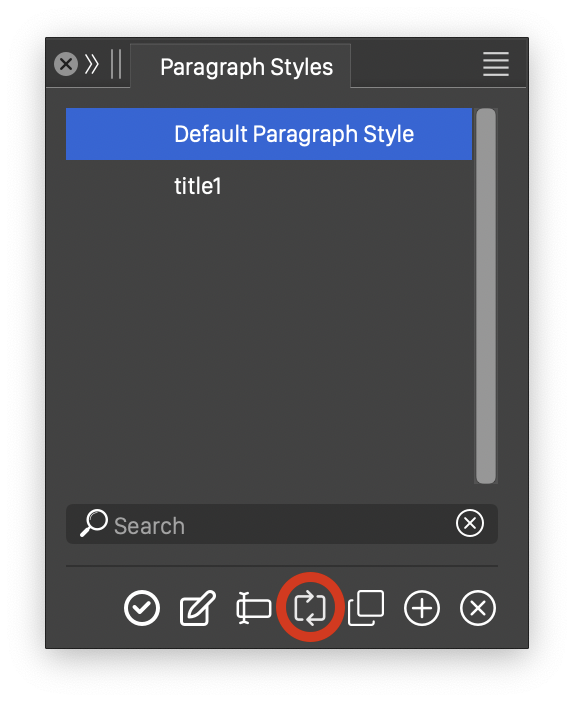
            I made a recording of the paragraph style syncing: https://recordit.co/0kiu9aB4s9

            Maybe I do something different here, attached the file also: 0_1701886168646_paragraphstyle2.vstyler

            In this file I have the default paragraph style and a new (not yet edited) "title1" style. In the text I changed some character and paragraph attributes, but still links to the default style at first.

            The syncing is done with he highlighted button (below).
            One problem: if the panel is set to apply the style in a single click, then syncing will not work, since by selecting the style (to sync) will apply the style, so there is nothing to sync.
            0_1701886228908_paragraphstyle.png

            B 1 Reply Last reply Reply Quote 0
            • B Offline
              B-Vs-V @VectorStyler
              last edited by B-Vs-V

              @VectorStyler I tried to repeat this problem but VS crashed (crash report sent).

              First, I was able to define a paragraph style and apply it to different parts of the text. It was easy to switch between the two styles.

              If I select a piece of text in a paragraph (with a paragraph style, e.g. title) and change the characteristics of the text (font, size, etc.), the synchronisation doesn't always work and I always ended up with "unstyled" text, and Ctrl+R does nothing.

              I didn't record this time, but it's like at the end of the video I sent you earlier.

              W11 Pro 25H2 - 12th Gen Intel(R) i7-12700K 3.61 GHz - RAM 64 Go - NVIDIA GF GTX 4070 Ti - Intuos - Dell UP3216Q / Eizo ColorEdge
              W11 Pro 25H2 - 12th Gen Intel(R) i7-12700KF 3.60 GHz -RAM 64 Go - NVIDIA GF GTX 3080 - IntuosPro- ProArt PA329C

              VectorStylerV 1 Reply Last reply Reply Quote 1
              • VectorStylerV Offline
                VectorStyler @B-Vs-V
                last edited by

                @Pat said in Paragraph style - can't be changed through the panel:

                I tried to repeat this problem but VS crashed (crash report sent).

                Got the crash report. Was the Guidelines panel open? Seems to be caused by that.

                Please send me the workspace and settings files (Help -> Reveal Workspace Folder).

                B 1 Reply Last reply Reply Quote 0
                • B Offline
                  B-Vs-V @VectorStyler
                  last edited by

                  @VectorStyler Yes, it is.

                  "Ressources" folder sent ☺

                  W11 Pro 25H2 - 12th Gen Intel(R) i7-12700K 3.61 GHz - RAM 64 Go - NVIDIA GF GTX 4070 Ti - Intuos - Dell UP3216Q / Eizo ColorEdge
                  W11 Pro 25H2 - 12th Gen Intel(R) i7-12700KF 3.60 GHz -RAM 64 Go - NVIDIA GF GTX 3080 - IntuosPro- ProArt PA329C

                  1 Reply Last reply Reply Quote 1
                  • B Offline
                    B-Vs-V
                    last edited by

                    It is still not possible to synchronise a text modification with a paragraph style that has already been set up ☹

                    W11 Pro 25H2 - 12th Gen Intel(R) i7-12700K 3.61 GHz - RAM 64 Go - NVIDIA GF GTX 4070 Ti - Intuos - Dell UP3216Q / Eizo ColorEdge
                    W11 Pro 25H2 - 12th Gen Intel(R) i7-12700KF 3.60 GHz -RAM 64 Go - NVIDIA GF GTX 3080 - IntuosPro- ProArt PA329C

                    VectorStylerV 1 Reply Last reply Reply Quote 0
                    • VectorStylerV Offline
                      VectorStyler @B-Vs-V
                      last edited by

                      @Pat said in Paragraph style - can't be changed through the panel:

                      It is still not possible to synchronise a text modification with a paragraph style that has already been set up

                      To change the style from the selected text or to apply the style onto the selected text?

                      B 1 Reply Last reply Reply Quote 0
                      • B Offline
                        B-Vs-V @VectorStyler
                        last edited by B-Vs-V

                        @VectorStyler I define a paragraph style. To test synchronisation, I change some of the text parameters (font, size) and try to update the style I've already created... it doesn't work as expected.

                        W11 Pro 25H2 - 12th Gen Intel(R) i7-12700K 3.61 GHz - RAM 64 Go - NVIDIA GF GTX 4070 Ti - Intuos - Dell UP3216Q / Eizo ColorEdge
                        W11 Pro 25H2 - 12th Gen Intel(R) i7-12700KF 3.60 GHz -RAM 64 Go - NVIDIA GF GTX 3080 - IntuosPro- ProArt PA329C

                        VectorStylerV 1 Reply Last reply Reply Quote 0
                        • VectorStylerV Offline
                          VectorStyler @B-Vs-V
                          last edited by

                          @Pat said in Paragraph style - can't be changed through the panel:

                          To test synchronisation, I change some of the text parameters (font, size) and try to update the style I've already created... it doesn't work as expected.

                          Found one issue, the fix will be in the next build.

                          B 1 Reply Last reply Reply Quote 1
                          • B Offline
                            B-Vs-V @VectorStyler
                            last edited by

                            @VectorStyler I've just started testing the paragraph styles again and the creation and synchronisation are working very well so far... very good news 👍 ☺

                            Just one small detail I've noticed (reproducible): when I create a new style and the cursor remains on the modified text from which I created it, this specific new style is never selected in the styles panel but always the previous style with the "+" sign. It's a minor detail, since all you have to do is reselect the style, but still.

                            W11 Pro 25H2 - 12th Gen Intel(R) i7-12700K 3.61 GHz - RAM 64 Go - NVIDIA GF GTX 4070 Ti - Intuos - Dell UP3216Q / Eizo ColorEdge
                            W11 Pro 25H2 - 12th Gen Intel(R) i7-12700KF 3.60 GHz -RAM 64 Go - NVIDIA GF GTX 3080 - IntuosPro- ProArt PA329C

                            VectorStylerV B 3 Replies Last reply Reply Quote 1
                            • VectorStylerV Offline
                              VectorStyler @B-Vs-V
                              last edited by

                              @Pat said in Paragraph style - can't be changed through the panel:

                              when I create a new style and the cursor remains on the modified text from which I created it, this specific new style is never selected in the styles panel but always the previous style with the "+" sign

                              I will try to fix this.

                              1 Reply Last reply Reply Quote 1
                              • B Offline
                                B-Vs-V @B-Vs-V
                                last edited by

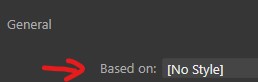
                                @VectorStyler Can I establish a dependency from one style to another?

                                For example, I've defined a "Title_1" style that applies to my first page title and then I want to use the characteristics of this style except for one parameter. For the moment I can't see any other option than to create a new style "Title_2" which is totally independent of Title_1.

                                This means that if I want to make a common change to all my titles (e.g., I decide to change the font) I'll have to make this change to all my title styles. If I only have two of them, that's fine, but if I create multiple sub-styles from a single one, it would be nice to apply a change to all of them by changing the "master" title.

                                I did not test "copy a style" and therefore do not known whether it creates a link between styles.

                                W11 Pro 25H2 - 12th Gen Intel(R) i7-12700K 3.61 GHz - RAM 64 Go - NVIDIA GF GTX 4070 Ti - Intuos - Dell UP3216Q / Eizo ColorEdge
                                W11 Pro 25H2 - 12th Gen Intel(R) i7-12700KF 3.60 GHz -RAM 64 Go - NVIDIA GF GTX 3080 - IntuosPro- ProArt PA329C

                                VectorStylerV 1 Reply Last reply Reply Quote 0
                                • VectorStylerV Offline
                                  VectorStyler @B-Vs-V
                                  last edited by

                                  @Pat said in Paragraph style - can't be changed through the panel:

                                  Can I establish a dependency from one style to another?

                                  Apply style "Title_1", make some changes and then create new style "Title_2" from selected text.
                                  "Title_2" should be dependent on "Title_1" for the parts that are not changed

                                  B 2 Replies Last reply Reply Quote 0
                                  • B Offline
                                    B-Vs-V @VectorStyler
                                    last edited by

                                    @VectorStyler It is what I did but the changes are not implemented in the second style.

                                    W11 Pro 25H2 - 12th Gen Intel(R) i7-12700K 3.61 GHz - RAM 64 Go - NVIDIA GF GTX 4070 Ti - Intuos - Dell UP3216Q / Eizo ColorEdge
                                    W11 Pro 25H2 - 12th Gen Intel(R) i7-12700KF 3.60 GHz -RAM 64 Go - NVIDIA GF GTX 3080 - IntuosPro- ProArt PA329C

                                    1 Reply Last reply Reply Quote 0
                                    • B Offline
                                      B-Vs-V @VectorStyler
                                      last edited by

                                      @VectorStyler to illustrate my point, in another app:
                                      0_1706959250231_s1.jpg

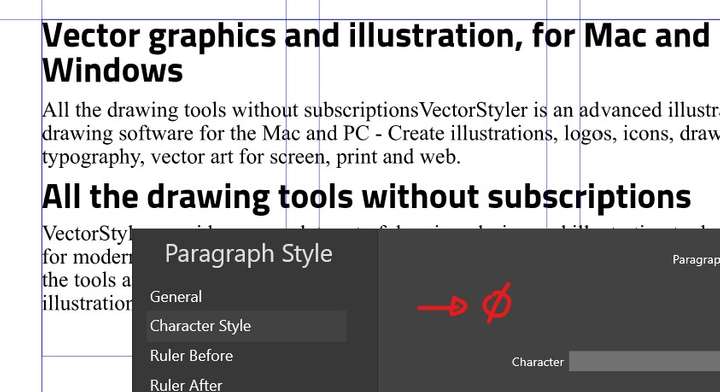
                                      in VS, even when editing the style, I can't see a way of creating a sub-style that depends on another:
                                      0_1706959263168_s2.jpg

                                      W11 Pro 25H2 - 12th Gen Intel(R) i7-12700K 3.61 GHz - RAM 64 Go - NVIDIA GF GTX 4070 Ti - Intuos - Dell UP3216Q / Eizo ColorEdge
                                      W11 Pro 25H2 - 12th Gen Intel(R) i7-12700KF 3.60 GHz -RAM 64 Go - NVIDIA GF GTX 3080 - IntuosPro- ProArt PA329C

                                      VectorStylerV 1 Reply Last reply Reply Quote 1
                                      • VectorStylerV Offline
                                        VectorStyler @B-Vs-V
                                        last edited by

                                        @Pat I opened a bug on this one.

                                        B 1 Reply Last reply Reply Quote 1
                                        • B Offline
                                          B-Vs-V @VectorStyler
                                          last edited by

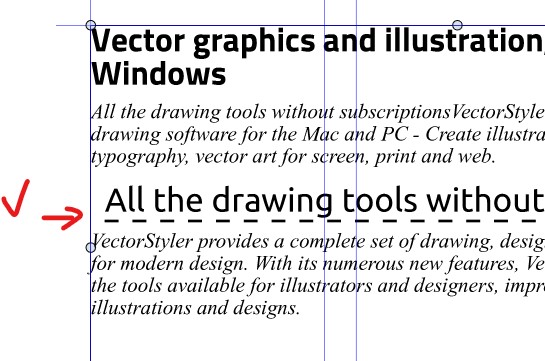
                                          @VectorStyler I've just tested a whole series of modifications, including decorations, and the synchronisation has always worked. Kudos for finding the issue (time to resume the tutorials) ☺
                                          0_1706967136165_s1.jpg

                                          The only important thing missing for a more complex and complete layout in vector app would be a hierarchy of paragraph styles. I haven't yet tested the interaction between paragraph styles and character styles.

                                          W11 Pro 25H2 - 12th Gen Intel(R) i7-12700K 3.61 GHz - RAM 64 Go - NVIDIA GF GTX 4070 Ti - Intuos - Dell UP3216Q / Eizo ColorEdge
                                          W11 Pro 25H2 - 12th Gen Intel(R) i7-12700KF 3.60 GHz -RAM 64 Go - NVIDIA GF GTX 3080 - IntuosPro- ProArt PA329C

                                          1 Reply Last reply Reply Quote 1
                                          • VectorStylerV Offline
                                            VectorStyler @B-Vs-V
                                            last edited by

                                            @Pat said in Paragraph style - can't be changed through the panel:

                                            when I create a new style and the cursor remains on the modified text from which I created it, this specific new style is never selected in the styles panel but always the previous style with the "+" sign

                                            This is by design. Creating a style (in general) from a selection does not automatically apply that style.

                                            1 Reply Last reply Reply Quote 1
                                            • First post
                                              Last post