VectorStyler
    • Categories
    • Unread
    • Recent
    • Tags
    • Popular
    • Register
    • Login

    Spacing between Objects
    Scheduled Pinned Locked Moved Questions and Support
    11 Posts 5 Posters 9.6k Views 4 Watching
    Loading More Posts
    • Oldest to Newest
    • Newest to Oldest
    • Most Votes
    Reply
    • Reply as topic
    Log in to reply
    This topic has been deleted. Only users with topic management privileges can see it.
    • S Offline
      Subpath @Kumr
      last edited by

      @Kumr

      Hi

      Here a Video which shows how

      Win 11
      CPU: AMD Ryzen 5 9600X, 6-core.
      GPU: Nvidia Geforce RTX 5070.

      1 Reply Last reply Reply Quote 2
      • BoldlineB Online
        Boldline
        last edited by

        @Subpath Thanks for the video. I had this same issue before and forgot to ask about it on the forum. I had thought you just edit the numerical information and it would work immediately. Your video made me realize I needed to change the amount and THEN choose the specific spacing action to see the result. This is better because you can choose which alignment option gets the numerical edit you enter...

        🍎 macOS Tahoe 26.2, Mac mini (M1, 2020), Chip Apple M1, Memory 16 GB
        Cintiq 27QHD Display and LG Ultra HD Display

        S 1 Reply Last reply Reply Quote 1
        • b77B Offline
          b77
          last edited by

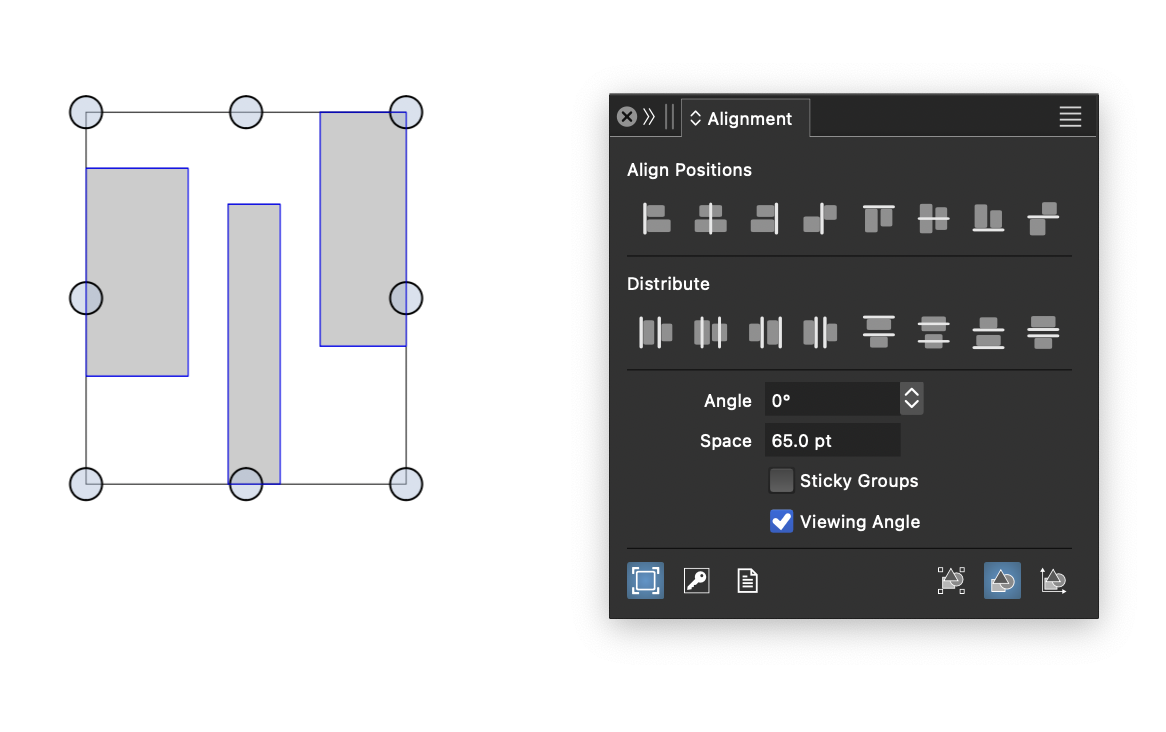
          @Kumr Can you mention which buttons did you try?
          The 'Distribute at Equal Distances' buttons?

          MacBook Pro (Intel) running Monterey 12.6.4

          1 Reply Last reply Reply Quote 0
          • VectorStylerV Offline
            VectorStyler @Kumr
            last edited by

            @Kumr Fourth button on the top row (position).

            K 1 Reply Last reply Reply Quote 0
            • S Offline
              Subpath @Boldline
              last edited by

              @Boldline

              if i understand you right
              this works only with the "Distribute at Equal Distances" buttons
              if you change the value you must select it again to make
              that change happen

              Win 11
              CPU: AMD Ryzen 5 9600X, 6-core.
              GPU: Nvidia Geforce RTX 5070.

              1 Reply Last reply Reply Quote 0
              • K Offline
                Kumr @VectorStyler
                last edited by Kumr

                @Subpath Thanks for the video. That makes sense.

                @VectorStyler @b77 I was using "distribute equal distances tool" (fourth in the second row). May be the icon gave different impression to me at that time.

                I noticed that the values to be in negative to get the spacing, it would help (for my mind) if it is other way around? 🙂 Also request a preview option.

                Again thanks for all the help.

                M1 MacBook Air, 16GB, macOS Sonoma 14.4.1

                VectorStylerV S 2 Replies Last reply Reply Quote 2
                • VectorStylerV Offline
                  VectorStyler @Kumr
                  last edited by

                  @Kumr said in Spacing between Objects:

                  I noticed that the values to be in negative to get the spacing, it would help (for my mind) if it is other way around?

                  I will change this.

                  K 2 Replies Last reply Reply Quote 1
                  • S Offline
                    Subpath @Kumr
                    last edited by

                    @Kumr

                    I think you're right, the "Distribute Equal Distances" tool conveys at first glance this impression, also to me

                    But as a good tip, it is always recommended
                    to read the tooltips carefully or twice 🙂

                    Win 11
                    CPU: AMD Ryzen 5 9600X, 6-core.
                    GPU: Nvidia Geforce RTX 5070.

                    1 Reply Last reply Reply Quote 0
                    • K Offline
                      Kumr @VectorStyler
                      last edited by

                      @VectorStyler Thanks

                      @Subpath Agree. But when I am working with complex designs and especially on deadlines tend to go default intuitive mode. 🙂 Getting there slowly... till all the VS functions get into memory.

                      M1 MacBook Air, 16GB, macOS Sonoma 14.4.1

                      1 Reply Last reply Reply Quote 1
                      • K Offline
                        Kumr @VectorStyler
                        last edited by

                        @VectorStyler Thank you for changing to positive values.

                        @VectorStyler said in Spacing between Objects:

                        @Kumr said in Spacing between Objects:

                        I noticed that the values to be in negative to get the spacing, it would help (for my mind) if it is other way around?

                        I will change this.

                        M1 MacBook Air, 16GB, macOS Sonoma 14.4.1

                        1 Reply Last reply Reply Quote 1
                        • First post
                          Last post
