How do I see brush stroke pressure profile in real-time?
-
Hello folks, new user here. I am a vector designer slowly transitioning away from Adobe. Hate subscribing! I use Xara for a great deal of my work - it does not get enough love. But I also use Affinity Designer/Inkscape where there is a feature shortfall in Xara.
Vectorstyler looks extremely promising. One thing I need to get right is this. When I use Path Brush Tool in VS with a pressure-sensitive tablet, I don't get to see the actual pressure profile of the path until I have lifted the pen. Get what I mean? When you draw in Illustrator using Blob Brush, you see the actual pressure profile of the path in real-time. This feedback allows you to modulate your pressure.
How do I get the same in VS? This isn't a deal breaker; I can probably get used to it, but it gets in the way of simulating real drawing experience.
Thank you for your response! Looking forward to being a part of this community.

-
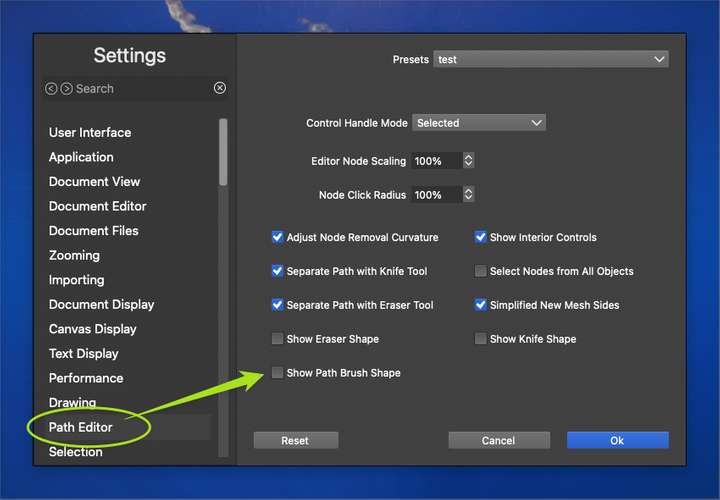
@Vivek In settings, search for "Show Path Brush Shape", and enable this option.
-
Thank you for the response. I will do that.
-
@Vivek
Hello and welcome have fun with VectorStyler.
Well, Xara got some love from me too. I was kind of
a part-time lover of Xara until I switched to Corel Draw.
I still own a copy -
@Subpath: Noice!
I still think Xara has some of the most intuitive implementations of tools. For example, "Shape Tool", the Illustrator equivalent of Pen Tool. I still don't understand why other software need three different tools when one will do. Shape Tool can create Bezier curves, select and moves nodes, select and move paths, select and move control points. All without once clicking out, using modifier or tool switching - in one seamless go. In fact, just realised even select tool can do most of these operations. You can't just move select and move paths with select tool.
I wish everyone made this the industry standard instead of copying Illustrator's terrible implementation.
Likewise, Xara does not differentiate between Selection, Direct Selection or Group Selection. It is a single tool. Xara's tool bar is a joy to my eyes.
But sadly, Xara's management took it in a completely different and unwanted direction. It is now a glorified desktop version of Squarespace X Canva together.Xara also does not copy/paste vector objects from the clipboard without rasterising them, meaning I am left with its small toolset when I want to do complex vector operations. I can't even round corners easily on Xara.
 Oh well!
 -
@Vivek
Yes, so many great little details. Love to this day,
copying a shape with the right mouse. So insane easy.Here's a video for those who doesn't know it.
It was so far ahead of any other vector graphics program
at the time. If I remember correctly, it was the first
vector graphics program with real-time transparency gradients.
And on top of that, you could blend shapes that had such
transparency gradients. No way for Illustrator or Corel Draw
back in those days.Yes, unfortunately Xara passed through a few hands. I think Corel
also briefly owned it call "Corel Xara", but I found Magix the worst. -
@VectorStyler: I searched as best I could. I couldn't spot it. Could I please ask for your help with this? I am trying to do one full piece of art in VS to test it out for viability. Much appreciated.
-
@Vivek said in How do I see brush stroke pressure profile in real-time?:
@VectorStyler: I searched as best I could. I couldn't spot it. Could I please ask for your help with this? I am trying to do one full piece of art in VS to test it out for viability. Much appreciated.
It is in Menu (VS 1.2 beta)
Edit > Settings > Path Editor > Show Path Brush Shape -
@Vivek said in How do I see brush stroke pressure profile in real-time?:
@VectorStyler: I searched as best I could. I couldn't spot it. Could I please ask for your help with this? I am trying to do one full piece of art in VS to test it out for viability. Much appreciated.
Are you using the 1.1 version or 1.2 beta?
-
@Vivek Welcome to the VS forum community! If you go to the settings panel for vectorstyler and look on the left side for the "Path Editor" section, you'll see the checkbox @VectorStyler was referring to.
Vectorstyler is a deeply customizable program so its easy to get confused at times where to find settings. It's come a long way in a short time.
-
" Vectorstyler is a deeply customizable program so its easy to get confused at times where to find settings."
The search function in Settings works pretty well
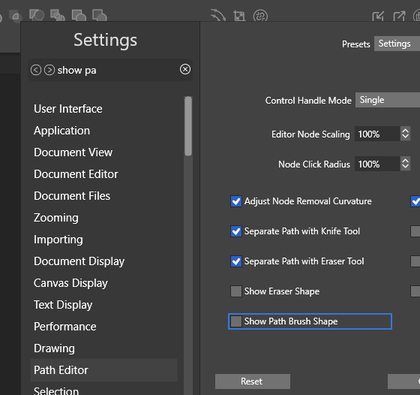
-
@Subpath said in How do I see brush stroke pressure profile in real-time?:
The search function in Settings works pretty well
Yes indeed! I use that search feature often. The settings panel is a LOT more organized and easier to utilize than it was before. I still find myself searching for settings at time even with the search box at the ready
-
Agree, i still search sometimes too.
Is really more organized. -
@VectorStyler: I am using VS 1.1. I reckon it is in 1.2 Beta?
Don't answer that: I found it! Thanks to @Subpath and @Boldline's screenshots!

