VectorStyler
    • Categories
    • Unread
    • Recent
    • Tags
    • Popular
    • Register
    • Login

    Swatches panel selection does not update to that color in the palette and instead remains on whatever color was clicked on prior

    Scheduled Pinned Locked Moved VectorStyler 1.2 beta
    4 Posts 3 Posters 5.0k Views 2 Watching
    Loading More Posts
    • Oldest to Newest
    • Newest to Oldest
    • Most Votes
    Reply
    • Reply as topic
    Log in to reply
    This topic has been deleted. Only users with topic management privileges can see it.
    • BoldlineB Online
      Boldline
      last edited by

      When I select a shape with a spot color on the artboard, the swatches panel selection does not update to that color in the palette and instead remains on whatever color was clicked on prior. Is this how it's supposed to be? The expected result in my eyes would be that the color selector updates to whatever color is used by the object selected on the artboard.
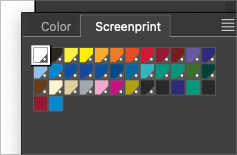
      0_1706732186685_5c40fac1-0fdc-45a5-98c6-4b2b79f7c869-BLD 2024-01-31 at 15.16.16.png

      🍎 macOS Tahoe 26.2, Mac mini (M1, 2020), Chip Apple M1, Memory 16 GB
      Cintiq 27QHD Display and LG Ultra HD Display

      b77B VectorStylerV 2 Replies Last reply Reply Quote 0
      • b77B Offline
        b77 @Boldline
        last edited by b77

        Replicated here: https://recordit.co/Q9aEmBGTxE

        MacBook Pro (Intel) running Monterey 12.6.4

        1 Reply Last reply Reply Quote 1
        • VectorStylerV Offline
          VectorStyler @Boldline
          last edited by

          @Boldline @b77 I could not replicate this using the document color palette.
          Are these external palettes?

          b77B 1 Reply Last reply Reply Quote 0
          • b77B Offline
            b77 @VectorStyler
            last edited by

            @VectorStyler Yes, an official Pantone palette in my case and a custom one
            in Boldline's case.

            MacBook Pro (Intel) running Monterey 12.6.4

            1 Reply Last reply Reply Quote 1
            • First post
              Last post
