VectorStyler
    • Categories
    • Unread
    • Recent
    • Tags
    • Popular
    • Register
    • Login

    How do I generate screen dots from blurred shapes?
    Scheduled Pinned Locked Moved Questions and Support
    6 Posts 5 Posters 6.0k Views 5 Watching
    Loading More Posts
    • Oldest to Newest
    • Newest to Oldest
    • Most Votes
    Reply
    • Reply as topic
    Log in to reply
    This topic has been deleted. Only users with topic management privileges can see it.
    • RaaskotR Offline
      Raaskot
      last edited by Raaskot

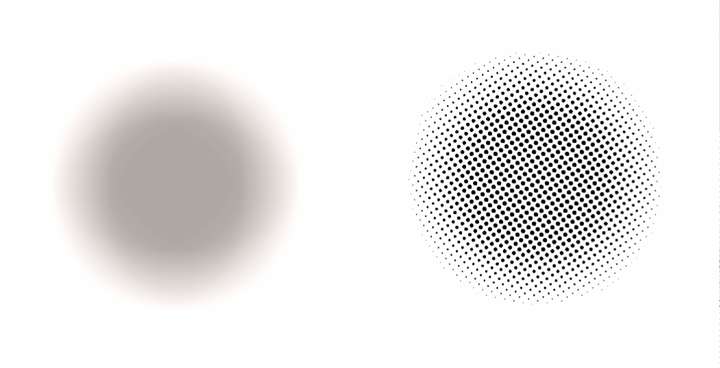
      In InkScape you can "trace" an imported raster image or a blurred vector object converting into screen dots of specified frequency.

      — How can I achieve this in VS?
      — Is there a particular effect option available or perhaps a work around?

      Kind regards, Raaskot

      (Following example generated in Clip Studio Paint )
      0_1706819428450_4fae1ef8-3471-4f0c-82df-e9ef473e78bb-billede.png

      b77B 861475_VctSt8 VectorStylerV 3 Replies Last reply Reply Quote 0
      • b77B Offline
        b77 @Raaskot
        last edited by b77

        @Raaskot You can try something like this with the Repeater: https://recordit.co/sZyUCa0doq

        MacBook Pro (Intel) running Monterey 12.6.4

        1 Reply Last reply Reply Quote 2
        • 861475_VctSt8 Offline
          861475_VctSt @Raaskot
          last edited by

          @Raaskot

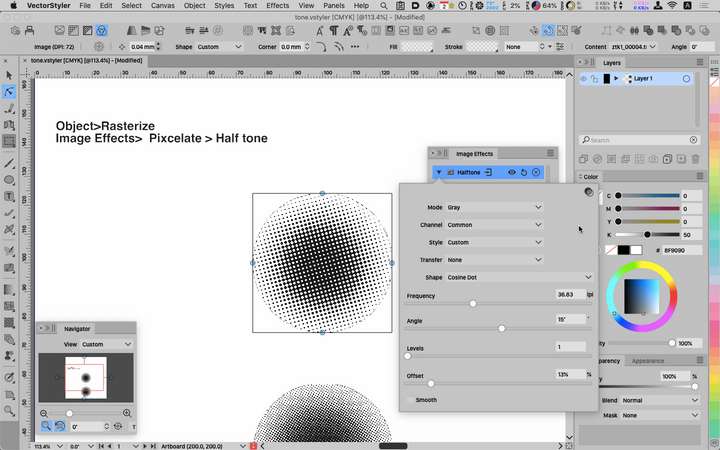
          The general approach is
          Object>Rasterize
          Image Effects>Pixcelate>Halftone
          0_1706839195261_02-02 10.55.11.png

          Parameters are to your liking.
          I think.

          LIc. 0 OS10.15.7
          MacBook Air (13-inch, Mid 2012) / Intel Core i5, 8GB / Intel HD Graphics 4000
          LIc. 1 OS13.6.7
          MacBook Pro (14-inch, 2023) / Apple M2 Pro, 16GB / Apple GPU

          1 Reply Last reply Reply Quote 2
          • VectorStylerV Offline
            VectorStyler @Raaskot
            last edited by

            @Raaskot I attached two examples using repeaters.

            The first one uses the blur effect. But to stay fully vector, the second one uses gradient.

            The idea is to use a symbol as a repeated object on the blurred (or gradient) object. Then adjust the repeated object size by the intensity of the underlying object content.

            With blur: 1_1706856105228_repeaterexample2.vstyler

            With gradient: 0_1706856105228_repeaterexample1.vstyler

            1 Reply Last reply Reply Quote 1
            • RaaskotR Offline
              Raaskot
              last edited by Raaskot

              @b77
              @861475_VctSt
              @VectorStyler
              @Subpath

              -- so cool! Very comprehensive and useful approaches.

              Kind regards and thanks😀 from Raaskot

              1 Reply Last reply Reply Quote 0
              • S Offline
                Subpath
                last edited by Subpath

                @Raaskot

                I know you can create something like this and more with the Repeater. 🙂
                As you can see in this thread, for example.
                https://www.vectorstyler.com/forum/topic/2295/repeater-halftone-problem-on-rasters/53
                .
                .
                But anyway, here is a little Online Tool that also has something to offer.
                The result can be saved/downloaded as SVG.
                https://labs.adobe.com/experiments/hello-halftones/

                Here yet a old Thread of mine about that Tool.
                https://www.vectorstyler.com/forum/topic/1089/tip-halftone-generator-bitmap-to-vector-graphics-svg/4

                Win 11
                CPU: AMD Ryzen 5 9600X, 6-core.
                GPU: Nvidia Geforce RTX 5070.

                1 Reply Last reply Reply Quote 3
                • First post
                  Last post
