VectorStyler
    • Categories
    • Unread
    • Recent
    • Tags
    • Popular
    • Register
    • Login

    Adjusting a text frame to fit the text
    Scheduled Pinned Locked Moved VectorStyler 1.2 beta
    15 Posts 3 Posters 15.3k Views 3 Watching
    Loading More Posts
    • Oldest to Newest
    • Newest to Oldest
    • Most Votes
    Reply
    • Reply as topic
    Log in to reply
    This topic has been deleted. Only users with topic management privileges can see it.
    • VectorStylerV Offline
      VectorStyler @B-Vs-V
      last edited by

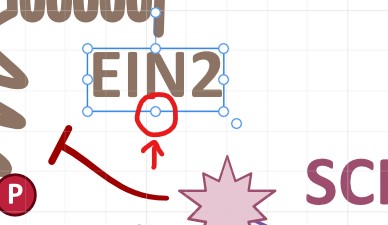
      @Pat Type menu -> Fit Text Frame

      B 861475_VctSt8 4 Replies Last reply Reply Quote 1
      • B Offline
        B-Vs-V @VectorStyler
        last edited by

        @VectorStyler Thank you, this option was right in front of me and I saw it without seeing it ☺ I knew it was possible in VS 😃

        W11 Pro 25H2 - 12th Gen Intel(R) i7-12700K 3.61 GHz - RAM 64 Go - NVIDIA GF GTX 4070 Ti - Intuos - Dell UP3216Q / Eizo ColorEdge
        W11 Pro 25H2 - 12th Gen Intel(R) i7-12700KF 3.60 GHz -RAM 64 Go - NVIDIA GF GTX 3080 - IntuosPro- ProArt PA329C

        1 Reply Last reply Reply Quote 0
        • B Offline
          B-Vs-V @VectorStyler
          last edited by

          @VectorStyler A small glitch: after adjusting the frame to the text, the (+) sign seems to indicate that part of the text is hidden when it shouldn't be.
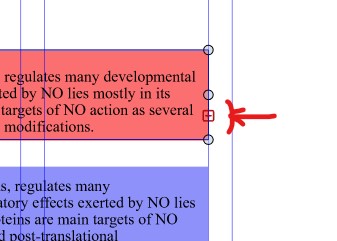
          0_1707130199934_fit.jpg

          W11 Pro 25H2 - 12th Gen Intel(R) i7-12700K 3.61 GHz - RAM 64 Go - NVIDIA GF GTX 4070 Ti - Intuos - Dell UP3216Q / Eizo ColorEdge
          W11 Pro 25H2 - 12th Gen Intel(R) i7-12700KF 3.60 GHz -RAM 64 Go - NVIDIA GF GTX 3080 - IntuosPro- ProArt PA329C

          1 Reply Last reply Reply Quote 0
          • B Offline
            B-Vs-V @VectorStyler
            last edited by

            @VectorStyler Would it be possible to apply the same method in VS, double-clicking is super easy?

            W11 Pro 25H2 - 12th Gen Intel(R) i7-12700K 3.61 GHz - RAM 64 Go - NVIDIA GF GTX 4070 Ti - Intuos - Dell UP3216Q / Eizo ColorEdge
            W11 Pro 25H2 - 12th Gen Intel(R) i7-12700KF 3.60 GHz -RAM 64 Go - NVIDIA GF GTX 3080 - IntuosPro- ProArt PA329C

            VectorStylerV 2 Replies Last reply Reply Quote 0
            • VectorStylerV Offline
              VectorStyler @B-Vs-V
              last edited by

              @Pat said in Adjusting a text frame to fit the text:

              Would it be possible to apply the same method in VS, double-clicking is super easy?

              I will try to add this.

              1 Reply Last reply Reply Quote 1
              • VectorStylerV Offline
                VectorStyler @B-Vs-V
                last edited by

                @Pat said in Adjusting a text frame to fit the text:

                Would it be possible to apply the same method in VS, double-clicking is super easy?

                The double clicking on resize knob to fit text frame will be postponed after the 1.2 beta is out (maybe for 1.3). Tere is also horizontal resizing to fit the text, that would be a new feature.

                B 2 Replies Last reply Reply Quote 1
                • B Offline
                  B-Vs-V @VectorStyler
                  last edited by

                  @VectorStyler Thank you for informing us ☺

                  W11 Pro 25H2 - 12th Gen Intel(R) i7-12700K 3.61 GHz - RAM 64 Go - NVIDIA GF GTX 4070 Ti - Intuos - Dell UP3216Q / Eizo ColorEdge
                  W11 Pro 25H2 - 12th Gen Intel(R) i7-12700KF 3.60 GHz -RAM 64 Go - NVIDIA GF GTX 3080 - IntuosPro- ProArt PA329C

                  1 Reply Last reply Reply Quote 0
                  • B Offline
                    B-Vs-V @VectorStyler
                    last edited by B-Vs-V

                    @VectorStyler I've retested the paragraph styles and there's no problem with the ones I've set up, everything seems fine except for the 'Fit frame to text' option.

                    I added an identical inset for all sides and the frame didn't fit
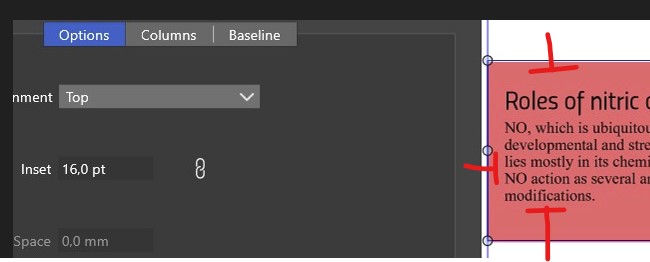
                    0_1707501861146_i1.jpg

                    so I applied the 'fit frame' option. The first time, VS crashed (crash report sent) and then the frame didn't fit properly.


                    0_1707501898124_i2.jpg

                    0_1707501923084_i3.jpg

                    W11 Pro 25H2 - 12th Gen Intel(R) i7-12700K 3.61 GHz - RAM 64 Go - NVIDIA GF GTX 4070 Ti - Intuos - Dell UP3216Q / Eizo ColorEdge
                    W11 Pro 25H2 - 12th Gen Intel(R) i7-12700KF 3.60 GHz -RAM 64 Go - NVIDIA GF GTX 3080 - IntuosPro- ProArt PA329C

                    VectorStylerV 2 Replies Last reply Reply Quote 1
                    • VectorStylerV Offline
                      VectorStyler @B-Vs-V
                      last edited by

                      @Pat said in Adjusting a text frame to fit the text:

                      I added an identical inset for all sides and the frame didn't fit

                      I will try to replicate this.

                      1 Reply Last reply Reply Quote 0
                      • VectorStylerV Offline
                        VectorStyler @B-Vs-V
                        last edited by

                        @Pat said in Adjusting a text frame to fit the text:

                        The first time, VS crashed (crash report sent) and then the frame didn't fit properly.

                        I cannot replicate this issue with the latest build.
                        If there is an example file (at list for the fit frame part), please send it to me. Thanks!

                        B 1 Reply Last reply Reply Quote 0
                        • B Offline
                          B-Vs-V @VectorStyler
                          last edited by

                          @VectorStyler File sent ☺

                          W11 Pro 25H2 - 12th Gen Intel(R) i7-12700K 3.61 GHz - RAM 64 Go - NVIDIA GF GTX 4070 Ti - Intuos - Dell UP3216Q / Eizo ColorEdge
                          W11 Pro 25H2 - 12th Gen Intel(R) i7-12700KF 3.60 GHz -RAM 64 Go - NVIDIA GF GTX 3080 - IntuosPro- ProArt PA329C

                          VectorStylerV 1 Reply Last reply Reply Quote 0
                          • VectorStylerV Offline
                            VectorStyler @B-Vs-V
                            last edited by

                            @Pat Got it, thanks!

                            1 Reply Last reply Reply Quote 0
                            • 861475_VctSt8 Offline
                              861475_VctSt @VectorStyler
                              last edited by

                              @VectorStyler
                              @Pat

                              May I make my request in relation to this?
                              1
                              I think it would be better to be able to select a reference point when fitting content.
                              For example, they could be the upper right or the bottom edge.
                              Currently, the entire frame shrinks with respect to the center of the frame. Therefore, the position of the text has to be modified again.

                              2
                              It would be nice if the text frame option could be set how it fits.
                              For example, to the bottom, to the right, or to the bottom and right.

                              LIc. 0 OS10.15.7
                              MacBook Air (13-inch, Mid 2012) / Intel Core i5, 8GB / Intel HD Graphics 4000
                              LIc. 1 OS13.6.7
                              MacBook Pro (14-inch, 2023) / Apple M2 Pro, 16GB / Apple GPU

                              VectorStylerV 1 Reply Last reply Reply Quote 2
                              • VectorStylerV Offline
                                VectorStyler @861475_VctSt
                                last edited by

                                @861475_VctSt I added these to the task.

                                1 Reply Last reply Reply Quote 1
                                • First post
                                  Last post