VectorStyler
    • Categories
    • Unread
    • Recent
    • Tags
    • Popular
    • Register
    • Login

    Unwanted buckling when warping with bulge shape

    Scheduled Pinned Locked Moved Questions and Support
    3 Posts 3 Posters 4.1k Views 2 Watching
    Loading More Posts
    • Oldest to Newest
    • Newest to Oldest
    • Most Votes
    Reply
    • Reply as topic
    Log in to reply
    This topic has been deleted. Only users with topic management privileges can see it.
    • BoldlineB Offline
      Boldline
      last edited by

      Using the Bulge Warp tool with an extreme negative amount applied, some of the letters begin to buckle. Is this how it's supposed to be? In my mind I expected them to remain straight.

      The image below shows a simple bulge amount and then a more extreme
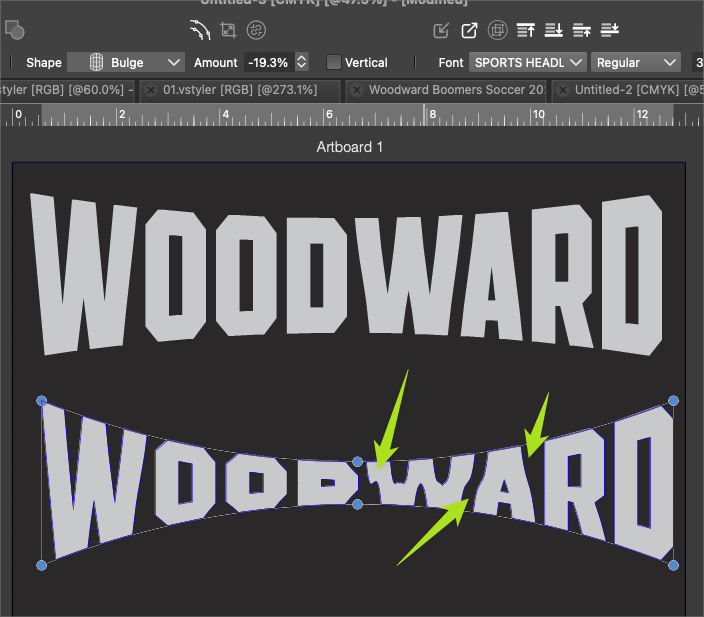
      0_1708978748625_2b653b4b-0057-436d-a427-20b71ee1a8fd-BLD 2024-02-26 at 15.18.09.png

      🍎 macOS Tahoe 26.2, Mac mini (M1, 2020), Chip Apple M1, Memory 16 GB
      Cintiq 27QHD Display and LG Ultra HD Display

      b77B VectorStylerV 2 Replies Last reply Reply Quote 1
      • b77B Offline
        b77 @Boldline
        last edited by

        @Boldline Disable 'Subdivisions' and enable 'Keep Lines' here:
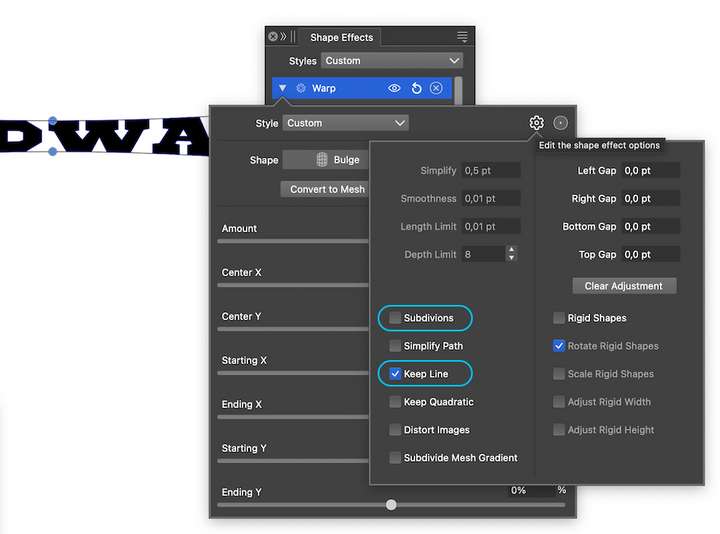
        0_1708981676598_kl.png

        MacBook Pro (Intel) running Monterey 12.6.4

        1 Reply Last reply Reply Quote 2
        • VectorStylerV Offline
          VectorStyler @Boldline
          last edited by

          @Boldline Changing the Warp options as suggested by @b77 should fix this. I will check if the defaults can be improved.

          1 Reply Last reply Reply Quote 1
          • First post
            Last post
