VectorStyler
    • Categories
    • Unread
    • Recent
    • Tags
    • Popular
    • Register
    • Login

    VS startup time

    Scheduled Pinned Locked Moved Questions and Support
    28 Posts 4 Posters 35.5k Views 3 Watching
    Loading More Posts
    • Oldest to Newest
    • Newest to Oldest
    • Most Votes
    Reply
    • Reply as topic
    Log in to reply
    This topic has been deleted. Only users with topic management privileges can see it.
    • VectorStylerV Offline
      VectorStyler @861475_VctSt
      last edited by

      @861475_VctSt said in VS startup time:

      Where is the problem?

      How many fonts you have on the old mac installed in the system?
      This is the only step where VS could be slow at startup.

      Is the slow startup by 1.1 or 1.2?

      1 Reply Last reply Reply Quote 0
      • 861475_VctSt8 Offline
        861475_VctSt
        last edited by 861475_VctSt

        Sys: 90
        Lib: 257
        user: 125

        Others are controlled by the 'RightFont' font management utility.
        I don't know how many there are, but I think there are several hundred or more registered.
        In volume: RightFont library: 3.27GB

        Both 1.1xx and 1.2xx take longer to start.

        LIc. 0 OS10.15.7
        MacBook Air (13-inch, Mid 2012) / Intel Core i5, 8GB / Intel HD Graphics 4000
        LIc. 1 OS13.6.7
        MacBook Pro (14-inch, 2023) / Apple M2 Pro, 16GB / Apple GPU

        VectorStylerV 1 Reply Last reply Reply Quote 0
        • VectorStylerV Offline
          VectorStyler @861475_VctSt
          last edited by

          @861475_VctSt How many fonts are on the system where VS starts faster?

          861475_VctSt8 1 Reply Last reply Reply Quote 0
          • 861475_VctSt8 Offline
            861475_VctSt @VectorStyler
            last edited by 861475_VctSt

            @VectorStyler

            Sys>Lib>Fonts has 90 fonts.
            There are 257 in Lib>Fonts.
            User>Me>Lib>Fonts has 125.

            Should I specify the font folder in Setting?

            LIc. 0 OS10.15.7
            MacBook Air (13-inch, Mid 2012) / Intel Core i5, 8GB / Intel HD Graphics 4000
            LIc. 1 OS13.6.7
            MacBook Pro (14-inch, 2023) / Apple M2 Pro, 16GB / Apple GPU

            VectorStylerV 1 Reply Last reply Reply Quote 1
            • VectorStylerV Offline
              VectorStyler @861475_VctSt
              last edited by

              @861475_VctSt In the ~/Library/Application Support/NumericPath/VectorStyler1.2/vector/data/ folder there is a config.ini file.
              This file contains some low level configuration for the app, including how to handle fonts at startup.
              Can you send me the file by email?

              861475_VctSt8 1 Reply Last reply Reply Quote 0
              • 861475_VctSt8 Offline
                861475_VctSt @VectorStyler
                last edited by

                @VectorStyler

                Roger.
                I will attach it in the mailer.
                Best regards.

                LIc. 0 OS10.15.7
                MacBook Air (13-inch, Mid 2012) / Intel Core i5, 8GB / Intel HD Graphics 4000
                LIc. 1 OS13.6.7
                MacBook Pro (14-inch, 2023) / Apple M2 Pro, 16GB / Apple GPU

                VectorStylerV 1 Reply Last reply Reply Quote 0
                • VectorStylerV Offline
                  VectorStyler @861475_VctSt
                  last edited by

                  @861475_VctSt Got the file. So it seems that at startup, all fonts installed in the system are scanned by VS (fetching basic font info).

                  This might include fonts installed by font managers, as these are seen by apps as fonts from the system.

                  One thing to try is to temporarily disable the font manager and those fonts in the User and Lib folders (keep the 90 fonts of the system) and see if it affects the startup time.

                  I will think of a solution for this.

                  861475_VctSt8 3 Replies Last reply Reply Quote 0
                  • 861475_VctSt8 Offline
                    861475_VctSt @VectorStyler
                    last edited by

                    @VectorStyler

                    Thanks.
                    I will try your suggestion as far as I can.

                    LIc. 0 OS10.15.7
                    MacBook Air (13-inch, Mid 2012) / Intel Core i5, 8GB / Intel HD Graphics 4000
                    LIc. 1 OS13.6.7
                    MacBook Pro (14-inch, 2023) / Apple M2 Pro, 16GB / Apple GPU

                    1 Reply Last reply Reply Quote 0
                    • 861475_VctSt8 Offline
                      861475_VctSt @VectorStyler
                      last edited by

                      @VectorStyler

                      In Settings>Application, I removed the following settings and it started in 1 minute 15 seconds. 15 seconds faster.
                      Scan Fonts with Host
                      Scan Fonts at Startup
                      Preview Fonts in Lists

                      Later, I will try some more things.
                      Thanks

                      LIc. 0 OS10.15.7
                      MacBook Air (13-inch, Mid 2012) / Intel Core i5, 8GB / Intel HD Graphics 4000
                      LIc. 1 OS13.6.7
                      MacBook Pro (14-inch, 2023) / Apple M2 Pro, 16GB / Apple GPU

                      1 Reply Last reply Reply Quote 1
                      • 861475_VctSt8 Offline
                        861475_VctSt @VectorStyler
                        last edited by

                        @VectorStyler

                        As you suggested, I tried I could with the user settings.
                        The result was about 1m10s.
                        I was able to shorten my time slightly from 1m30s.

                        I tried it with the old VS1.0.062 in the same environment.
                        It started up in 7 seconds.

                        VS is growing. On the other hand, with my old Macintosh, should I give up on the ``former startup time (7 seconds)''?
                        😂

                        LIc. 0 OS10.15.7
                        MacBook Air (13-inch, Mid 2012) / Intel Core i5, 8GB / Intel HD Graphics 4000
                        LIc. 1 OS13.6.7
                        MacBook Pro (14-inch, 2023) / Apple M2 Pro, 16GB / Apple GPU

                        VectorStylerV 2 Replies Last reply Reply Quote 0
                        • VectorStylerV Offline
                          VectorStyler @861475_VctSt
                          last edited by

                          @861475_VctSt I will look into this issue, as there is nothing added to the startup that should slow it down.

                          There is one other thing that might cause slowdowns, the Apple notarization process (code signing of the application) might have been changed over the years. This might also impact startup.

                          1 Reply Last reply Reply Quote 0
                          • F Offline
                            fde101 Global Moderator
                            last edited by

                            I thought the notarization checks were done as part of the Gatekeeper checks at first launch and not after that?

                            VectorStylerV 1 Reply Last reply Reply Quote 1
                            • VectorStylerV Offline
                              VectorStyler @fde101
                              last edited by

                              @fde101 Yes it should be. I will try to make the same tests on a similar Mac.

                              1 Reply Last reply Reply Quote 0
                              • VectorStylerV Offline
                                VectorStyler @861475_VctSt
                                last edited by

                                @861475_VctSt One other thing to try: completely remove the user data folder of VectorStyler from ~/Library/Application Support/NumericPath/

                                861475_VctSt8 1 Reply Last reply Reply Quote 0
                                • 861475_VctSt8 Offline
                                  861475_VctSt @VectorStyler
                                  last edited by

                                  @VectorStyler
                                  @fde101

                                  I deleted that folder.
                                  This will still take 90 seconds. No change.
                                  I'll try to find out when this happened by tracing the VS version (1.2β).
                                  I will try it after I finish my main work, so it will take some time.

                                  addition
                                  The same goes for 1.2.016.

                                  LIc. 0 OS10.15.7
                                  MacBook Air (13-inch, Mid 2012) / Intel Core i5, 8GB / Intel HD Graphics 4000
                                  LIc. 1 OS13.6.7
                                  MacBook Pro (14-inch, 2023) / Apple M2 Pro, 16GB / Apple GPU

                                  VectorStylerV 1 Reply Last reply Reply Quote 1
                                  • VectorStylerV Offline
                                    VectorStyler @861475_VctSt
                                    last edited by

                                    @861475_VctSt Yet another suspect for the slowdown: there might be too many files in the temporary files folder.
                                    This folder unfortunately is hidden in MacOS and it is different per system.

                                    VectorStyler scans the content of this folder for files that might have been created in previous runs (in case of crashes) to avoid accumulating such files.

                                    861475_VctSt8 1 Reply Last reply Reply Quote 0
                                    • 861475_VctSt8 Offline
                                      861475_VctSt @VectorStyler
                                      last edited by

                                      @VectorStyler

                                      Temporary files are about this.
                                      /private/tmp
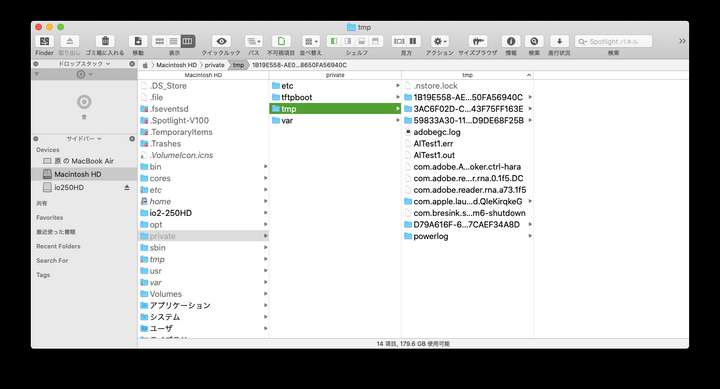
                                      0_1710403925645_スクリーンショット 2024-03-14 16.56.41.png

                                      With VS ver. 1.0.062 it starts up in 7 seconds, but with ver. 1.0.005 and later it takes about 90 seconds.
                                      Then I would think, in layman's terms, that there must have been something between these versions "regarding startup". What do you think?

                                      Of course, I'm thinking "maybe it's time for Catalina to retire".

                                      LIc. 0 OS10.15.7
                                      MacBook Air (13-inch, Mid 2012) / Intel Core i5, 8GB / Intel HD Graphics 4000
                                      LIc. 1 OS13.6.7
                                      MacBook Pro (14-inch, 2023) / Apple M2 Pro, 16GB / Apple GPU

                                      VectorStylerV 1 Reply Last reply Reply Quote 0
                                      • VectorStylerV Offline
                                        VectorStyler @861475_VctSt
                                        last edited by

                                        @861475_VctSt said in VS startup time:

                                        been something between these versions "regarding startup". What do you think?

                                        Yes that would be a correct assumption.

                                        But I also tested both 1.2016 and 1.1062 on a MacBook Mid 2012 with Catalina on it. And both start up around 7 seconds.

                                        So I suspect that there might be something here that can be fixed.
                                        BTW: that temp folder is not the one used by apps (temp folders are served by MacOS, and have long /generated names).

                                        861475_VctSt8 1 Reply Last reply Reply Quote 0
                                        • 861475_VctSt8 Offline
                                          861475_VctSt @VectorStyler
                                          last edited by

                                          @VectorStyler

                                          Thanks for all your help and research.
                                          I logged in as a different user and started VS1.2 in 7 seconds.
                                          There seems to be a problem with the main account library.
                                          For now, I will continue to use it as is.

                                          Just to be sure, I did the following maintenance on the main account.
                                          Still, the VS startup time did not change.

                                          Deleted the cache here. ( /Users/hara/Library/Caches/TemporaryItems )
                                          Rebuilt the Spotlight data.

                                          Thanks

                                          LIc. 0 OS10.15.7
                                          MacBook Air (13-inch, Mid 2012) / Intel Core i5, 8GB / Intel HD Graphics 4000
                                          LIc. 1 OS13.6.7
                                          MacBook Pro (14-inch, 2023) / Apple M2 Pro, 16GB / Apple GPU

                                          VectorStylerV 1 Reply Last reply Reply Quote 0
                                          • VectorStylerV Offline
                                            VectorStyler @861475_VctSt
                                            last edited by

                                            @861475_VctSt said in VS startup time:

                                            Deleted the cache here. ( /Users/hara/Library/Caches/TemporaryItems )
                                            Rebuilt the Spotlight data.

                                            None of these are the problem. The temp folder for apps in MacOS are given by an API called "NSTemporaryDirectory"

                                            For me this is: /var/folders/05/z_3lq3qx1r3fwq25d68vr6g00000gp/T/
                                            But a lot of other apps place their data in this folder.
                                            If the content of the folder is too large then VS startup may take longer.

                                            861475_VctSt8 1 Reply Last reply Reply Quote 0
                                            • First post
                                              Last post