VectorStyler
    • Categories
    • Unread
    • Recent
    • Tags
    • Popular
    • Register
    • Login

    How do I reset the gap between the dashes (dots) to even spacing?
    Scheduled Pinned Locked Moved Questions and Support
    5 Posts 2 Posters 7.0k Views 1 Watching
    Loading More Posts
    • Oldest to Newest
    • Newest to Oldest
    • Most Votes
    Reply
    • Reply as topic
    Log in to reply
    This topic has been deleted. Only users with topic management privileges can see it.
    • BoldlineB Offline
      Boldline
      last edited by

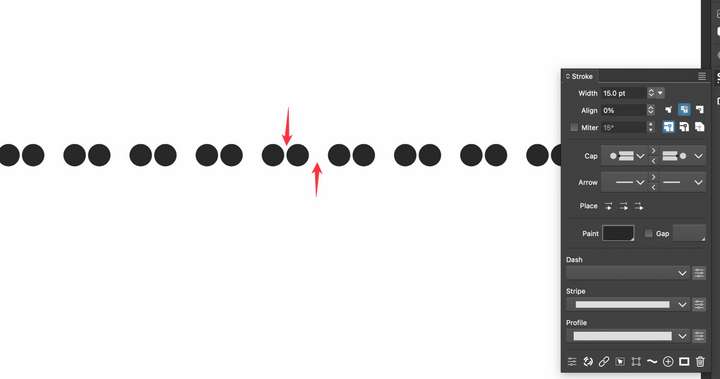
      I'm sure this is very simple to do but I'm not seeing where the setting is to reset the spacing between the dots I created using the dash portion of the stroke panel. thanks for any help!
      0_1710607985230_a06138aa-4143-4cc0-91ef-4647cfdcd6b7-CleanShot 2024-03-16 at 12.49.04.png

      🍎 macOS Tahoe 26.2, Mac mini (M1, 2020), Chip Apple M1, Memory 16 GB
      Cintiq 27QHD Display and LG Ultra HD Display

      VectorStylerV 1 Reply Last reply Reply Quote 1
      • VectorStylerV Offline
        VectorStyler @Boldline
        last edited by

        @Boldline The only way is to edit the dash and use only two values: space and dot, where the space sets the amount of space and the dot is zero length.

        BoldlineB 1 Reply Last reply Reply Quote 0
        • BoldlineB Offline
          Boldline @VectorStyler
          last edited by

          @VectorStyler said in How do I reset the gap between the dashes (dots) to even spacing?:

          @Boldline The only way is to edit the dash and use only two values: space and dot, where the space sets the amount of space and the dot is zero length.

          ok that makes sense but I'm not seeing where that is an option. I tried all the settings I thought would do that including the gap in the dash settings. would you please show a screenshot or be more descriptive of where the "space" setting is? thank you for your help

          🍎 macOS Tahoe 26.2, Mac mini (M1, 2020), Chip Apple M1, Memory 16 GB
          Cintiq 27QHD Display and LG Ultra HD Display

          VectorStylerV 1 Reply Last reply Reply Quote 0
          • VectorStylerV Offline
            VectorStyler @Boldline
            last edited by

            @Boldline https://recordit.co/JtriZNkeP8

            1 Reply Last reply Reply Quote 0
            • BoldlineB Offline
              Boldline
              last edited by Boldline

              thank you for the video, I must have some other setting wrong elsewhere because when I do those steps, I still get the odd spacing. here is a video of my attempt

              I will try on my other computer and see if I have the same issue so I know if it's a setting here on the first machine that I have wrong

              UPDATE: I see where the issue lies - I was going back to another setting in the dash dropdown and that was resetting the number of spaces again. Thank you for your help!


              🍎 macOS Tahoe 26.2, Mac mini (M1, 2020), Chip Apple M1, Memory 16 GB
              Cintiq 27QHD Display and LG Ultra HD Display

              1 Reply Last reply Reply Quote 1
              • First post
                Last post