VectorStyler
    • Categories
    • Unread
    • Recent
    • Tags
    • Popular
    • Register
    • Login

    Controlled thick and thin lines

    Scheduled Pinned Locked Moved Questions and Support
    8 Posts 3 Posters 6.4k Views 3 Watching
    Loading More Posts
    • Oldest to Newest
    • Newest to Oldest
    • Most Votes
    Reply
    • Reply as topic
    Log in to reply
    This topic has been deleted. Only users with topic management privileges can see it.
    • J Offline
      Jackamus
      last edited by

      I currently use Affinity V2 but am thinking of changing to VectorStyler. I have down loaded the free version to try out but to save time I would like to ask a number of questions about VS.
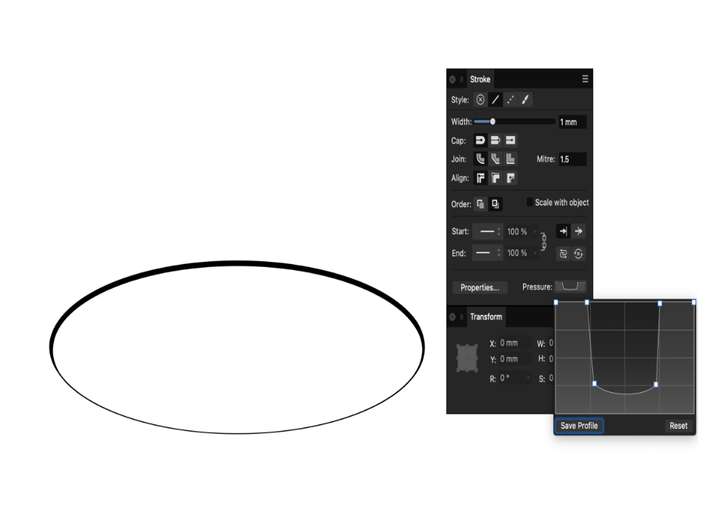
      Is there a facility to accurately change the line thickness of a shape like an ellipse? Affinity had a line pressure feature where you could modify a graph to determine the line thickness. Attached is an example of what I mean.

      ![0_1711538290926_Thick and thin.jpg](Uploading 100%)

      VectorStylerV S 2 Replies Last reply Reply Quote 1
      • VectorStylerV Offline
        VectorStyler @Jackamus
        last edited by

        @Jackamus Hi and welcome to VectorStyler.

        The image was not uploaded apparently, but the answer would be Yes and a bit more.

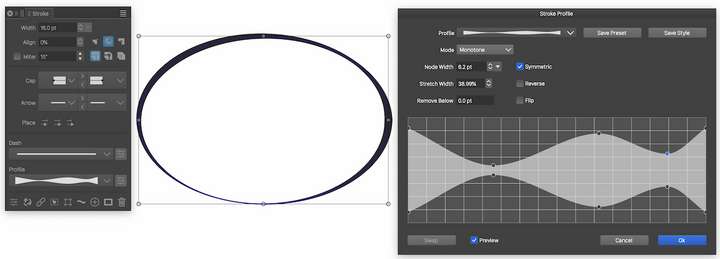
        In the Stroke panel you can edit the Width Profile of the stroke, in a larger view than Affinity and with more precision.

        These width profiles can be saved as presets and styles for future use.

        But you also get the Width tool (from the toolbox) to interactively adjust the width of a stroke at any location on the canvas.

        1 Reply Last reply Reply Quote 0
        • S Offline
          Subpath @Jackamus
          last edited by

          @Jackamus

          Hi

          Tools for this are here and more advanced then in AD:
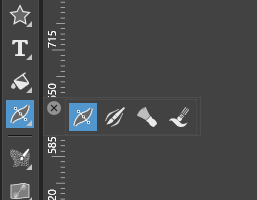
          0_1711540084153_width tool.png

          i would say VS have also a sensitive pressure ability

          There is a VS Tutorial that may interest you:
          https://www.vectorstyler.com/forum/topic/2307/attempts-of-a-kind-of-halftone-lines-in-vs

          Win 11
          CPU: AMD Ryzen 5 9600X, 6-core.
          GPU: Nvidia Geforce RTX 5070.

          1 Reply Last reply Reply Quote 2
          • J Offline
            Jackamus
            last edited by

            Thanks for information. I will try and upload my file again using a different format. In the mean time I will check out the stroke panel etc.!0_1711619950222_Thick and thin 2.png

            VectorStylerV 1 Reply Last reply Reply Quote 1
            • VectorStylerV Offline
              VectorStyler @Jackamus
              last edited by

              @Jackamus

              yes, this is available in VectorStyler also:

              0_1711621022887_strokeprofile.png

              1 Reply Last reply Reply Quote 0
              • J Offline
                Jackamus
                last edited by

                Thanks Subpath form the screen shot. I will check it out.

                1 Reply Last reply Reply Quote 1
                • J Offline
                  Jackamus
                  last edited by

                  I was able to create an ellipse with the correct thick and thin stroke and saved it. I could only do this using a vertical ellipse and then rotating it to a horizontal position.
                  I found the stroke panel more useful than the AD one.
                  However when I try to draw another ellipse it has the same thick and thin lines as the saved one. How do I draw a new ellipse without any previous attributes?

                  VectorStylerV 1 Reply Last reply Reply Quote 0
                  • VectorStylerV Offline
                    VectorStyler @Jackamus
                    last edited by

                    @Jackamus said in Controlled thick and thin lines:

                    How do I draw a new ellipse without any previous attributes?

                    In VS the previous attributes are used when drawing new objects.

                    In this case you can clear the width profile on the new object by clicking the solid stroke icon in the stroke panel (second from last).

                    1 Reply Last reply Reply Quote 0
                    • First post
                      Last post