VectorStyler
    • Categories
    • Unread
    • Recent
    • Tags
    • Popular
    • Register
    • Login

    Please add a 'search next' in the Customize windows

    Scheduled Pinned Locked Moved Features and Ideas
    10 Posts 4 Posters 7.7k Views 4 Watching
    Loading More Posts
    • Oldest to Newest
    • Newest to Oldest
    • Most Votes
    Reply
    • Reply as topic
    Log in to reply
    This topic has been deleted. Only users with topic management privileges can see it.
    • M Offline
      maarten
      last edited by

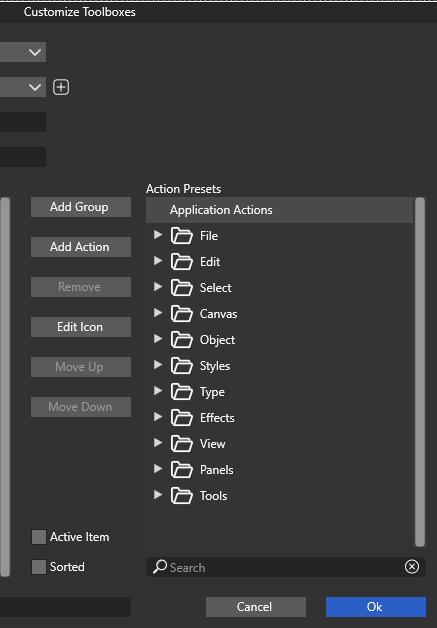
      While customizing the Toolboxes we can search for an item in the list, but if it's not the first item it's find that we are looking for there seems to be no way to move to the next search item and so on. We need a 'Next search'-button near the search bar.
      0_1712700485324_62eab87d-fd8b-4381-be30-6c1d68811f9d-image.png

      VectorStylerV 1 Reply Last reply Reply Quote 2
      • VectorStylerV Offline
        VectorStyler @maarten
        last edited by

        @maarten Click the loupe icon just before the search text to go to the next find.

        M 1 Reply Last reply Reply Quote 0
        • M Offline
          maarten @VectorStyler
          last edited by

          @VectorStyler said in Please add a 'search next' in the Customize windows:

          @maarten Click the loupe icon just before the search text to go to the next find.

          Ah, I get it. Thanks!

          1 Reply Last reply Reply Quote 0
          • encartE Offline
            encart
            last edited by

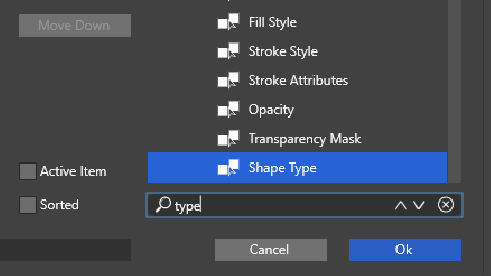
            I admit that if I were not a member of the forum, I might also have had a problem with the loupe hidden button. Maybe it's worth changing something here?
            0_1712800839352_screenshot_20240411_035704.png

            Windows 11 Home 10.0.22621

            VectorStylerV 1 Reply Last reply Reply Quote 0
            • VectorStylerV Offline
              VectorStyler @encart
              last edited by

              @encart said in Please add a 'search next' in the Customize windows:

              Maybe it's worth changing something here

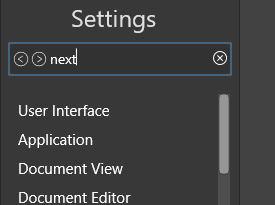
              Would the way done in the Settings view (top-left) work?

              encartE 1 Reply Last reply Reply Quote 0
              • encartE Offline
                encart @VectorStyler
                last edited by

                @VectorStyler For me it is ok. Since there is a ready-made solution and it is already present elsewhere , it makes sense to use this familiar scheme.

                I'm posting a screenshot so you know what we are talking about.
                0_1712826590864_screenshot_20240411_110939.png

                Windows 11 Home 10.0.22621

                H 1 Reply Last reply Reply Quote 2
                • H Offline
                  Harry @encart
                  last edited by

                  @encart said in Please add a 'search next' in the Customize windows:

                  @VectorStyler For me it is ok. Since there is a ready-made solution and it is already present elsewhere , it makes sense to use this familiar scheme.

                  I'm posting a screenshot so you know what we are talking about.
                  0_1712826590864_screenshot_20240411_110939.png

                  I was asking about the same thing in my old thread

                  But I would go a little further and replace the loupe with the previous and next arrows everywhere "Search" function appears like in:

                  • layers panel
                  • customize menu
                  • character menu (fonts search)
                  • glyphs panel
                  • document styles etc.

                  In my opinion, it is a more practical solution.

                  Win 11, XP Pen Deco 01 V2 graphic tablet

                  VectorStylerV encartE 2 Replies Last reply Reply Quote 2
                  • VectorStylerV Offline
                    VectorStyler @Harry
                    last edited by

                    @Harry said in Please add a 'search next' in the Customize windows:

                    In my opinion, it is a more practical solution.

                    I added this to the backlog and will try to update all search fields.

                    1 Reply Last reply Reply Quote 2
                    • encartE Offline
                      encart @Harry
                      last edited by

                      @Harry I agree. It is better if analogous elements are handled in the same familiar way.

                      Windows 11 Home 10.0.22621

                      1 Reply Last reply Reply Quote 2
                      • M Offline
                        maarten
                        last edited by

                        Thanks all. I think these arrow-buttons are more obvious and intuitive and I agree that it's best to keep UI consistent. Nice to see this added, because this is one of those hidden features that are easy to forget, let alone for newcomers.

                        1 Reply Last reply Reply Quote 2
                        • First post
                          Last post