release of VectorStyler
-
Congratulations on the release of VS! I tried to download and register VS on my Mac, but in the fields in the Register window I can not type text, only giving me a error sound. The first time I tried it the app subsequently crashed.
Edit: I have succeeded in copying the text into the fields. This is a bit counterintuitive though.
-
Hi @postdes
I have the same "issue". So how exactly did you succeed? I always get a "invalid license" error.
-
Indeed I first tried entering the fields by typing, which does not work, copy/paste does fill the fields, but I also get an error message:
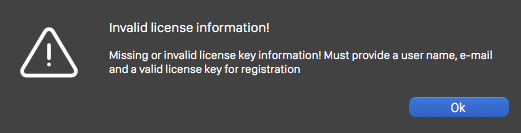
-
Must be a server issue, I will check this ASAP!
-
For now, try to copy the license from the "---begin" up to the "end--" text. This should have been fixed, but it seems it is not yet.
Also: if there is a space before the user name or email please remove it. -
@vectoradmin Congratulations!
 It's been quite the journey. Really looking forward to the success of VS
-
Congratulations! I got a tad tied up with work but am still following the development. Such a wonderful milestone! Thank you for rewarding contributing beta testers with a license key. I have and will continue to shout out about VS wherever there is a listening ear. Such exciting development! Again - congratulations!
Windows 10 Pro | 22H2
-
Best piece of news in my inbox today! Congratulations for the release!
The license key is much appreciated too.Make sure to launch the app on Producthunt too, and share the link with us.
-
@WhiteX @vectoradmin YES! Producthunt!!!
Windows 10 Pro | 22H2
-
So far so good... what is permitted with the license?
Install on multiple machines (desktop + laptop)?
Use on both at once or non-simultaneous use?
Just so we know what the rules are as I don't see an actual license document anywhere, including within the product after installing or anywhere in the distribution...
-
@vectoradmin Woo-hoo!

-
Uploaded a new build, with better name and license handling. Let me know if there are still issues to register.
-
@syllie @vectoradmin +1 Producthunt!
-
@vectoradmin
If I try "Check for Updates" I am getting "Update Error!" - "No valid update information could be loaded."
This is with the build I downloaded earlier from the web site (1.0.035), license was applied successfully, under macOS 10.14.6.
-
@vectoradmin congratulations! Such exciting news. I'm glad to hear the pace will continue with improvements and additions. It's been impressive to see the almost weekly pace you've been on with it the last couple years, I'm glad you'll start getting financially rewarded for it. I've been spreading the word about vectorstyler and will continue to do so. Thank you for all you've done for the beta testers. I'm excited to see where this all goes in the next year and beyond!
-
@syllie glad to see you around again! I learned much from your approach to giving feedback. You're a valuable asset to the VS community
-
@fde101 I did manage to replicate this issue with the Universal binary.
The problem was the version number on the server side of the universal update feed.
This is fixed now, so please try again. -
All went well. I did the automatic update within my currently installed beta of VS and it let me install the new version just fine and then gave me the 42 day trial option. I went to the Help option at the top and registered my version just fine.
-
@vectoradmin
Still getting the same error.
I did try quitting and restarting the app, no change.
-
Congratulations @vectoradmin for this amazing accomplishment and thank you for the complementary license, you have my heartiest blessings and wishing you all the best!




