VectorStyler
    • Categories
    • Unread
    • Recent
    • Tags
    • Popular
    • Register
    • Login

    Transformed Clipping Shape distorts clipped content
    Scheduled Pinned Locked Moved Questions and Support
    5 Posts 2 Posters 4.5k Views 1 Watching
    Loading More Posts
    • Oldest to Newest
    • Newest to Oldest
    • Most Votes
    Reply
    • Reply as topic
    Log in to reply
    This topic has been deleted. Only users with topic management privileges can see it.
    • W Offline
      William Kansepa
      last edited by

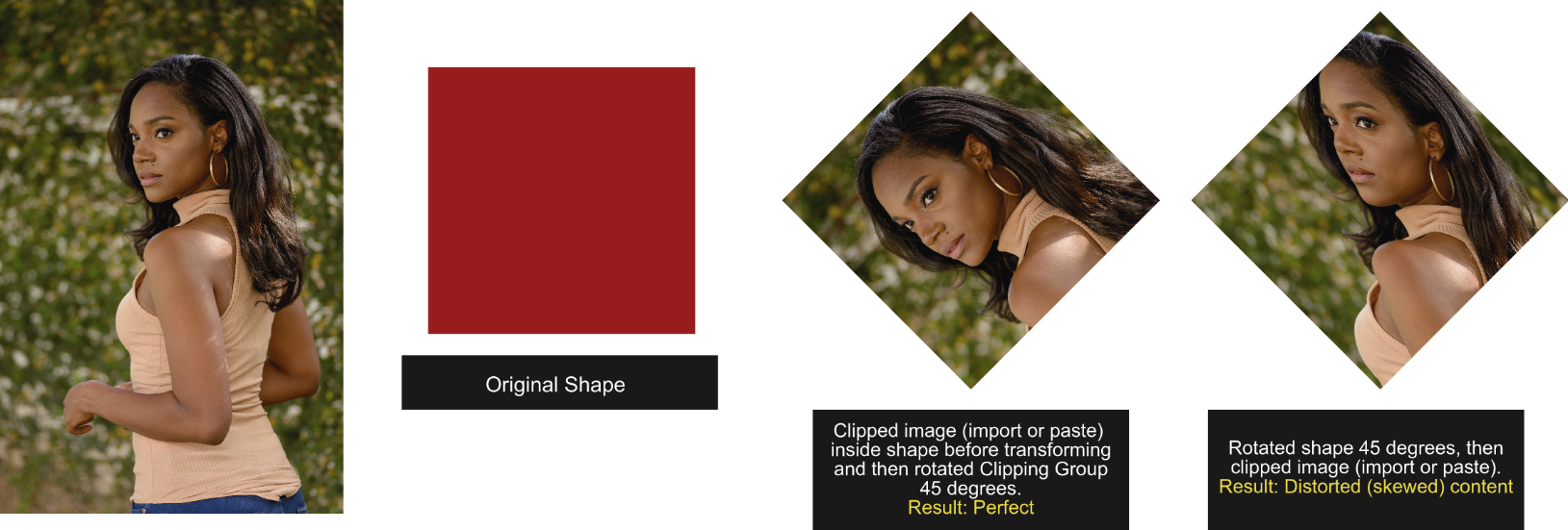
      I have always encountered this problem when I try to mask artwork after transforming the Clipping shape/ path. The contents come out distorted (skewed).
      I am hesitant to label it a bug that's why I am posing it as a question.
      What could be causing this?

      Plèase refer to attached image.
      0_1713274178480_Distorted content in Clipping Group_.jpg

      HP•Windows 11 Pro•11th Gen Intel(R) Core(TM) i7-1165G7 @ 2.80GHz 2.70 GHz• RAM: 16.0 GB (DDR4)

      VectorStylerV 2 Replies Last reply Reply Quote 0
      • VectorStylerV Offline
        VectorStyler @William Kansepa
        last edited by

        @William-Kansepa There is an Object -> Content -> Proportional option to use proportional scaling into the clipping shape.

        W 1 Reply Last reply Reply Quote 0
        • W Offline
          William Kansepa @VectorStyler
          last edited by

          @VectorStyler said in Transformed Clipping Shape distorts clipped content:

          @William-Kansepa There is an Object -> Content -> Proportional option to use proportional scaling into the clipping shape.

          I have to use this setting, but there is no change.

          HP•Windows 11 Pro•11th Gen Intel(R) Core(TM) i7-1165G7 @ 2.80GHz 2.70 GHz• RAM: 16.0 GB (DDR4)

          1 Reply Last reply Reply Quote 0
          • VectorStylerV Offline
            VectorStyler @William Kansepa
            last edited by

            @William-Kansepa Try creating the clipping by drag&drop of the (already imported) image into the shape in the Layers panel.
            In this way the image object remains separate (but clipped inside the shape) and the image then can be separately adjusted / resized by double clicking for isolation.

            W 1 Reply Last reply Reply Quote 1
            • W Offline
              William Kansepa @VectorStyler
              last edited by

              @VectorStyler thank you. This method is perfect!

              HP•Windows 11 Pro•11th Gen Intel(R) Core(TM) i7-1165G7 @ 2.80GHz 2.70 GHz• RAM: 16.0 GB (DDR4)

              1 Reply Last reply Reply Quote 0
              • First post
                Last post