VectorStyler
    • Categories
    • Unread
    • Recent
    • Tags
    • Popular
    • Register
    • Login

    Snapping seems different when using shift and option/alt

    Scheduled Pinned Locked Moved Questions and Support
    3 Posts 2 Posters 3.8k Views 1 Watching
    Loading More Posts
    • Oldest to Newest
    • Newest to Oldest
    • Most Votes
    Reply
    • Reply as topic
    Log in to reply
    This topic has been deleted. Only users with topic management privileges can see it.
    • BoldlineB Offline
      Boldline
      last edited by Boldline

      When I create a row of squares and then use the shift and alt/option modifiers to create a duplicate and drag it down below the first row, the snap sensitivity does not seem very strong compared to just casually moving an existing shape up to another and having them snap. Here is a video of this.

      Here is another video showing I'm having a difficult time getting a row of squares to snap to the row above. even when i think I have it snapped right, it's off by a little bit

      🍎 macOS Tahoe 26.2, Mac mini (M1, 2020), Chip Apple M1, Memory 16 GB
      Cintiq 27QHD Display and LG Ultra HD Display

      VectorStylerV 1 Reply Last reply Reply Quote 2
      • VectorStylerV Offline
        VectorStyler @Boldline
        last edited by

        @Boldline I added this to the backlog and will try to replicate.

        BoldlineB 1 Reply Last reply Reply Quote 2
        • BoldlineB Offline
          Boldline @VectorStyler
          last edited by Boldline

          @VectorStyler one thing I like in Affinity is that an obvious indicator appears when the selected shape is completely snapped flush with the first shape.
          In this example screenshot below, the three squares to the right side of the green line were dragged over to touch the original three squares on the left side. When they touched, an obvious green line appeared to let the user know they were exactly flush

          Here is a gif of what I am talking about
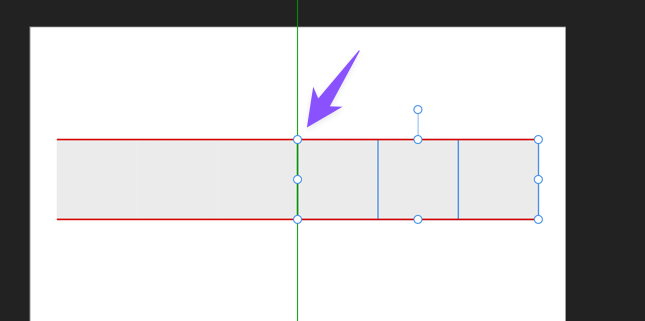
          0_1716830613465_cdb149a5-1ab8-40ad-9c2c-40e0053635b2-CleanShot 2024-05-27 at 13.21.34.png

          🍎 macOS Tahoe 26.2, Mac mini (M1, 2020), Chip Apple M1, Memory 16 GB
          Cintiq 27QHD Display and LG Ultra HD Display

          1 Reply Last reply Reply Quote 2
          • First post
            Last post
