VectorStyler
    • Categories
    • Unread
    • Recent
    • Tags
    • Popular
    • Register
    • Login

    Does the "combining option for before/after cancel out the option for "Separate Offsets"?

    Scheduled Pinned Locked Moved Features and Ideas
    2 Posts 2 Posters 2.5k Views 1 Watching
    Loading More Posts
    • Oldest to Newest
    • Newest to Oldest
    • Most Votes
    Reply
    • Reply as topic
    Log in to reply
    This topic has been deleted. Only users with topic management privileges can see it.
    • BoldlineB Online
      Boldline
      last edited by

      When I am using the offset path panel, if I have the checkmark next to separate offsets, wouldn't changing the combining option (either before or after) cancel out separate offsets? Is this set up more to leave separate offsets on for example if we usually want it to be separate and then the combining option would be for the occasional use when we wanted a unified result?
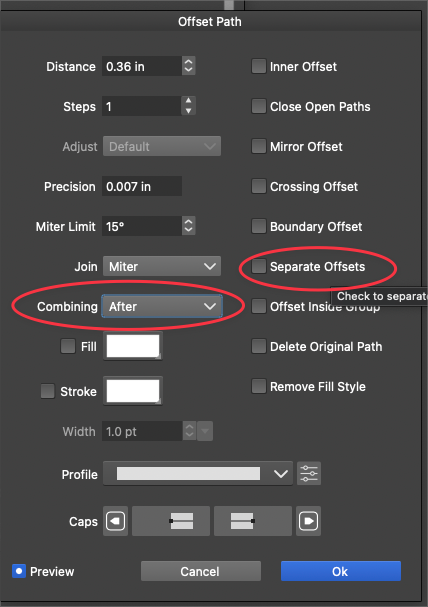
      0_1717690957812_a7ed80d5-f9a6-417a-9145-d6e6320b0328-BLD 2024-06-06 at 12.21.26.png

      🍎 macOS Tahoe 26.2, Mac mini (M1, 2020), Chip Apple M1, Memory 16 GB
      Cintiq 27QHD Display and LG Ultra HD Display

      VectorStylerV 1 Reply Last reply Reply Quote 1
      • VectorStylerV Offline
        VectorStyler @Boldline
        last edited by

        @Boldline

        The "Separate Offset" refers to the object selection, do we apply the offset separately on each or on the whole as a single object.

        The "Combining" option refers how to treat the one object (and the combined object if separate is not checked).

        Not sure yet if these two could be merged into a single option.

        1 Reply Last reply Reply Quote 0
        • First post
          Last post
