VectorStyler
    • Categories
    • Unread
    • Recent
    • Tags
    • Popular
    • Register
    • Login

    How to increase the height of the font family list. Cropped fonts previews.

    Scheduled Pinned Locked Moved Questions and Support
    8 Posts 5 Posters 7.8k Views 5 Watching
    Loading More Posts
    • Oldest to Newest
    • Newest to Oldest
    • Most Votes
    Reply
    • Reply as topic
    Log in to reply
    This topic has been deleted. Only users with topic management privileges can see it.
    • encartE Offline
      encart
      last edited by encart

      Often previews are only partially visible. It is inconvenient and does not look good.
      Is there any option for the height to be adjusted to the font preview?
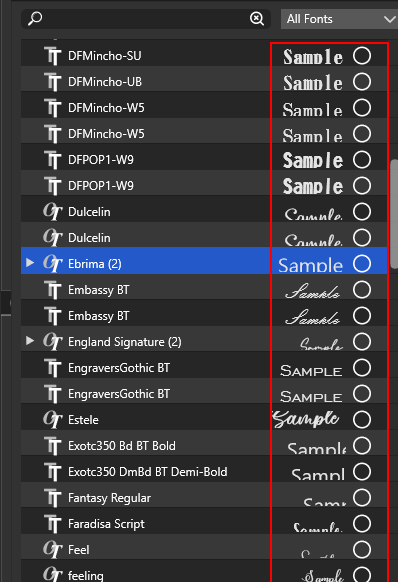
      0_1636888298690_screenshot_20211114_120639.png

      MacBook Air M4 24Gb, Tahoe 26.2

      b77B VectorStylerV IngolfI 3 Replies Last reply Reply Quote 2
      • b77B Offline
        b77 @encart
        last edited by

        Yep, these should be displayed from the descent line of the font, not from the baseline.

        MacBook Pro (Intel) running Monterey 12.6.4

        1 Reply Last reply Reply Quote 0
        • VectorStylerV Offline
          VectorStyler @encart
          last edited by

          @encart No option for this. It looks like a bug, I added it to the backlog.

          1 Reply Last reply Reply Quote 1
          • IngolfI Offline
            Ingolf @encart
            last edited by

            @encart I see it here too, Windows port issue I believe.

            🍏 macOS Sequoia Apple Silicon

            1 Reply Last reply Reply Quote 0
            • debraspicherD Offline
              debraspicher
              last edited by debraspicher

              This issue is still present, at least on my setup:
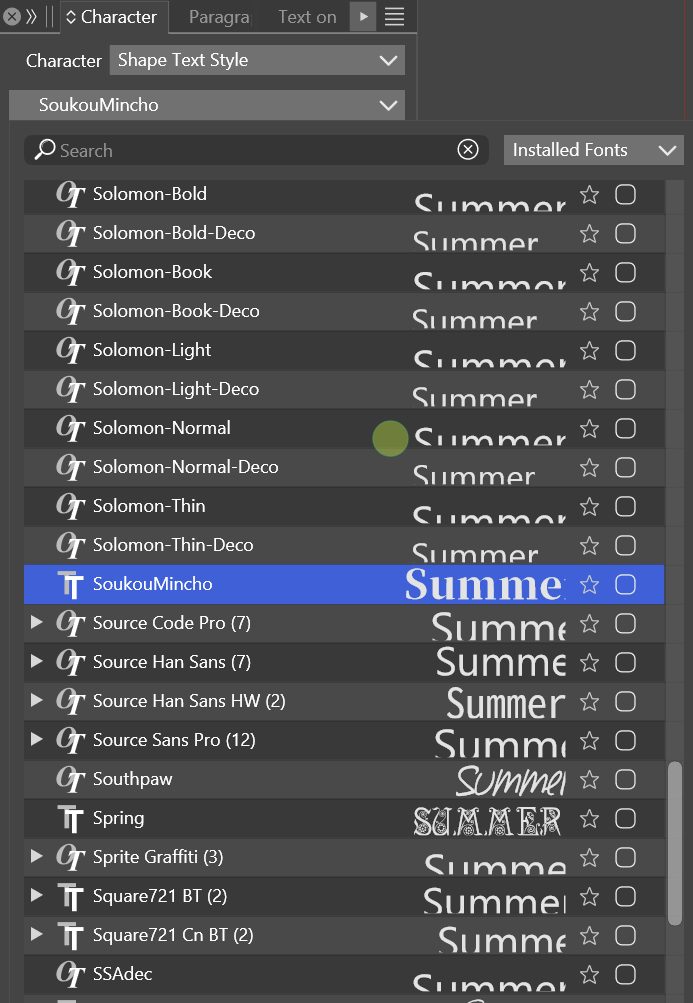
              0_1718052270656_725dfb29-943f-4940-a796-bc3480f2561a-image.png

              Windows 11 Build 26200.7171 (25H2)
              AMD Ryzen 7 9700X with Gigabyte X870E Aorus Pro Ice
              32GB RAM @ 6000MHz
              PNY NVIDIA RTX 5070 Ti 16GB; Display 1: 4K @150%; Display 2: 4K @200%
              Wacom Intuos Pro L (2025); Wacom Intuos Pro M; Epson ET-8550; Siser Romeo

              VectorStylerV 1 Reply Last reply Reply Quote 1
              • VectorStylerV Offline
                VectorStyler @debraspicher
                last edited by

                @debraspicher I will try to fix this for the next build.

                debraspicherD 1 Reply Last reply Reply Quote 1
                • debraspicherD Offline
                  debraspicher @VectorStyler
                  last edited by

                  @VectorStyler I just checked text just now. I see there was an update, but it looks a bit more truncated now on for the Solomon font family I used for the screenshot. Weirdly enough, "SoukouMincho" fits fine in the 2nd example. Most are still truncated, though, but there's also some variance there and some have a variable justification (are more right/left than others)... not sure what is going on there:
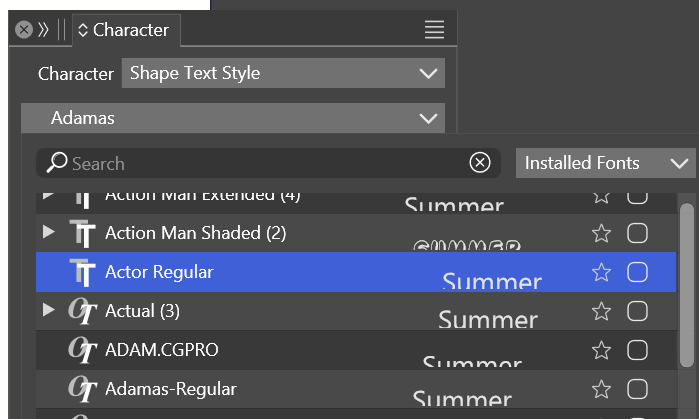
                  0_1719002074912_c222248f-c1de-47d9-8568-dcdfc04b6535-image.png

                  New version of the old screenshot:
                  0_1719002120264_3d427b5a-5099-4fca-91c1-cade2993814b-image.png

                  What is seen when scrolling through fontlist: https://1drv.ms/v/s!AuWHX0h5bAoRipIMvCvcUkUFGgZ61w?e=Hrxomf

                  Hope that helps.

                  Windows 11 Build 26200.7171 (25H2)
                  AMD Ryzen 7 9700X with Gigabyte X870E Aorus Pro Ice
                  32GB RAM @ 6000MHz
                  PNY NVIDIA RTX 5070 Ti 16GB; Display 1: 4K @150%; Display 2: 4K @200%
                  Wacom Intuos Pro L (2025); Wacom Intuos Pro M; Epson ET-8550; Siser Romeo

                  VectorStylerV 1 Reply Last reply Reply Quote 1
                  • VectorStylerV Offline
                    VectorStyler @debraspicher
                    last edited by

                    @debraspicher I will try to find a solution for this.

                    1 Reply Last reply Reply Quote 1
                    • First post
                      Last post