VectorStyler
    • Categories
    • Unread
    • Recent
    • Tags
    • Popular
    • Register
    • Login

    Repeater & Symbols - 2 questions

    Scheduled Pinned Locked Moved Questions and Support
    21 Posts 5 Posters 31.6k Views 5 Watching
    Loading More Posts
    • Oldest to Newest
    • Newest to Oldest
    • Most Votes
    Reply
    • Reply as topic
    Log in to reply
    This topic has been deleted. Only users with topic management privileges can see it.
    • L Offline
      Li Xiao @VectorStyler
      last edited by Li Xiao

      @VectorStyler

      This would be some sort of packing. I will try to add some new geometries in the future, but packing with arbitrary shapes is a "hard" problem.

      Two months ago, when I recommended VectorStyler to some people, a few of them asked me these types of questions. They sent me some videos, and I'm uploading two of them for reference. The questions were about arranging irregular shapes, such as circles or other shapes, tightly along the edges, without overlapping or having equal spacing between the arranged shapes. They wanted to maximize the number of shapes arranged. I found it challenging to achieve this using the Repeater, and it was also not easy to accomplish with the contour tool.

      This has wide applications in the advertising industry, as well as in garment rhinestone applications, laser cutting for material optimization, and print layout for material optimization, among others.

      https://go.screenpal.com/watch/cZhvnHVNcTF
      https://go.screenpal.com/watch/cZhvnHVNcTb

      0_1717039631087_Arrange.vstyler

      VectorStylerV 1 Reply Last reply Reply Quote 2
      • VectorStylerV Offline
        VectorStyler @Li Xiao
        last edited by

        @Li-Xiao Those examples in the video are with circles and sometimes overlap (first video).

        With circles (even with different size) it is a bit easier to do this, but it is hard to generalize for arbitrary shapes.

        I do have some more complex repeater geometries in the backlog but not sure yet that there will be generalized packing before version 2.

        L 1 Reply Last reply Reply Quote 2
        • B Offline
          B-Vs-V
          last edited by

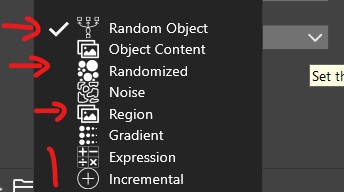
          @VectorStyler In the Selection menu, I think I understand the difference between 'Random object' and 'Randomized', but how do you insert and select an object for this to have a function (also for 'Object content' & 'Region')?
          'Expression' & 'Incremental' ?
          0_1717047116341_r1.jpg

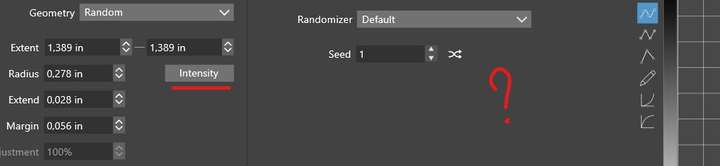
          For my file, the 'Intensity' function does nothing:
          0_1717047156041_r2.jpg

          W11 Pro 25H2 - 12th Gen Intel(R) i7-12700K 3.61 GHz - RAM 64 Go - NVIDIA GF GTX 4070 Ti - Intuos - Dell UP3216Q / Eizo ColorEdge
          W11 Pro 25H2 - 12th Gen Intel(R) i7-12700KF 3.60 GHz -RAM 64 Go - NVIDIA GF GTX 3080 - IntuosPro- ProArt PA329C

          1 Reply Last reply Reply Quote 0
          • L Offline
            Li Xiao @VectorStyler
            last edited by

            @VectorStyler
            The first video is not perfect either, and achieving arbitrary shapes is indeed challenging. Can refer to UV Packing techniques used in some 3D software for reference.
            https://youtu.be/xuGzSsgnwS4

            1 Reply Last reply Reply Quote 3
            • B Offline
              B-Vs-V
              last edited by

              @VectorStyler

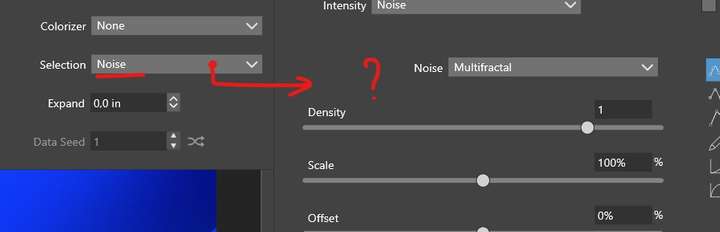
              Repeater - Noise ? Intensity ?

              I'm trying to distribute my objects on the basis of noise by modifying the parameters. No matter whether I select a different type of noise and modify the options, I can't see any change in the distribution (preview on of course ☺ ).

              Same issue with "Random" or "Intensity" (& of which parameter ?) ?
              0_1718178124492_r2'.jpg

              0_1718178141624_r3.jpg

              ++++

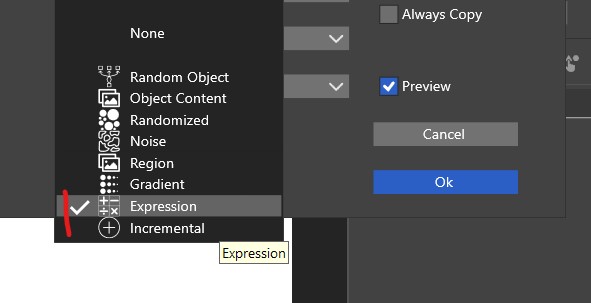
              What are "Expression" (suggest that we can we modify it?) and Incremental ?
              0_1718177786382_r1.jpg

              Thanks ☺

              W11 Pro 25H2 - 12th Gen Intel(R) i7-12700K 3.61 GHz - RAM 64 Go - NVIDIA GF GTX 4070 Ti - Intuos - Dell UP3216Q / Eizo ColorEdge
              W11 Pro 25H2 - 12th Gen Intel(R) i7-12700KF 3.60 GHz -RAM 64 Go - NVIDIA GF GTX 3080 - IntuosPro- ProArt PA329C

              VectorStylerV 1 Reply Last reply Reply Quote 0
              • VectorStylerV Offline
                VectorStyler @B-Vs-V
                last edited by

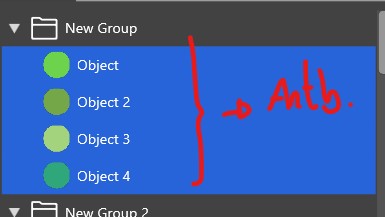
                @Pat In the first image, it shows that the symbol "Selection" is "Noise" this means that if the repeater contains multiple symbols (not just the repetition of one), the the symbols are selected based on the noise.

                To adjust positions, you need to set up the "Adjust Geometry" -> "Edit Adjustment", enable "Adjust Positions" and then select a method.

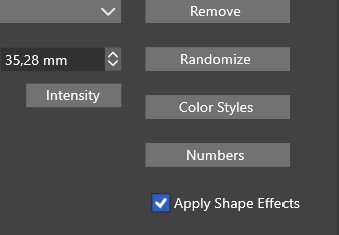
                In the second image, it seems that you are editing the radius variation intensity. This should adjust the radius of how the objects are distributed. It looks like there is a bug here with confirming the options. I will fix this ASAP.

                The "Expression" can be used to edit an expression based on an "index" variable, to select between multiple symbols (see the first case).
                "Incremental" is just incrementing the index variable.

                B 1 Reply Last reply Reply Quote 0
                • B Offline
                  B-Vs-V @VectorStyler
                  last edited by

                  @VectorStyler Thanks ☺

                  1. Yes, I think it's what I understood, but if you change the type of noise, no change in the distribution of objects is visible after modifications.

                  2. I did test this & I did not see any change in the objects' repartition.

                  3. Ok.

                  4. Can we (& where) edit this variable ? "Incrementing the index variable" is not obvious to me (in a practical example, what can we do?).

                  I think several parameters need to be checked, as no change in object distribution is visible after many options have been modified.

                  W11 Pro 25H2 - 12th Gen Intel(R) i7-12700K 3.61 GHz - RAM 64 Go - NVIDIA GF GTX 4070 Ti - Intuos - Dell UP3216Q / Eizo ColorEdge
                  W11 Pro 25H2 - 12th Gen Intel(R) i7-12700KF 3.60 GHz -RAM 64 Go - NVIDIA GF GTX 3080 - IntuosPro- ProArt PA329C

                  VectorStylerV L 2 Replies Last reply Reply Quote 0
                  • VectorStylerV Offline
                    VectorStyler @B-Vs-V
                    last edited by

                    @Pat said in Repeater & Symbols - 2 questions:

                    but if you change the type of noise, no change in the distribution of objects is visible after modifications.

                    I will try to replicate this.

                    1 Reply Last reply Reply Quote 0
                    • L Offline
                      Li Xiao @B-Vs-V
                      last edited by

                      @Pat

                      but if you change the type of noise, no change in the distribution of objects is visible after modifications.

                      Whether it's multiple symbols with the same shape but different grayscale values or multiple symbols with the same color but different shapes, you can accurately observe the variations in object distribution.

                      https://youtu.be/pqeXgo2UZ7M

                      0_1718200279850_Noise.vstyler

                      B 1 Reply Last reply Reply Quote 3
                      • B Offline
                        B-Vs-V @Li Xiao
                        last edited by

                        @Li-Xiao @VectorStyler Thanks ☺ ...
                        I was relying on previewing the changes, but it is the "Preview" function that doesn't work.

                        W11 Pro 25H2 - 12th Gen Intel(R) i7-12700K 3.61 GHz - RAM 64 Go - NVIDIA GF GTX 4070 Ti - Intuos - Dell UP3216Q / Eizo ColorEdge
                        W11 Pro 25H2 - 12th Gen Intel(R) i7-12700KF 3.60 GHz -RAM 64 Go - NVIDIA GF GTX 3080 - IntuosPro- ProArt PA329C

                        1 Reply Last reply Reply Quote 0
                        • B Offline
                          B-Vs-V
                          last edited by

                          @VectorStyler ... & without this "Preview" function, it's impossible to fine-tune various adjustments to achieve the desired design.

                          W11 Pro 25H2 - 12th Gen Intel(R) i7-12700K 3.61 GHz - RAM 64 Go - NVIDIA GF GTX 4070 Ti - Intuos - Dell UP3216Q / Eizo ColorEdge
                          W11 Pro 25H2 - 12th Gen Intel(R) i7-12700KF 3.60 GHz -RAM 64 Go - NVIDIA GF GTX 3080 - IntuosPro- ProArt PA329C

                          1 Reply Last reply Reply Quote 0
                          • B Offline
                            B-Vs-V
                            last edited by

                            @VectorStyler From what I've just tested, it's indeed the "Preview" feature that doesn't render changes in real time, also for other options like "Intensity"... I suppose it is the same issue for other features/options ☺

                            W11 Pro 25H2 - 12th Gen Intel(R) i7-12700K 3.61 GHz - RAM 64 Go - NVIDIA GF GTX 4070 Ti - Intuos - Dell UP3216Q / Eizo ColorEdge
                            W11 Pro 25H2 - 12th Gen Intel(R) i7-12700KF 3.60 GHz -RAM 64 Go - NVIDIA GF GTX 3080 - IntuosPro- ProArt PA329C

                            VectorStylerV 1 Reply Last reply Reply Quote 1
                            • VectorStylerV Offline
                              VectorStyler @B-Vs-V
                              last edited by

                              @Pat said in Repeater & Symbols - 2 questions:

                              indeed the "Preview" feature that doesn't render changes in real time

                              I will try to fix these for the next build.

                              1 Reply Last reply Reply Quote 0
                              • First post
                                Last post