VectorStyler
    • Categories
    • Unread
    • Recent
    • Tags
    • Popular
    • Register
    • Login

    Editable text after a Boolean operation

    Scheduled Pinned Locked Moved Features and Ideas
    33 Posts 6 Posters 45.9k Views 4 Watching
    Loading More Posts
    • Oldest to Newest
    • Newest to Oldest
    • Most Votes
    Reply
    • Reply as topic
    Log in to reply
    This topic has been deleted. Only users with topic management privileges can see it.
    • VectorStylerV Offline
      VectorStyler @B-Vs-V
      last edited by

      @Pat said in Editable text after a Boolean operation:

      However, after having applied the boolean operation (minus), I can't apply any effect to it (e.g., Repeater) or at least it is not visible

      This one I cannot replicate. Can you send me the image with the combined text and the repeater? Thanks!

      B 1 Reply Last reply Reply Quote 0
      • B Offline
        B-Vs-V @VectorStyler
        last edited by

        @VectorStyler I didn't save the last file but I just recreated one (two artboards). However, I've had some VS crashes and I haven't finished the one on the right. File sent.

        W11 Pro 25H2 - 12th Gen Intel(R) i7-12700K 3.61 GHz - RAM 64 Go - NVIDIA GF GTX 4070 Ti - Intuos - Dell UP3216Q / Eizo ColorEdge
        W11 Pro 25H2 - 12th Gen Intel(R) i7-12700KF 3.60 GHz -RAM 64 Go - NVIDIA GF GTX 3080 - IntuosPro- ProArt PA329C

        VectorStylerV 1 Reply Last reply Reply Quote 1
        • VectorStylerV Offline
          VectorStyler @B-Vs-V
          last edited by

          @Pat Got the file. This case resulted from creating a composite shape from two repeater objects (with shapes). This will not combine the second repeater content.

          I think the desired result can be achieved by first creating the composite shape (solid fill) and then adding a repeater.

          B 1 Reply Last reply Reply Quote 0
          • B Offline
            B-Vs-V @VectorStyler
            last edited by

            @VectorStyler It is what I did yesterday but it did not work. I wanted to test both ways, first making the repeater (left artboard) or the compound shape (right artboard).

            W11 Pro 25H2 - 12th Gen Intel(R) i7-12700K 3.61 GHz - RAM 64 Go - NVIDIA GF GTX 4070 Ti - Intuos - Dell UP3216Q / Eizo ColorEdge
            W11 Pro 25H2 - 12th Gen Intel(R) i7-12700KF 3.60 GHz -RAM 64 Go - NVIDIA GF GTX 3080 - IntuosPro- ProArt PA329C

            VectorStylerV 1 Reply Last reply Reply Quote 0
            • VectorStylerV Offline
              VectorStyler @B-Vs-V
              last edited by

              @Pat

              I attached a simple example of a compound shape with text (first) and then a repeater added on that.

              0_1718691937777_combinedtext2.vstyler

              B 2 Replies Last reply Reply Quote 1
              • B Offline
                B-Vs-V @VectorStyler
                last edited by

                @VectorStyler Thank you ☺
                Indeed, it worked on the text. When I tried it, it was as if the symbols disappeared. The layers (Layer panel) were still there but as empty without object. It would be really great if you could enable the history if it's not too much to ask ☺
                However, I don't think I'll be able to do what I'd imagined because this way of doing the design doesn't create two mutually exclusive containers and I can't see a way of doing that.

                W11 Pro 25H2 - 12th Gen Intel(R) i7-12700K 3.61 GHz - RAM 64 Go - NVIDIA GF GTX 4070 Ti - Intuos - Dell UP3216Q / Eizo ColorEdge
                W11 Pro 25H2 - 12th Gen Intel(R) i7-12700KF 3.60 GHz -RAM 64 Go - NVIDIA GF GTX 3080 - IntuosPro- ProArt PA329C

                1 Reply Last reply Reply Quote 0
                • B Offline
                  B-Vs-V @VectorStyler
                  last edited by

                  @VectorStyler Maybe the issue with my tests comes from having to apply two different repeater to these two objects with several 'symbol' objects.

                  W11 Pro 25H2 - 12th Gen Intel(R) i7-12700K 3.61 GHz - RAM 64 Go - NVIDIA GF GTX 4070 Ti - Intuos - Dell UP3216Q / Eizo ColorEdge
                  W11 Pro 25H2 - 12th Gen Intel(R) i7-12700KF 3.60 GHz -RAM 64 Go - NVIDIA GF GTX 3080 - IntuosPro- ProArt PA329C

                  VectorStylerV 1 Reply Last reply Reply Quote 0
                  • VectorStylerV Offline
                    VectorStyler @B-Vs-V
                    last edited by

                    @Pat said in Editable text after a Boolean operation:

                    with several 'symbol' objects

                    Multiple symbols can also be added in the modal repeater options view (second button in the panel).

                    B 1 Reply Last reply Reply Quote 0
                    • B Offline
                      B-Vs-V @VectorStyler
                      last edited by

                      @VectorStyler yes indeed, but I always place all the symbols on the artboard and select everything (including the object) to apply the repeater feature.

                      W11 Pro 25H2 - 12th Gen Intel(R) i7-12700K 3.61 GHz - RAM 64 Go - NVIDIA GF GTX 4070 Ti - Intuos - Dell UP3216Q / Eizo ColorEdge
                      W11 Pro 25H2 - 12th Gen Intel(R) i7-12700KF 3.60 GHz -RAM 64 Go - NVIDIA GF GTX 3080 - IntuosPro- ProArt PA329C

                      VectorStylerV 1 Reply Last reply Reply Quote 0
                      • VectorStylerV Offline
                        VectorStyler @B-Vs-V
                        last edited by

                        @Pat said in Editable text after a Boolean operation:

                        symbols on the artboard and select everything (including the object) to apply the repeater feature

                        That should also work. Send me a file with the state just before creating the repeater with multiple symbols.

                        B 1 Reply Last reply Reply Quote 0
                        • B Offline
                          B-Vs-V @VectorStyler
                          last edited by

                          @VectorStyler if you go back in history of the file I sent you today, you should get to this point. Let me know if it's ok ☺

                          W11 Pro 25H2 - 12th Gen Intel(R) i7-12700K 3.61 GHz - RAM 64 Go - NVIDIA GF GTX 4070 Ti - Intuos - Dell UP3216Q / Eizo ColorEdge
                          W11 Pro 25H2 - 12th Gen Intel(R) i7-12700KF 3.60 GHz -RAM 64 Go - NVIDIA GF GTX 3080 - IntuosPro- ProArt PA329C

                          VectorStylerV 1 Reply Last reply Reply Quote 1
                          • VectorStylerV Offline
                            VectorStyler @B-Vs-V
                            last edited by

                            @Pat Still, seems to be working here: 0_1718700832490_repeatertest1.vstyler

                            B 1 Reply Last reply Reply Quote 0
                            • B Offline
                              B-Vs-V @VectorStyler
                              last edited by B-Vs-V

                              @VectorStyler No, I can't manage to generate two containers with different symbols after a boolean operation.

                              Either I'm not applying the right steps and, as it seems logical to me, I don't understand my error, or the order of the steps is important (or the part of the interface where the action is performed) is important, like when I couldn't define an object as a symbol because there was a bug in one of the ways of doing it.

                              I'm a bit frustrated now ☺ 😁 ...so I'll leave the testing for later.

                              W11 Pro 25H2 - 12th Gen Intel(R) i7-12700K 3.61 GHz - RAM 64 Go - NVIDIA GF GTX 4070 Ti - Intuos - Dell UP3216Q / Eizo ColorEdge
                              W11 Pro 25H2 - 12th Gen Intel(R) i7-12700KF 3.60 GHz -RAM 64 Go - NVIDIA GF GTX 3080 - IntuosPro- ProArt PA329C

                              VectorStylerV 1 Reply Last reply Reply Quote 0
                              • VectorStylerV Offline
                                VectorStyler @B-Vs-V
                                last edited by

                                @Pat said in Editable text after a Boolean operation:

                                No, I can't manage to generate two containers with different symbols after a boolean operation.

                                Is the attached file working?

                                There is a single container with multiple symbols. Combining two containers is not supported.

                                B 1 Reply Last reply Reply Quote 0
                                • B Offline
                                  B-Vs-V @VectorStyler
                                  last edited by

                                  @VectorStyler There are two sets of symbols visible in the symbol panel. I've sent you the file before placing the second set on the artboard.

                                  What I've tested is a way to get this kind of graphics editable in all aspects in order to avoid to redo everything if the design had to change. To get this, I have two independent separate containers to apply the Repeater feature.
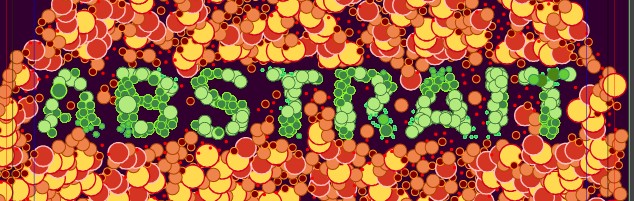
                                  0_1718707626476_r1.jpg

                                  I thought that by doing a BO (minus) with an object or text, I could manage to maintain the text live and editable to see in real time any effect in the arrangement of repeated objects.

                                  W11 Pro 25H2 - 12th Gen Intel(R) i7-12700K 3.61 GHz - RAM 64 Go - NVIDIA GF GTX 4070 Ti - Intuos - Dell UP3216Q / Eizo ColorEdge
                                  W11 Pro 25H2 - 12th Gen Intel(R) i7-12700KF 3.60 GHz -RAM 64 Go - NVIDIA GF GTX 3080 - IntuosPro- ProArt PA329C

                                  VectorStylerV 1 Reply Last reply Reply Quote 0
                                  • VectorStylerV Offline
                                    VectorStyler @B-Vs-V
                                    last edited by

                                    @Pat said in Editable text after a Boolean operation:

                                    I could manage to maintain the text live and editable to see in real time any effect in the arrangement of repeated objects.

                                    Possible to do, but has to be two different repeaters, and then using shape references. Attached the example file: 0_1718709148152_repeatertest2.vstyler

                                    The trick is to create a text shape (for the green repeater), but also set an object name (ex. "mytext") and the shape role to this object. Apply the green symbols in a repeater to this.

                                    Then create the other shape. Create a dummy shape and select the text shape reference from the "Shape" drop down in the context panel, the name will be the one given to the text object (ex. "mytext")
                                    Now group these two (the custom shape and the dummy shape) and select a combine operator.
                                    Apply a repeater on this also (red symbols).
                                    Manually align these so that the text location matches.
                                    Editing the text shape will also update the shape inside the compound group.

                                    B 1 Reply Last reply Reply Quote 1
                                    • B Offline
                                      B-Vs-V @VectorStyler
                                      last edited by

                                      @VectorStyler thanks, but it's not quite there yet: the containers are not mutually exclusive, so the objects overlap ☺

                                      W11 Pro 25H2 - 12th Gen Intel(R) i7-12700K 3.61 GHz - RAM 64 Go - NVIDIA GF GTX 4070 Ti - Intuos - Dell UP3216Q / Eizo ColorEdge
                                      W11 Pro 25H2 - 12th Gen Intel(R) i7-12700KF 3.60 GHz -RAM 64 Go - NVIDIA GF GTX 3080 - IntuosPro- ProArt PA329C

                                      VectorStylerV 1 Reply Last reply Reply Quote 0
                                      • VectorStylerV Offline
                                        VectorStyler @B-Vs-V
                                        last edited by

                                        @Pat said in Editable text after a Boolean operation:

                                        so the objects overlap

                                        The type of repeater combination, as shown in the earlier image is not achievable now. The two repeaters arrange objects independently, and if not clipped, the symbols may overlap.

                                        L 2 Replies Last reply Reply Quote 1
                                        • L Offline
                                          Li Xiao @VectorStyler
                                          last edited by

                                          @VectorStyler Using just one Repeater, symbols in gray color with transparency and blending mode, and calling Repeater color using Region, a crash occurs during testing. The saved file also crashes when opened.

                                          0_1718717551419_repeater test crash.vstyler

                                          VectorStylerV 1 Reply Last reply Reply Quote 1
                                          • L Offline
                                            Li Xiao @VectorStyler
                                            last edited by

                                            @VectorStyler I have recorded the process of the crash.

                                            https://youtu.be/NMkJRwi4LC0

                                            0_1718718384645_repeater test 3.vstyler

                                            1 Reply Last reply Reply Quote 0
                                            • First post
                                              Last post