VectorStyler
    • Categories
    • Unread
    • Recent
    • Tags
    • Popular
    • Register
    • Login

    Start Node - disable it from hiding the real type of node

    Scheduled Pinned Locked Moved Features and Ideas
    18 Posts 7 Posters 16.7k Views 5 Watching
    Loading More Posts
    • Oldest to Newest
    • Newest to Oldest
    • Most Votes
    Reply
    • Reply as topic
    Log in to reply
    This topic has been deleted. Only users with topic management privileges can see it.
    • VectorStylerV Offline
      VectorStyler @Ingolf
      last edited by

      @Ingolf said in Start Node - disable it from hiding the real type of node:

      I propose/prefer a more discreet indication of the start node, perhaps just attributes like color (stroke, fill), and the option to disable this indication altogether in the user interface.

      I find a way to do this. But it will be an option to select.

      1 Reply Last reply Reply Quote 3
      • IngolfI Offline
        Ingolf
        last edited by

        Much appreciated 🙂

        🍏 macOS Sequoia Apple Silicon

        L 1 Reply Last reply Reply Quote 0
        • L Offline
          Li Xiao @Ingolf
          last edited by

          @Ingolf In my work, the start node is crucial. Changing the start node in CorelDraw is quite cumbersome as it requires disconnecting and reconnecting a node. Therefore, I spent money to customize a feature related to the start node. VectorStyler is much more convenient. Just select the node and press "s" to get it done. It would be necessary to have an option to cater to different user needs, allowing users to make choices based on their requirements.

          1 Reply Last reply Reply Quote 1
          • BoldlineB Offline
            Boldline
            last edited by

            While I'm thinking of it, start nodes matter often when designing. They also matter when it comes to blending objects together

            🍎 macOS Tahoe 26.2, Mac mini (M1, 2020), Chip Apple M1, Memory 16 GB
            Cintiq 27QHD Display and LG Ultra HD Display

            1 Reply Last reply Reply Quote 1
            • AyoA Offline
              Ayo
              last edited by

              @Ingolf
              Sometimes, for some users, certainly not indispensable. Remember that the triangle symbol besides start or also symbolizes the direction of the path. Sometimes useful for even/odd fills, winding rules, text on path and maybe more.

              IngolfI 1 Reply Last reply Reply Quote 1
              • IngolfI Offline
                Ingolf @Ayo
                last edited by Ingolf

                @Ayo Yes, but I have never needed it over several decades. In my use cases, having it visible is a burden. I've created billions of complex illustrations, but this particular feature has never been relevant to me. I can't be the only one nor a minority.

                I think we should take a broad look at the customer segment today, that vector illustration programs have become commonplace, and that there are many quite ordinary illustrators out there for whom many classic features in vector programs are not daily relevant. Furthermore, in my experience, they are less likely to frequent forums. For example, in Serif's forums, you won't find many regulars who don't happen to know programming languages like JavaScript or even more advanced. I find it hard to believe all Affinity customers both create art and code.

                An option would be fine. No option, a pain. 🙂

                🍏 macOS Sequoia Apple Silicon

                1 Reply Last reply Reply Quote 3
                • debraspicherD Offline
                  debraspicher
                  last edited by

                  I like having it, but yes sometimes it gets in the way visually.

                  Windows 11 Build 26200.7171 (25H2)
                  AMD Ryzen 7 9700X with Gigabyte X870E Aorus Pro Ice
                  32GB RAM @ 6000MHz
                  PNY NVIDIA RTX 5070 Ti 16GB; Display 1: 4K @150%; Display 2: 4K @200%
                  Wacom Intuos Pro L (2025); Wacom Intuos Pro M; Epson ET-8550; Siser Romeo

                  1 Reply Last reply Reply Quote 2
                  • F Offline
                    fde101 Global Moderator
                    last edited by fde101

                    Personally I think it would be best to find some way to keep it on, but as an indicator on top of the "normal" indicator - put a differently-colored dot in the middle of it or just make the outline thicker or something - visible enough to stand out, but not block the normal interpretation.

                    The end point probably doesn't need to be specially marked as long as the start can be identified.

                    AyoA 2 Replies Last reply Reply Quote 0
                    • AyoA Offline
                      Ayo @fde101
                      last edited by

                      @fde101
                      Sounds good if the starting node manifests itself as a smooth or cusp node for what it is. I think that's the main goal. Option to outline/color it differently in: Settings > Indicator Styles > Path Editing Indicators, is up to the user.
                      End node can be dropped as a special node symbol, my idea or I must overlook the function.

                      The only problem left is the path direction indication.
                      Dit is usually logically solved with a triangle/arrow shape, but with the convention of cusp=square and smooth=circle an additional dot does not provide this information in these symmetrical shapes. In addition, an extra dot does not contribute reducing visual clutter (Initial issue).

                      1 Reply Last reply Reply Quote 1
                      • AyoA Offline
                        Ayo @fde101
                        last edited by Ayo

                        @fde101 I remember Astute graphics.
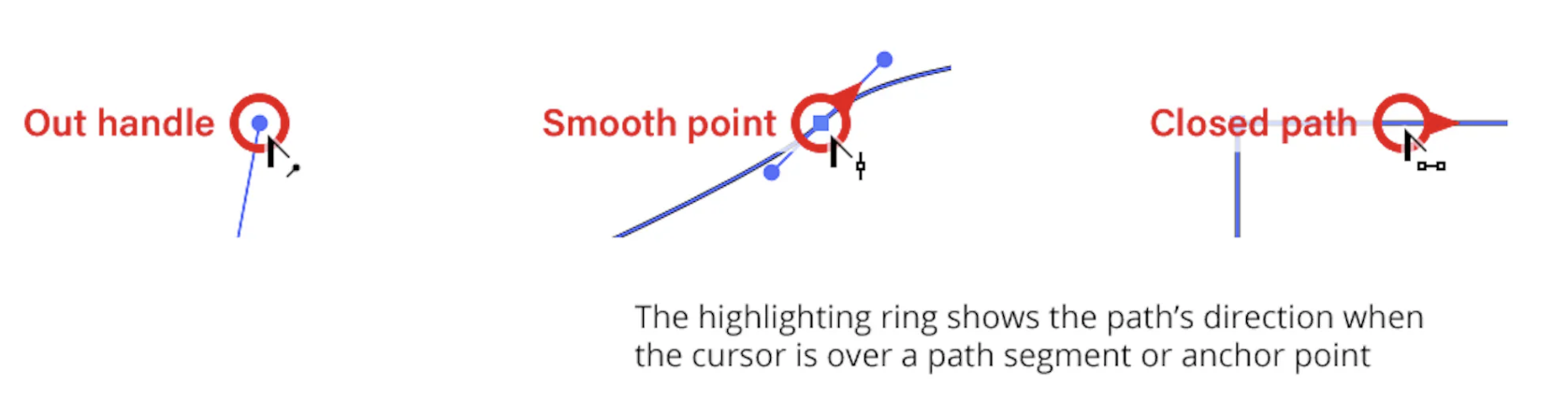
                        It shows a direction indicator when hovering over a node or path. Something like that (+ a modifier key) could be an option.
                        0_1719748110731_a8dc88eb-ed51-4034-959a-5a2a85508737-image.png
                        From the PathScribe Documentation

                        1 Reply Last reply Reply Quote 2
                        • F Offline
                          fde101 Global Moderator
                          last edited by fde101

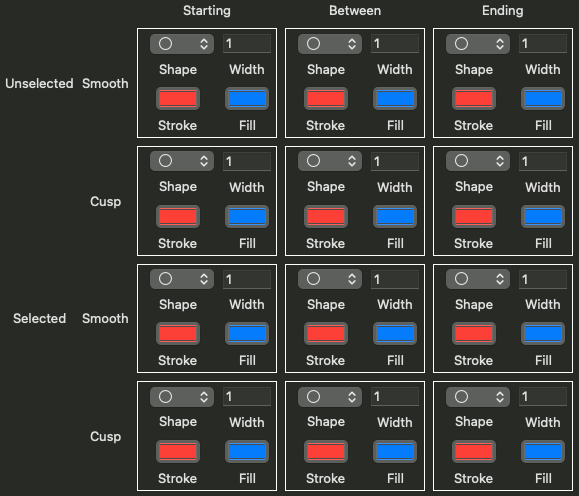
                          Of course the other way to handle this is to split the "Path Starting Node" and "Path Ending Node" options into "Path Starting Cusp" and "Path Starting Smooth" (or "... Ending ...") options (and similarly with "Selected..."), maybe add a rounded triangle shape and one or two others to give more variety... and allow each user to handle it through customization. Maybe split the color options as well between cusp and smooth (or between starting and other)?
                          0_1719752504947_Screenshot 2024-06-30 at 09.00.21.png

                          AyoA 1 Reply Last reply Reply Quote 1
                          • AyoA Offline
                            Ayo @fde101
                            last edited by

                            @fde101
                            This looks a bit over-engineered to me and doesn't make things easier for the user (cockpit panel fighter jet 🙂)

                            1 Reply Last reply Reply Quote 1
                            • debraspicherD Offline
                              debraspicher
                              last edited by debraspicher

                              I'm fine with it being a toggle in a panel or a toolbar. I don't need to be able to change it to the batwing symbol or anything. Though that would be cool.

                              Windows 11 Build 26200.7171 (25H2)
                              AMD Ryzen 7 9700X with Gigabyte X870E Aorus Pro Ice
                              32GB RAM @ 6000MHz
                              PNY NVIDIA RTX 5070 Ti 16GB; Display 1: 4K @150%; Display 2: 4K @200%
                              Wacom Intuos Pro L (2025); Wacom Intuos Pro M; Epson ET-8550; Siser Romeo

                              1 Reply Last reply Reply Quote 2
                              • IngolfI Offline
                                Ingolf
                                last edited by

                                I just need to be able to hide it 100% in a way that is also remembered between program starts. Sticky.

                                I simply don't need tons of visual information that is not relevant for me, ever. Once I disable it, I will never enable it again.

                                🍏 macOS Sequoia Apple Silicon

                                1 Reply Last reply Reply Quote 1
                                • First post
                                  Last post