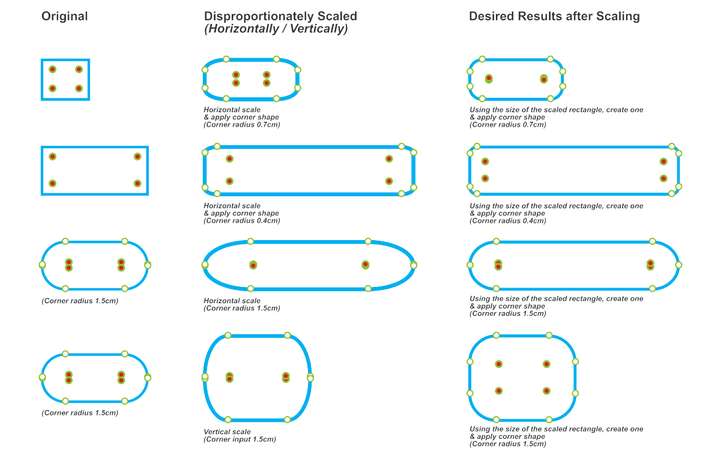
Corner Editing Nodes shift and distort shapes
-
- Draw a rectangle
- Disproportionately scale the rectangle horizontally/vertically using the Transform Tool
- Apply a Round Corner Shape effect
Notice how the rectangle's corners become distorted. It appears this distortion is caused by the shift in position of the Corner Editing Nodes relative to the object. Even when you attempt to scale horizontally/vertically rectangles which already have a Corner Shape applied, the undesirable distortion also occurs.
Note that this behaviour is not something new.
Can we at least have an option to lock the Corner Editing Nodes?
HP•Windows 11 Pro•11th Gen Intel(R) Core(TM) i7-1165G7 @ 2.80GHz 2.70 GHz• RAM: 16.0 GB (DDR4)
-
I know I can convert to curves and use the Node Tool to achieve a favourable result, but at times I need to maintain the parametric shapes.
-
@William-Kansepa I could not replicate this. Please send me a file with the scaled rectangle and the Round Corner shape effect applied. Thanks!
-
@VectorStyler Please refer to the attached files.
Notice and compare the positions of the Corner Editing Nodes with respect to their counterparts in the same row.
-
I have sent some files to your email.
-
@William-Kansepa It is recommended to use the shape panel to adjust the dimensions of the rectangle instead of using the transform panel. This way, you can avoid any distortion issues with the corners.
-
@Li-Xiao said in Corner Editing Nodes shift and distort shapes:
@William-Kansepa It is recommended to use the shape panel to adjust the dimensions of the rectangle instead of using the transform panel. This way, you can avoid any distortion issues with the corners.
@Li-Xiao, thank you.
I tried your recommendation and it works as expected.I once had a go at the Shape panel in my early days working with VS and the only gripes I had with it was:
- Dimensions input through the Transform panel would not match those in the Shape panel
- Object size input from the Shape panel would differ from the one displaying in the Transform panel
With the multitude of panels, tools, menu items and functions, VS is so overwhelming and unfortunately since I was a very raw beginner in the program, I was then forced to neglect this panel in order to minimize confusion. To this day, I still strongly believe that the Transform and Shape panels should be further integrated to act in harmony. They should both display similar dimensions. Illogical logic perhaps? After all, at the end of the day a dimension still remains as such.
Would you agree with me that ideally in the real world one should be able to make manual transformations on the fly and still flawlessly achieve their desired objectives? There is need to introduce more fluidity or rather intuitiveness in VS to complement the otherwise rigidity of some of the panel/modal views and dialog boxes. Observe that in most graphic design software this is the norm.
Once again, thanks for the tip.