VectorStyler
    • Categories
    • Unread
    • Recent
    • Tags
    • Popular
    • Register
    • Login

    The shape rotates arbitrarily with transform panel
    Scheduled Pinned Locked Moved Questions and Support
    11 Posts 3 Posters 9.5k Views 3 Watching
    Loading More Posts
    • Oldest to Newest
    • Newest to Oldest
    • Most Votes
    Reply
    • Reply as topic
    Log in to reply
    This topic has been deleted. Only users with topic management privileges can see it.
    • RaaskotR Offline
      Raaskot
      last edited by

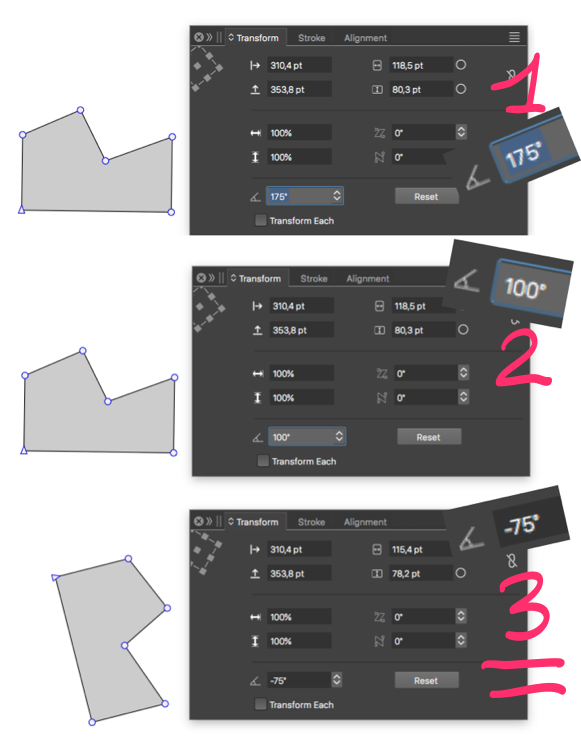
      I dont understand the response from the viewport. The shape (and the bounding box) rotates arbitrarily when everything is switched off. The strange chopped edge point signature upperleft on the Transform panel makes no sence.

      Does the UI appear correct or have I missed something?
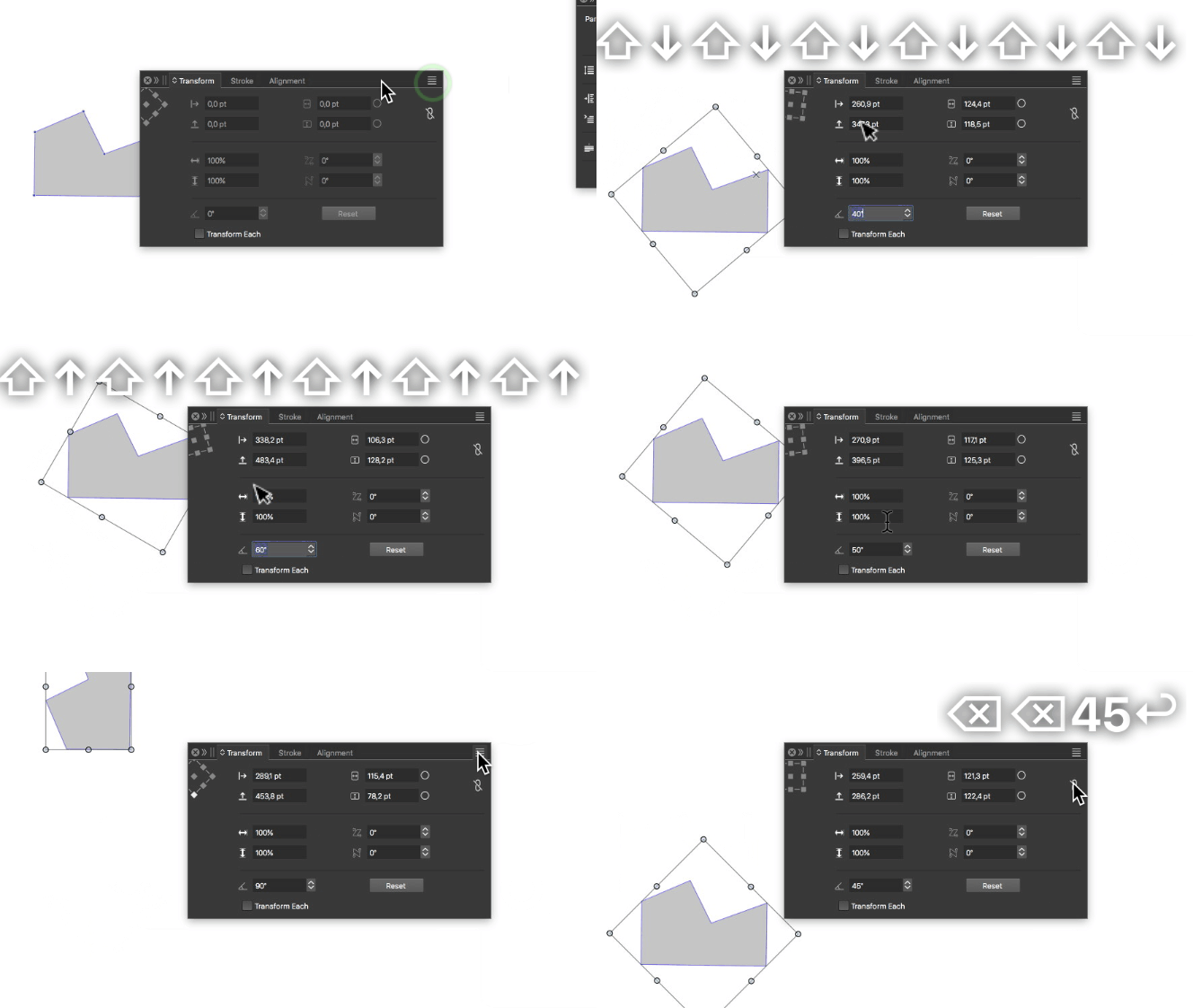
      alt text
      0_1719582021796_3524a780-ce30-4b9f-ad76-28ec2d38cada-billede.png

      Also I'm pusseled when entering numbers in the rotate field: It seems that VS is altering the value. How comes?
      0_1719582452478_5788343e-9bce-4e5d-9837-36d160216402-billede.png

      VectorStylerV 1 Reply Last reply Reply Quote 0
      • VectorStylerV Offline
        VectorStyler @Raaskot
        last edited by

        @Raaskot When the rotation center is off (in the top-left knob), the rotation center is the object origin which in case of free paths / polygons can be anywhere (depends on how they were drawn).

        RaaskotR 1 Reply Last reply Reply Quote 0
        • RaaskotR Offline
          Raaskot @VectorStyler
          last edited by

          @VectorStyler said in The shape rotates arbitrarily with transform panel:

          When the rotation center is off (in the top-left knob), the rotation center is the object origin which in case of free paths / polygons can be anywhere (depends on how they were drawn).

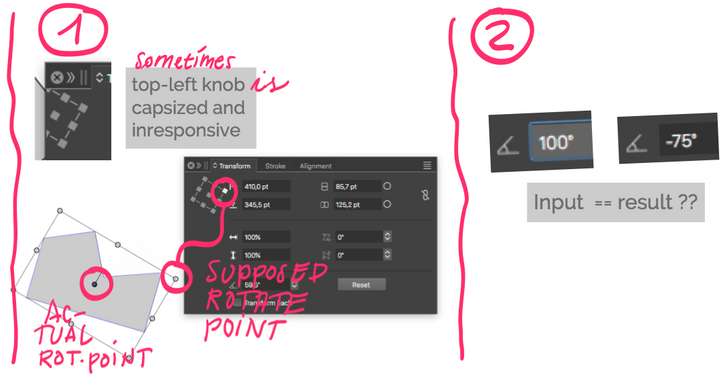
          1. I understand but the way it works in VS it's confusing and not very useful. The top-left knob-thing appears randomly inresponsive and tilted. After setting/restore and VS restart I could make the knob appear un-truncated in Transform panel but clicking the points had no influence.

          2. What about the strangely altered number in the degree-field?
          0_1719640511536_bb9abaff-eccb-49c0-a415-2480f2d844d5-billede.png

          VectorStylerV 1 Reply Last reply Reply Quote 0
          • VectorStylerV Offline
            VectorStyler @Raaskot
            last edited by

            @Raaskot Send me a file with that shape, when it is not rotating according to the selected pivot, or when the number in the field is altered. These seem to be bugs.

            RaaskotR 1 Reply Last reply Reply Quote 1
            • RaaskotR Offline
              Raaskot @VectorStyler
              last edited by

              @VectorStyler

              0_1719644762258_shape_rotate-arbitrarily-02.vstyler

              VectorStylerV 1 Reply Last reply Reply Quote 1
              • VectorStylerV Offline
                VectorStyler @Raaskot
                last edited by

                @Raaskot I troed to replicate these issues, using the file, but all seem to work here. Also, the transform knob (top-left) did not move away in my case.

                Not sture, but it could also be that something broke in the workspace. Can you try to replicate this with the default config.

                RaaskotR 1 Reply Last reply Reply Quote 0
                • debraspicherD Offline
                  debraspicher
                  last edited by

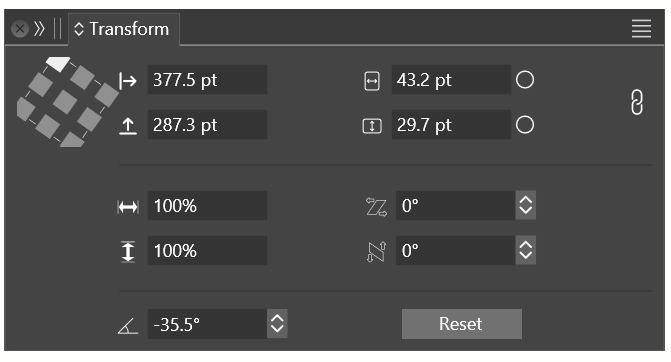
                  My version is partially truncated. It's not as bad as OP's, though:
                  0_1720048057931_6e7f969e-08e8-459c-b4d0-b8814901020b-image.png

                  Windows 11 Build 26200.7171 (25H2)
                  AMD Ryzen 7 9700X with Gigabyte X870E Aorus Pro Ice
                  32GB RAM @ 6000MHz
                  PNY NVIDIA RTX 5070 Ti 16GB; Display 1: 4K @150%; Display 2: 4K @200%
                  Wacom Intuos Pro L (2025); Wacom Intuos Pro M; Epson ET-8550; Siser Romeo

                  1 Reply Last reply Reply Quote 1
                  • RaaskotR Offline
                    Raaskot @VectorStyler
                    last edited by

                    @VectorStyler
                    0_1720083509304_da6f5f78-d1a0-463f-9db0-c87b33ff6e63-billede.png

                    VectorStylerV 2 Replies Last reply Reply Quote 1
                    • VectorStylerV Offline
                      VectorStyler @Raaskot
                      last edited by

                      @Raaskot I will try to replicate with this.

                      1 Reply Last reply Reply Quote 1
                      • VectorStylerV Offline
                        VectorStyler @Raaskot
                        last edited by

                        @Raaskot Still no luck. Send me your current workspace files (Help -> Reveal Workspace).

                        Also: from the screenshots I see that the Node tool is active, for me it is not rotating when the Node tool is active and no node is selected.
                        Or is there some other active tool?

                        RaaskotR 1 Reply Last reply Reply Quote 0
                        • RaaskotR Offline
                          Raaskot @VectorStyler
                          last edited by

                          @VectorStyler
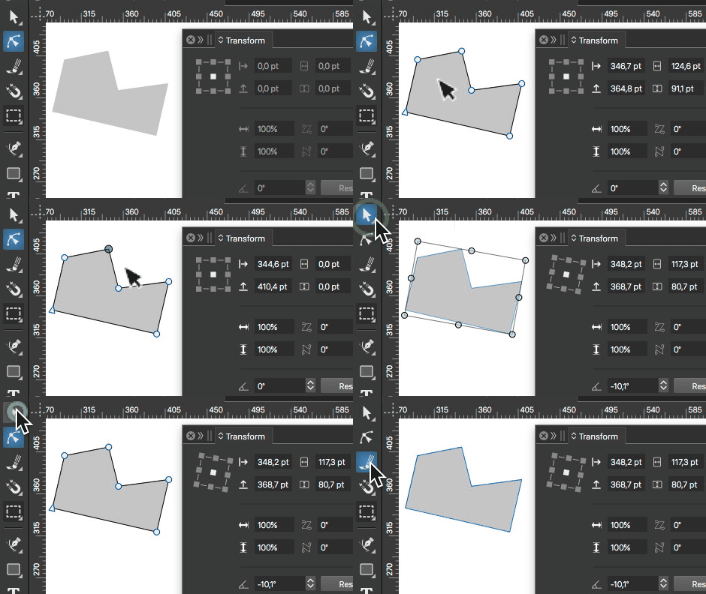
                          The turning knob is determined by the order of tool selections.

                          I've mailed the workspace data to VS-support separately
                          alt text

                          1 Reply Last reply Reply Quote 1
                          • First post
                            Last post