VectorStyler
    • Categories
    • Unread
    • Recent
    • Tags
    • Popular
    • Register
    • Login

    Option to select all nodes on a path with one click by also pressing alt/option modifier

    Scheduled Pinned Locked Moved Features and Ideas
    6 Posts 5 Posters 6.1k Views 3 Watching
    Loading More Posts
    • Oldest to Newest
    • Newest to Oldest
    • Most Votes
    Reply
    • Reply as topic
    Log in to reply
    This topic has been deleted. Only users with topic management privileges can see it.
    • BoldlineB Offline
      Boldline
      last edited by

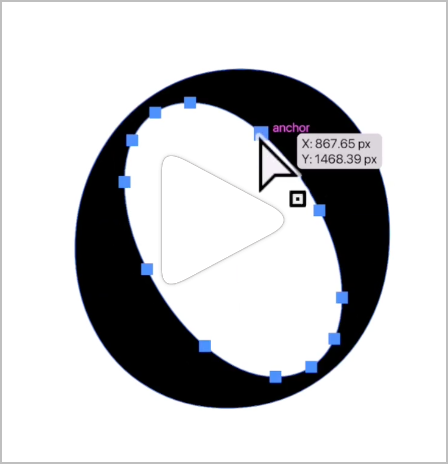
      I saw this Illustrator trick on Instagram today and it seemed like a useful thing.
      If you hold down the alt/option key while clicking on a node of a path, the entire path will be selected. I know available modifier keys are scarce these days, but it could be a neat option with any modifier
      0_1720535106172_96b3c425-6a8f-4d42-b052-2b572d718cf8-BLD 2024-07-09 at 10.19.02@2x.png

      🍎 macOS Tahoe 26.2, Mac mini (M1, 2020), Chip Apple M1, Memory 16 GB
      Cintiq 27QHD Display and LG Ultra HD Display

      VectorStylerV 1 Reply Last reply Reply Quote 1
      • VectorStylerV Offline
        VectorStyler @Boldline
        last edited by

        @Boldline I added this to the features backlog.

        1 Reply Last reply Reply Quote 1
        • W Offline
          William Kansepa
          last edited by

          @Boldline that's one of my favourite features in Illustrator!
          Just wanted to say in VS you can achieve the same: click on a node and press Control +A... oops that's 1 or 2 extra moves. But it works.

          HP•Windows 11 Pro•11th Gen Intel(R) Core(TM) i7-1165G7 @ 2.80GHz 2.70 GHz• RAM: 16.0 GB (DDR4)

          M 1 Reply Last reply Reply Quote 4
          • M Offline
            monsterfox @William Kansepa
            last edited by

            @William-Kansepa Compare curious why you select all nodes mainly for what operation to do preparation? I also often select all nodes, mainly using node optimization tools.

            VectorStylerV 1 Reply Last reply Reply Quote 1
            • VectorStylerV Offline
              VectorStyler @monsterfox
              last edited by

              @monsterfox said in Option to select all nodes on a path with one click by also pressing alt/option modifier:

              Compare curious why you select all nodes mainly for what operation to do preparation?

              The primary feature here is to select all nodes of a sub-path (a section of a combined path) to move around or transform

              1 Reply Last reply Reply Quote 1
              • S Offline
                Subpath
                last edited by Subpath

                Apart from that i find it useful to select all Nodes of a Shape this way
                i find it also helpful for to add new Nodes the Corel Way

                Select a node, then press CTRL+A to select all nodes
                and then press "+" as many times as you need and
                you have evenly inserted Nodes all around the Shape

                Here a little Video

                Win 11
                CPU: AMD Ryzen 5 9600X, 6-core.
                GPU: Nvidia Geforce RTX 5070.

                1 Reply Last reply Reply Quote 3
                • First post
                  Last post
