VectorStyler
    • Categories
    • Unread
    • Recent
    • Tags
    • Popular
    • Register
    • Login

    It is HSL not HLS

    Scheduled Pinned Locked Moved Questions and Support
    7 Posts 3 Posters 7.0k Views 2 Watching
    Loading More Posts
    • Oldest to Newest
    • Newest to Oldest
    • Most Votes
    Reply
    • Reply as topic
    Log in to reply
    This topic has been deleted. Only users with topic management privileges can see it.
    • IngolfI Offline
      Ingolf
      last edited by

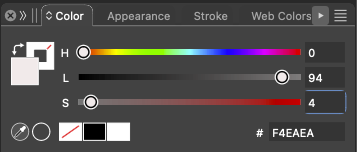
      It took me a while to understand why I was always fumbling so much with using the HSL color picker in VectorStyler until I realized that the parameters (sliders) are in the wrong order (HLS) in VectorStyler compared to all the other programs where I use the color model. HSL is clearly my favorite. Itโ€™s ingrained in my muscle memory which sliders to adjust for colors, so it makes sense that my subconscious have issues in VectorStyler.

      I donโ€™t have any program that uses an order other than HSL; Photoshop, Illustrator, Affinity, Inkscape, Lightroom Classic, websites, whatever. Well, the reason is obvious. The official name is HSL (Hue, Saturation, Lightness). It's important to use the correct order and terminology as it is the standard in graphics applications and programming.

      I don't have time to go in circles about this observation, so here's some documentation: ๐Ÿ™‚

      W3C (World Wide Web Consortium): W3C specifies the HSL color model in CSS.

      W3C CSS Color Module Level 3
      Mozilla Developer Network (MDN): MDN documents the HSL color model in their CSS reference.

      MDN Web Docs: hsl()
      Wikipedia: The Wikipedia article on HSL and HSV color models describes the technical aspects and usage.

      HSL and HSV on Wikipedia

      So can we please have it corrected, thank you. ๐Ÿ™‚

      ๐Ÿ macOS Sequoia Apple Silicon

      VectorStylerV 1 Reply Last reply Reply Quote 1
      • IngolfI Offline
        Ingolf
        last edited by

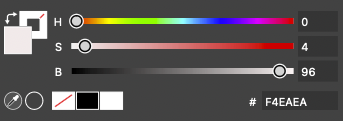
        BTW sliders still do not show the correct value on the sliders, if not always, then often. It is very, very confusing:
        0_1719867253494_439434e1-154f-412a-a6c7-a627fb412a3d-image.png

        HSB is getting it right this time:

        0_1719867290019_5b669837-782b-4010-83b2-e21bc32e131b-image.png

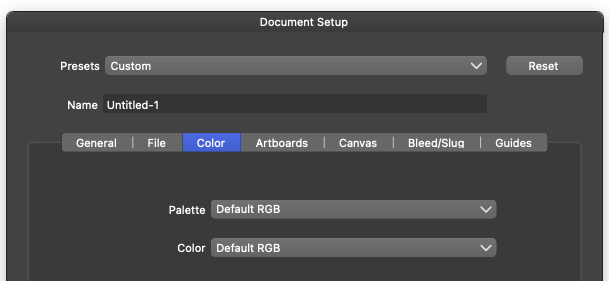
        This happened instantly in new default settings driven document:
        0_1719867469224_3264eb0d-3c5c-4e13-97eb-308a6698502b-image.png

        ๐Ÿ macOS Sequoia Apple Silicon

        1 Reply Last reply Reply Quote 0
        • VectorStylerV Offline
          VectorStyler @Ingolf
          last edited by

          @Ingolf I opened a bug on this.

          1 Reply Last reply Reply Quote 1
          • IngolfI Offline
            Ingolf
            last edited by

            Thank you ๐Ÿ™‚

            ๐Ÿ macOS Sequoia Apple Silicon

            1 Reply Last reply Reply Quote 0
            • W Offline
              William Kansepa
              last edited by

              The sequence of the sliders has been corrected but the labelling is still wrong (HLS) in some of the colour dialogs.

              HPโ€ขWindows 11 Proโ€ข11th Gen Intel(R) Core(TM) i7-1165G7 @ 2.80GHz 2.70 GHzโ€ข RAM: 16.0 GB (DDR4)

              VectorStylerV 1 Reply Last reply Reply Quote 2
              • VectorStylerV Offline
                VectorStyler @William Kansepa
                last edited by

                @William-Kansepa said in It is HSL not HLS:

                The sequence of the sliders has been corrected but the labelling is still wrong (HLS) in some of the colour dialogs.

                I will try to fix this.

                1 Reply Last reply Reply Quote 0
                • IngolfI Offline
                  Ingolf
                  last edited by

                  HSL it is now, many thanks! ๐Ÿ™‚

                  ๐Ÿ macOS Sequoia Apple Silicon

                  1 Reply Last reply Reply Quote 2
                  • First post
                    Last post