VectorStyler
    • Categories
    • Unread
    • Recent
    • Tags
    • Popular
    • Register
    • Login

    update 1.2.037

    Scheduled Pinned Locked Moved Release notes of past builds
    8 Posts 3 Posters 7.7k Views 3 Watching
    Loading More Posts
    • Oldest to Newest
    • Newest to Oldest
    • Most Votes
    Reply
    • Reply as topic
    Log in to reply
    This topic has been deleted. Only users with topic management privileges can see it.
    • VectorStylerV Offline
      VectorStyler
      last edited by

      VectorStyler 1.2.037 release notes

      • Added separate "Copy as PDF" and "Copy as SVG" commands.
      • Improved support for exporting large image.
      • Fixed a shape divide operation error.
      • Added a "Reveal Font File" option to the Character panel menu.
      • Fixed a CSV importing error.
      • Fixed the alignment of reversed corner shapes.
      • Larger click zone for opening tool groups.
      • Output objects with no fill and stroke to SVG.
      • Zoom to page to keep view rotation.
      • Added a separate zoom to page action to rotate view to the page angle.
      • Allow selection of numbers in unfocused number fields with click+drag.
      • Improved number field scrolling.
      S 1 Reply Last reply Reply Quote 8
      • S Offline
        Subpath @VectorStyler
        last edited by

        @VectorStyler , 👍

        Win 11
        CPU: AMD Ryzen 5 9600X, 6-core.
        GPU: Nvidia Geforce RTX 5070.

        1 Reply Last reply Reply Quote 0
        • VectorStylerV Offline
          VectorStyler
          last edited by

          There was a regression affecting Windows users only.
          A fix has been uploaded, but without version increase, so you must manually remove and reinstall VS.

          1 Reply Last reply Reply Quote 1
          • debraspicherD Offline
            debraspicher
            last edited by debraspicher

            Your work here is not appreciated enough. I didn't get a chance to update today as I was working on something, but looking forward to checking it out.

            Windows 11 Build 26200.7171 (25H2)
            AMD Ryzen 7 9700X with Gigabyte X870E Aorus Pro Ice
            32GB RAM @ 6000MHz
            PNY NVIDIA RTX 5070 Ti 16GB; Display 1: 4K @150%; Display 2: 4K @150%
            Wacom Intuos Pro L (2025); Wacom Intuos Pro M; Epson ET-8550; Siser Romeo

            1 Reply Last reply Reply Quote 3
            • debraspicherD Offline
              debraspicher
              last edited by

              I updated and reported (by email) a bug where the UI text is remapping all over the place. We lost power so inevitably it closed down the program, but on reopen, it's still showing as remapped.

              Windows 11 Build 26200.7171 (25H2)
              AMD Ryzen 7 9700X with Gigabyte X870E Aorus Pro Ice
              32GB RAM @ 6000MHz
              PNY NVIDIA RTX 5070 Ti 16GB; Display 1: 4K @150%; Display 2: 4K @150%
              Wacom Intuos Pro L (2025); Wacom Intuos Pro M; Epson ET-8550; Siser Romeo

              VectorStylerV 1 Reply Last reply Reply Quote 0
              • VectorStylerV Offline
                VectorStyler @debraspicher
                last edited by

                @debraspicher said in update 1.2.037:

                I updated and reported (by email) a bug where the UI text is remapping all over the place. We lost power so inevitably it closed down the program, but on reopen, it's still showing as remapped.

                You need to remove VS and manually reinstall. Somehow the MSI installer is not replacing all files.

                debraspicherD 2 Replies Last reply Reply Quote 1
                • debraspicherD Offline
                  debraspicher @VectorStyler
                  last edited by

                  @VectorStyler It's working now

                  Windows 11 Build 26200.7171 (25H2)
                  AMD Ryzen 7 9700X with Gigabyte X870E Aorus Pro Ice
                  32GB RAM @ 6000MHz
                  PNY NVIDIA RTX 5070 Ti 16GB; Display 1: 4K @150%; Display 2: 4K @150%
                  Wacom Intuos Pro L (2025); Wacom Intuos Pro M; Epson ET-8550; Siser Romeo

                  1 Reply Last reply Reply Quote 1
                  • debraspicherD Offline
                    debraspicher @VectorStyler
                    last edited by

                    @VectorStyler I did peak at Event Viewer and didn't see any errors or odd messages:
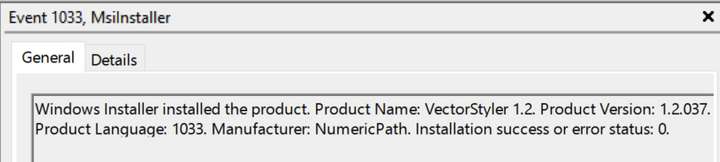
                    0_1724533826997_31b69ce3-8cad-4f39-86c0-ccb9db35bcd9-image.png

                    Windows 11 Build 26200.7171 (25H2)
                    AMD Ryzen 7 9700X with Gigabyte X870E Aorus Pro Ice
                    32GB RAM @ 6000MHz
                    PNY NVIDIA RTX 5070 Ti 16GB; Display 1: 4K @150%; Display 2: 4K @150%
                    Wacom Intuos Pro L (2025); Wacom Intuos Pro M; Epson ET-8550; Siser Romeo

                    1 Reply Last reply Reply Quote 1
                    • First post
                      Last post