VectorStyler
    • Categories
    • Unread
    • Recent
    • Tags
    • Popular
    • Register
    • Login

    How to use these by keyboard?
    Scheduled Pinned Locked Moved Questions and Support
    2 Posts 2 Posters 2.8k Views 2 Watching
    Loading More Posts
    • Oldest to Newest
    • Newest to Oldest
    • Most Votes
    Reply
    • Reply as topic
    Log in to reply
    This topic has been deleted. Only users with topic management privileges can see it.
    • debraspicherD Offline
      debraspicher
      last edited by

      I'd like to be able to 'straighten' a section easily. How do I this with these context menu commands? Right click works fine obviously, but Ctrl + 1 just zooms back to the document. I'm not sure how this is useful:
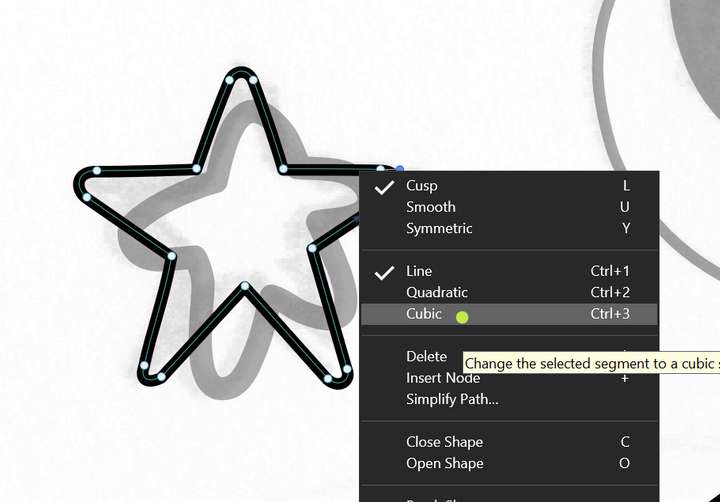
      0_1725678307404_7773da40-59e7-4eaf-8fd3-ca8bc5ee8de6-image.png

      Windows 11 Build 26200.7171 (25H2)
      AMD Ryzen 7 9700X with Gigabyte X870E Aorus Pro Ice
      32GB RAM @ 6000MHz
      PNY NVIDIA RTX 5070 Ti 16GB; Display 1: 4K @150%; Display 2: 4K @200%
      Wacom Intuos Pro L (2025); Wacom Intuos Pro M; Epson ET-8550; Siser Romeo

      VectorStylerV 1 Reply Last reply Reply Quote 0
      • VectorStylerV Offline
        VectorStyler @debraspicher
        last edited by

        @debraspicher Should work when a node is selected. But now it seems that on Windows it is in conflict with a zoom shortcut.
        I will redefine these in the next build (fix the conflict).

        1 Reply Last reply Reply Quote 2
        • First post
          Last post
