VectorStyler
    • Categories
    • Unread
    • Recent
    • Tags
    • Popular
    • Register
    • Login

    Auto reset transformation

    Scheduled Pinned Locked Moved Questions and Support
    11 Posts 2 Posters 8.8k Views 2 Watching
    Loading More Posts
    • Oldest to Newest
    • Newest to Oldest
    • Most Votes
    Reply
    • Reply as topic
    Log in to reply
    This topic has been deleted. Only users with topic management privileges can see it.
    • VectorStylerV Offline
      VectorStyler @Ayo
      last edited by

      @Ayo said in Auto reset transformation:

      "automatically reset after each transformation" as a default?

      No such option. What is the action that is hindered by transforms?

      AyoA 1 Reply Last reply Reply Quote 0
      • AyoA Offline
        Ayo @VectorStyler
        last edited by

        @VectorStyler said in Auto reset transformation:

        What is the action

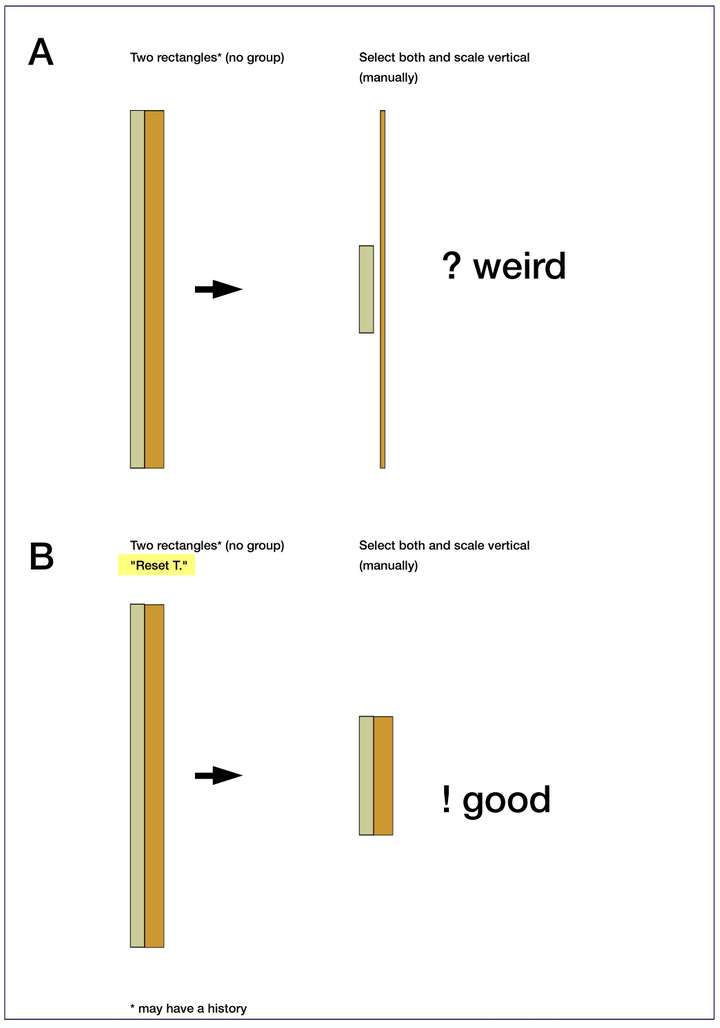
        These kind of surprises

        0_1728718231689_8cc64ac6-085b-4c92-a90f-9472976e4fcc-image.png

        AyoA VectorStylerV 2 Replies Last reply Reply Quote 1
        • AyoA Offline
          Ayo @Ayo
          last edited by

          @Ayo
          Note:
          By reset I mean values, not the bounding box. That is something different.

          1 Reply Last reply Reply Quote 0
          • VectorStylerV Offline
            VectorStyler @Ayo
            last edited by

            @Ayo what are the steps to replicate the case "A", that sure looks like a bug.

            AyoA 1 Reply Last reply Reply Quote 0
            • AyoA Offline
              Ayo @VectorStyler
              last edited by

              @VectorStyler said in Auto reset transformation:

              what are the steps to replicate

              As stated in the footnote; objects may have a history.
              While sketching I can't keep track of how an object comes into being and what its history is.

              Send you the file by mail...

              Action is simple:
              – select both rectangles
              – pick center bottom bounding box
              – + ctrl
              – drag to scale vertically

              VectorStylerV 1 Reply Last reply Reply Quote 0
              • VectorStylerV Offline
                VectorStyler @Ayo
                last edited by

                @Ayo I cannot replicate this. Send me a file with those rectangles.

                AyoA 1 Reply Last reply Reply Quote 0
                • AyoA Offline
                  Ayo @VectorStyler
                  last edited by

                  @VectorStyler
                  I did!

                  VectorStylerV 1 Reply Last reply Reply Quote 0
                  • VectorStylerV Offline
                    VectorStyler @Ayo
                    last edited by

                    @Ayo It is a bug. Disable "Direct Shape Transform" in Settings -> Editing, then it will work correctly.

                    I will try to fix this ASAP.

                    AyoA 1 Reply Last reply Reply Quote 0
                    • AyoA Offline
                      Ayo @VectorStyler
                      last edited by

                      @VectorStyler
                      Glad it's a bug and this issue contributes to a better VS .

                      What I'm wondering now is:
                      Disable for the time being?
                      Or when the bug is fixed should I disable or enable "Direct Shape Transform" in Settings?

                      VectorStylerV 1 Reply Last reply Reply Quote 0
                      • VectorStylerV Offline
                        VectorStyler @Ayo
                        last edited by

                        @Ayo said in Auto reset transformation:

                        Disable for the time being?

                        Yes.

                        1 Reply Last reply Reply Quote 0
                        • First post
                          Last post