VectorStyler
    • Categories
    • Unread
    • Recent
    • Tags
    • Popular
    • Register
    • Login

    Additional guide options while using pen tool

    Scheduled Pinned Locked Moved Features and Ideas
    9 Posts 4 Posters 10.8k Views 3 Watching
    Loading More Posts
    • Oldest to Newest
    • Newest to Oldest
    • Most Votes
    Reply
    • Reply as topic
    Log in to reply
    This topic has been deleted. Only users with topic management privileges can see it.
    • BoldlineB Offline
      Boldline
      last edited by Boldline

      When using the "preview next segment in pen tool" option, the ability to see a guide to show the height and angle extensions would also be helpful. This is demonstrated in this video. I don't know if it's better a separate option or as part of the existing "preview segment in pen tool"

      You can see from this second video, it's very useful for giving the options to snap-align with angles and heights.

      The same guides can be used with the line tool as well

      🍎 macOS Tahoe 26.2, Mac mini (M1, 2020), Chip Apple M1, Memory 16 GB
      Cintiq 27QHD Display and LG Ultra HD Display

      BoldlineB VectorStylerV M 3 Replies Last reply Reply Quote 1
      • BoldlineB Offline
        Boldline @Boldline
        last edited by

        I also like that it can find the center of an existing shape or path as you pass nearby so you could start a new path at that centered location.

        🍎 macOS Tahoe 26.2, Mac mini (M1, 2020), Chip Apple M1, Memory 16 GB
        Cintiq 27QHD Display and LG Ultra HD Display

        1 Reply Last reply Reply Quote 0
        • VectorStylerV Offline
          VectorStyler @Boldline
          last edited by

          @Boldline I added this to the backlog

          1 Reply Last reply Reply Quote 1
          • M Offline
            monsterfox @Boldline
            last edited by

            @Boldline What software is this?

            S BoldlineB 2 Replies Last reply Reply Quote 0
            • S Offline
              Subpath @monsterfox
              last edited by

              @monsterfox

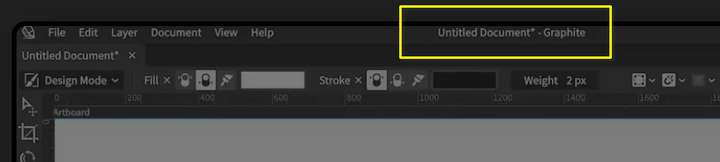
              if you look closely at his videos,
              the software seems to be called "Graphite"

              0_1729484780798_ksnip_20241021-062233.png

              Win 11
              CPU: AMD Ryzen 5 9600X, 6-core.
              GPU: Nvidia Geforce RTX 5070.

              1 Reply Last reply Reply Quote 1
              • BoldlineB Offline
                Boldline @monsterfox
                last edited by

                @monsterfox It's a vector editing program called "Graphite" Here is the link to the website.

                🍎 macOS Tahoe 26.2, Mac mini (M1, 2020), Chip Apple M1, Memory 16 GB
                Cintiq 27QHD Display and LG Ultra HD Display

                S 1 Reply Last reply Reply Quote 2
                • S Offline
                  Subpath @Boldline
                  last edited by Subpath

                  @Boldline

                  I knew I knew it from somewhere 🙂
                  I am on the Blender Artist Forum from time to time.

                  There is a thread about it.
                  https://blenderartists.org/t/graphite-2d-foss-raster-vector-editor-looking-back-on-2023-and-what-s-next/1508057

                  Win 11
                  CPU: AMD Ryzen 5 9600X, 6-core.
                  GPU: Nvidia Geforce RTX 5070.

                  1 Reply Last reply Reply Quote 1
                  • M Offline
                    monsterfox
                    last edited by

                    @Boldline Thank you. I haven't seen this thing before. After a careful look, I found out that it is a new program under development. Study it when I have time.

                    BoldlineB 1 Reply Last reply Reply Quote 1
                    • BoldlineB Offline
                      Boldline @monsterfox
                      last edited by

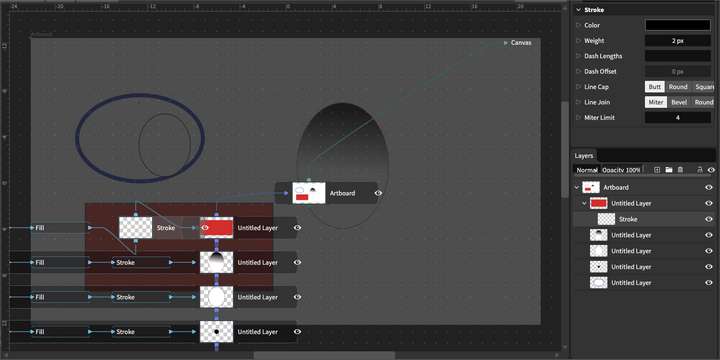
                      @monsterfox Yes it's in development. I first found it about a year ago and it was at a very very basic level, but I was intrigued by it and would occasionally check in to see how it was doing. I hadn't checked in since spring of this year and found they had done a lot of work on it over the summer months.

                      One aspect that intrigued me was the ability to switch around attributes of each shape. It might be an interesting thing to add in VS at some point.
                      0_1729524878764_22f8ee42-c5d9-4a1c-a8e0-5a44a2fe78a3-BLD 2024-10-21 at 11.33.26.png

                      🍎 macOS Tahoe 26.2, Mac mini (M1, 2020), Chip Apple M1, Memory 16 GB
                      Cintiq 27QHD Display and LG Ultra HD Display

                      1 Reply Last reply Reply Quote 1
                      • First post
                        Last post