VectorStyler
    • Categories
    • Unread
    • Recent
    • Tags
    • Popular
    • Register
    • Login

    User interface - adjusting panel height (when docked)

    Scheduled Pinned Locked Moved Features and Ideas
    2 Posts 2 Posters 2.6k Views 2 Watching
    Loading More Posts
    • Oldest to Newest
    • Newest to Oldest
    • Most Votes
    Reply
    • Reply as topic
    Log in to reply
    This topic has been deleted. Only users with topic management privileges can see it.
    • B Offline
      B-Vs-V
      last edited by

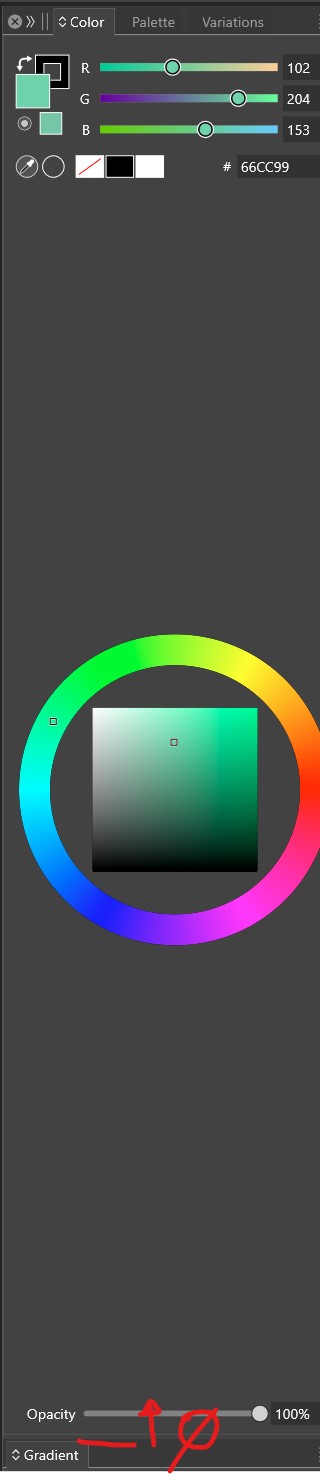
      The height of the colour panel (and others as well) is very (too) large but it is not possible to adjust its height manually. Thanks in advance for trying to improve UI ☺

      0_1729752397775_b1.jpg

      W11 Pro 25H2 - 12th Gen Intel(R) i7-12700K 3.61 GHz - RAM 64 Go - NVIDIA GF GTX 4070 Ti - Intuos - Dell UP3216Q / Eizo ColorEdge
      W11 Pro 25H2 - 12th Gen Intel(R) i7-12700KF 3.60 GHz -RAM 64 Go - NVIDIA GF GTX 3080 - IntuosPro- ProArt PA329C

      VectorStylerV 1 Reply Last reply Reply Quote 1
      • VectorStylerV Offline
        VectorStyler @B-Vs-V
        last edited by

        @Pat I will try to improve this. If the other docked panel heights cannot be adjusted, then the color panel will have its maximum height.

        1 Reply Last reply Reply Quote 0
        • First post
          Last post