VectorStyler
    • Categories
    • Unread
    • Recent
    • Tags
    • Popular
    • Register
    • Login

    Dragging Panels

    Scheduled Pinned Locked Moved Features and Ideas
    3 Posts 3 Posters 3.1k Views 3 Watching
    Loading More Posts
    • Oldest to Newest
    • Newest to Oldest
    • Most Votes
    Reply
    • Reply as topic
    Log in to reply
    This topic has been deleted. Only users with topic management privileges can see it.
    • 4f00d4 Offline
      4f00d
      last edited by 4f00d

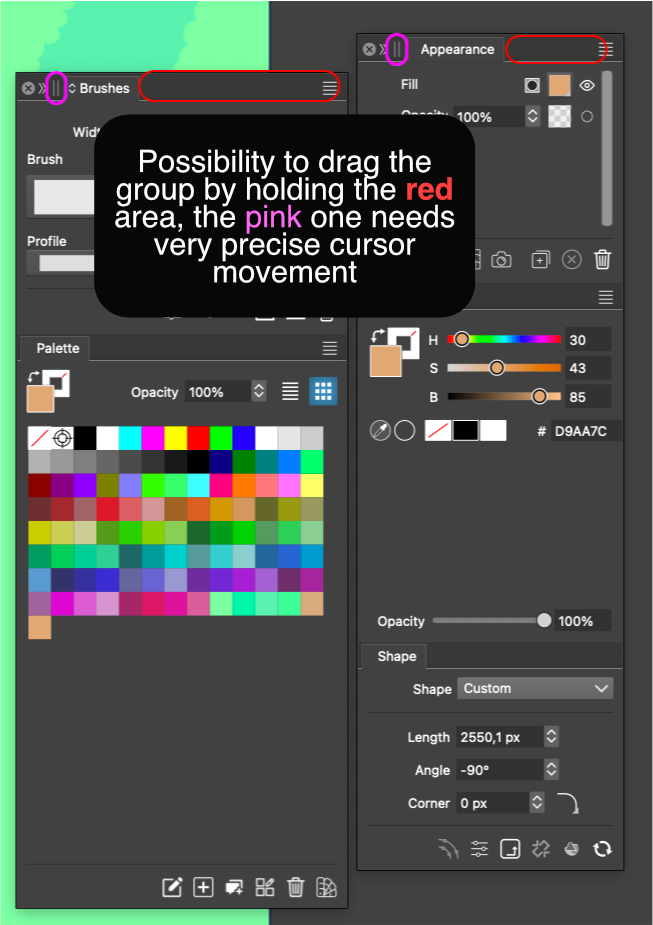
      Hello, a picture explains better then a thousand words uh.. 😁
      0_1732118827508_slice1.png
      and if holding "Brushes" or "Palette" then you can drag the Panel out of the group, the pink area is not very intuitive or easily "reached".. like I have to fight not to drag the panel out of the group by miss clicking the pink area, and it kinda starts to add up to a hand strain 😐

      S VectorStylerV 2 Replies Last reply Reply Quote 1
      • S Offline
        Subpath @4f00d
        last edited by Subpath

        @4f00d

        a whole group of panels can be dragged
        by using the red area

        to drag a panel out of a group just use the title aera

        here a video

        Win 11
        CPU: AMD Ryzen 5 9600X, 6-core.
        GPU: Nvidia Geforce RTX 5070.

        1 Reply Last reply Reply Quote 0
        • VectorStylerV Offline
          VectorStyler @4f00d
          last edited by

          @4f00d I added this to the backlog.

          1 Reply Last reply Reply Quote 1
          • First post
            Last post