VectorStyler
    • Categories
    • Unread
    • Recent
    • Tags
    • Popular
    • Register
    • Login

    A new Document always enable snapping

    Scheduled Pinned Locked Moved Questions and Support
    7 Posts 3 Posters 5.4k Views 3 Watching
    Loading More Posts
    • Oldest to Newest
    • Newest to Oldest
    • Most Votes
    Reply
    • Reply as topic
    Log in to reply
    This topic has been deleted. Only users with topic management privileges can see it.
    • S Offline
      Subpath
      last edited by

      I think at some point since the latest updates I've had
      the problem that "Snapping Enabled" is switched on
      when I create a new document. I find this very annoying.

      I've already looked in settings but haven't found anything.
      I haven't changed anything myself either, because normally
      I only have snapping on when I need it.

      Any advice would be greatly appreciated.

      Here a Video

      Win 11
      CPU: AMD Ryzen 5 9600X, 6-core.
      GPU: Nvidia Geforce RTX 5070.

      VectorStylerV 1 Reply Last reply Reply Quote 1
      • M Offline
        monsterfox
        last edited by

        You can solve the problem by saving a preset template.

        S 1 Reply Last reply Reply Quote 1
        • S Offline
          Subpath @monsterfox
          last edited by

          @monsterfox

          Thanks, saving a preset in the Snapping Panel
          with snapping disabled didn't work. But your tip
          gave me another idea, that I hadn't tried before.

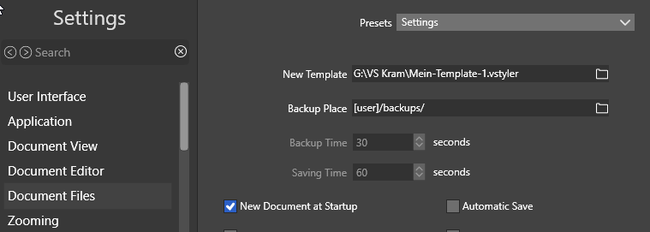
          I have now set a file as a template with snapping
          disabled in the settings. Every time I create a
          new file in VS, this file with snapping disabled
          is called. That solves the problem for now.

          But apart from that, snapping should normally be disabled
          when you start VS.
          .
          .
          0_1732684365783_Snapping problem.png

          Win 11
          CPU: AMD Ryzen 5 9600X, 6-core.
          GPU: Nvidia Geforce RTX 5070.

          1 Reply Last reply Reply Quote 0
          • VectorStylerV Offline
            VectorStyler @Subpath
            last edited by

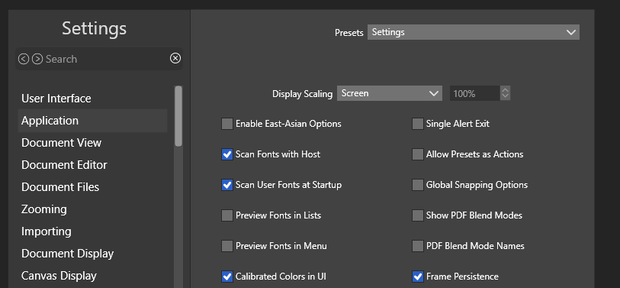
            @Subpath What is the state of the "Global Snapping Options" in settings -> application?

            S 1 Reply Last reply Reply Quote 1
            • S Offline
              Subpath @VectorStyler
              last edited by Subpath

              @VectorStyler said in A new Document always enable snapping:

              @Subpath What is the state of the "Global Snapping Options" in settings -> application?

              They are off. Not set
              0_1732690561778_Global snapping options.png

              Win 11
              CPU: AMD Ryzen 5 9600X, 6-core.
              GPU: Nvidia Geforce RTX 5070.

              VectorStylerV 1 Reply Last reply Reply Quote 1
              • VectorStylerV Offline
                VectorStyler @Subpath
                last edited by

                @Subpath Then it will use the snapping associated with the document (or document template in case of new documents).

                One thing to try is to save a document template with snapping disabled.

                S 1 Reply Last reply Reply Quote 1
                • S Offline
                  Subpath @VectorStyler
                  last edited by Subpath

                  @VectorStyler said in A new Document always enable snapping:

                  @Subpath Then it will use the snapping associated with the document (or document template in case of new documents).

                  One thing to try is to save a document template with snapping disabled.

                  Thank you, I think I solved it now.

                  I've deleted my document template file in which snapping were disabled.
                  So that it can't be called up.

                  Then I started VS and set the global snapping options. After this i created
                  a new file, turned snapping off and closed VS.

                  Everything is fine now and snapping is disabled when creating a new file.
                  But I could swear that I didn't change any settings before.

                  Win 11
                  CPU: AMD Ryzen 5 9600X, 6-core.
                  GPU: Nvidia Geforce RTX 5070.

                  1 Reply Last reply Reply Quote 0
                  • First post
                    Last post