VectorStyler
    • Categories
    • Unread
    • Recent
    • Tags
    • Popular
    • Register
    • Login

    update 1.2.058

    Scheduled Pinned Locked Moved Release notes of past builds
    22 Posts 5 Posters 23.9k Views 4 Watching
    Loading More Posts
    • Oldest to Newest
    • Newest to Oldest
    • Most Votes
    Reply
    • Reply as topic
    Log in to reply
    This topic has been deleted. Only users with topic management privileges can see it.
    • K Offline
      Kumr
      last edited by Kumr

      @VectorStyler Since updating to latest version, VS is not responding properly. None of the tools working. I can select the tool but not able to use them.

      Thanks

      M1 MacBook Air, 16GB, macOS Sonoma 14.4.1

      1 Reply Last reply Reply Quote 0
      • K Offline
        Kumr
        last edited by

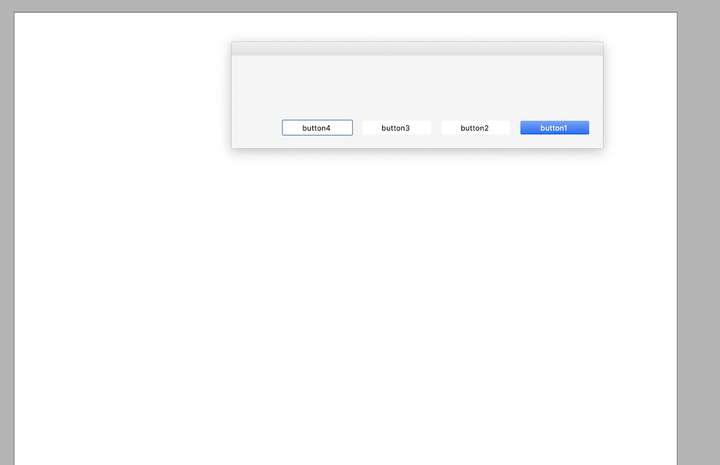
        @VectorStyler Also when quitting app, this window appears.
        0_1738310707661_wind.jpg

        M1 MacBook Air, 16GB, macOS Sonoma 14.4.1

        B VectorStylerV 2 Replies Last reply Reply Quote 1
        • B Offline
          B-Vs-V @Kumr
          last edited by

          @VectorStyler got similar issues on W.

          W11 Pro 25H2 - 12th Gen Intel(R) i7-12700K 3.61 GHz - RAM 64 Go - NVIDIA GF GTX 4070 Ti - Intuos - Dell UP3216Q / Eizo ColorEdge
          W11 Pro 25H2 - 12th Gen Intel(R) i7-12700KF 3.60 GHz -RAM 64 Go - NVIDIA GF GTX 3080 - IntuosPro- ProArt PA329C

          VectorStylerV 1 Reply Last reply Reply Quote 0
          • VectorStylerV Offline
            VectorStyler @B-Vs-V
            last edited by

            @B-Vs-V @Kumr Remove VectorStyler and reinstall manually.
            Also: you may need to remove all user data (make sure to backup if needed).

            I opened a bug on this. Something goes wrong with the MSI installer.

            B 1 Reply Last reply Reply Quote 0
            • B Offline
              B-Vs-V @VectorStyler
              last edited by

              @VectorStyler it doesn't help at all, same problem as soon as you open the first window to activate VS. I'd already had to do this with the previous version. I think I'll wait for the next ones before reusing VS again.

              W11 Pro 25H2 - 12th Gen Intel(R) i7-12700K 3.61 GHz - RAM 64 Go - NVIDIA GF GTX 4070 Ti - Intuos - Dell UP3216Q / Eizo ColorEdge
              W11 Pro 25H2 - 12th Gen Intel(R) i7-12700KF 3.60 GHz -RAM 64 Go - NVIDIA GF GTX 3080 - IntuosPro- ProArt PA329C

              1 Reply Last reply Reply Quote 1
              • VectorStylerV Offline
                VectorStyler @Kumr
                last edited by

                @Kumr If this occurs on Mac also, then it is a different problem.
                I will try to find out what can cause this.

                B K 2 Replies Last reply Reply Quote 0
                • B Offline
                  B-Vs-V @VectorStyler
                  last edited by

                  @VectorStyler many functions no longer work and it's impossible to close a file.

                  W11 Pro 25H2 - 12th Gen Intel(R) i7-12700K 3.61 GHz - RAM 64 Go - NVIDIA GF GTX 4070 Ti - Intuos - Dell UP3216Q / Eizo ColorEdge
                  W11 Pro 25H2 - 12th Gen Intel(R) i7-12700KF 3.60 GHz -RAM 64 Go - NVIDIA GF GTX 3080 - IntuosPro- ProArt PA329C

                  1 Reply Last reply Reply Quote 0
                  • K Offline
                    Kumr @VectorStyler
                    last edited by Kumr

                    @VectorStyler I completely removed VS. I installed previous version and. then updated. Same issue. It's not possible to close VS. I had to force quit.

                    M1 MacBook Air, 16GB, macOS Sonoma 14.4.1

                    1 Reply Last reply Reply Quote 0
                    • B Offline
                      B-Vs-V
                      last edited by

                      Same issues. I reinstall .057 & I get now issues with the UI.

                      W11 Pro 25H2 - 12th Gen Intel(R) i7-12700K 3.61 GHz - RAM 64 Go - NVIDIA GF GTX 4070 Ti - Intuos - Dell UP3216Q / Eizo ColorEdge
                      W11 Pro 25H2 - 12th Gen Intel(R) i7-12700KF 3.60 GHz -RAM 64 Go - NVIDIA GF GTX 3080 - IntuosPro- ProArt PA329C

                      VectorStylerV debraspicherD 2 Replies Last reply Reply Quote 1
                      • VectorStylerV Offline
                        VectorStyler @B-Vs-V
                        last edited by

                        @B-Vs-V Can you make a recording of this?

                        B 1 Reply Last reply Reply Quote 0
                        • B Offline
                          B-Vs-V @VectorStyler
                          last edited by

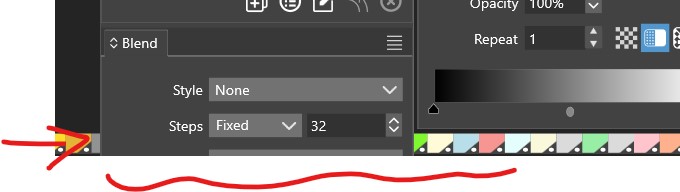
                          @VectorStyler the lower part of the panels is not visible, I touch the tab of a panel and it disappears, I want to enlarge a set of panels and they are others that move...
                          0_1738320174048_vs.jpg

                          W11 Pro 25H2 - 12th Gen Intel(R) i7-12700K 3.61 GHz - RAM 64 Go - NVIDIA GF GTX 4070 Ti - Intuos - Dell UP3216Q / Eizo ColorEdge
                          W11 Pro 25H2 - 12th Gen Intel(R) i7-12700KF 3.60 GHz -RAM 64 Go - NVIDIA GF GTX 3080 - IntuosPro- ProArt PA329C

                          VectorStylerV 2 Replies Last reply Reply Quote 1
                          • VectorStylerV Offline
                            VectorStyler @B-Vs-V
                            last edited by

                            @B-Vs-V Send a full screenshot of VS, I want to understand what happens

                            1 Reply Last reply Reply Quote 0
                            • VectorStylerV Offline
                              VectorStyler @B-Vs-V
                              last edited by

                              Some additional checks that can help solving this issue with the empty alert view:

                              Are these other alert view also empty?

                              • overwriting an existing preset definition
                              • removing a preset Group in the preset manager
                              • trying to open a missing recent file (File menu Open Recent).
                              • clicking with the symbol spray tool without a symbol selected.
                              debraspicherD 1 Reply Last reply Reply Quote 0
                              • debraspicherD Offline
                                debraspicher
                                last edited by

                                I've been sending emails, but just wanted to say, I'm having the same issue as others here on Windows.

                                Windows 11 Build 26200.7171 (25H2)
                                AMD Ryzen 7 9700X with Gigabyte X870E Aorus Pro Ice
                                32GB RAM @ 6000MHz
                                PNY NVIDIA RTX 5070 Ti 16GB; Display 1: 4K @150%; Display 2: 4K @150%
                                Wacom Intuos Pro L (2025); Wacom Intuos Pro M; Epson ET-8550; Siser Romeo

                                1 Reply Last reply Reply Quote 0
                                • debraspicherD Offline
                                  debraspicher @VectorStyler
                                  last edited by

                                  @VectorStyler

                                  overwriting an existing preset definition
                                  

                                  As far as I can tell, no dialog.

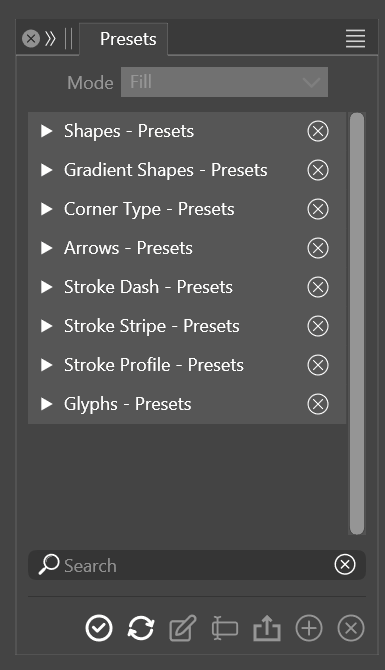
                                  removing a preset Group in the preset manager
                                  

                                  If it's from this panel, hitting the X, no dialog:
                                  0_1738339077487_71966fc3-68b9-4fe0-86b7-9122ba9836a0-image.png

                                  trying to open a missing recent file (File menu Open Recent).
                                  

                                  Yes, it's the same box:

                                  0_1738339246264_d2956d54-9df3-4989-a1e7-5021fafb59a5-image.png

                                  clicking with the symbol spray tool without a symbol selected.
                                  

                                  I was able to use tools before resetting everything and now I can't activate them at all, so I can't test this.

                                  I'm having major difficulty just unlocking, selecting Layers to delete, so it's also difficult to test.

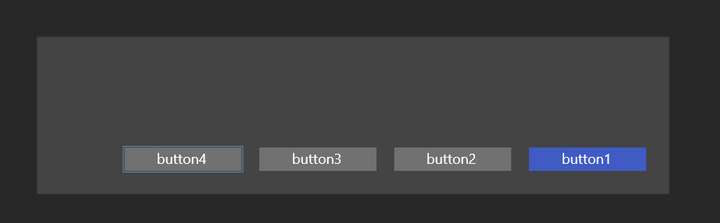
                                  **In case it is helpful to anyone, I found a way to close the dialog is to click the blue button and then Hit Esc.

                                  Windows 11 Build 26200.7171 (25H2)
                                  AMD Ryzen 7 9700X with Gigabyte X870E Aorus Pro Ice
                                  32GB RAM @ 6000MHz
                                  PNY NVIDIA RTX 5070 Ti 16GB; Display 1: 4K @150%; Display 2: 4K @150%
                                  Wacom Intuos Pro L (2025); Wacom Intuos Pro M; Epson ET-8550; Siser Romeo

                                  VectorStylerV 1 Reply Last reply Reply Quote 1
                                  • VectorStylerV Offline
                                    VectorStyler @debraspicher
                                    last edited by

                                    @debraspicher Yes, so basically the alert views are broken.
                                    I will be working on this now and hopefully I can find the root cause.

                                    1 Reply Last reply Reply Quote 1
                                    • debraspicherD Offline
                                      debraspicher @B-Vs-V
                                      last edited by

                                      @B-Vs-V Fwiw, I reinstalled the older version to see if I would have a problem somehow and I don't have these issues. But I did delete the Numericpath Appdata folders in Windows before reinstalling. So it might be something residual loading from there.

                                      Windows 11 Build 26200.7171 (25H2)
                                      AMD Ryzen 7 9700X with Gigabyte X870E Aorus Pro Ice
                                      32GB RAM @ 6000MHz
                                      PNY NVIDIA RTX 5070 Ti 16GB; Display 1: 4K @150%; Display 2: 4K @150%
                                      Wacom Intuos Pro L (2025); Wacom Intuos Pro M; Epson ET-8550; Siser Romeo

                                      1 Reply Last reply Reply Quote 1
                                      • First post
                                        Last post