VectorStyler
    • Categories
    • Unread
    • Recent
    • Tags
    • Popular
    • Register
    • Login

    How do I pull out a tabbed panel from a group?

    Scheduled Pinned Locked Moved Questions and Support
    5 Posts 2 Posters 4.4k Views 1 Watching
    Loading More Posts
    • Oldest to Newest
    • Newest to Oldest
    • Most Votes
    Reply
    • Reply as topic
    Log in to reply
    This topic has been deleted. Only users with topic management privileges can see it.
    • BoldlineB Online
      Boldline
      last edited by

      Is there a way to pull out a grouped tab-panel without closing out the whole grouping or closing that specific panel first?

      In this case, it seems if I want to pull out the middle panel called "Panotne", I have to close it first
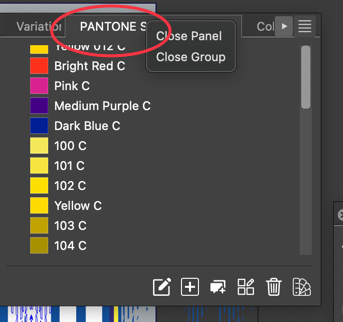
      0_1738356779928_38df7d92-602d-4b28-beb8-2eea1c9e6ffb-CleanShot 2025-01-31 at 15.51.52.png

      🍎 macOS Sequoia 15.3, Mac mini (M1, 2020), Chip Apple M1, Memory 16 GB
      Cintiq 27QHD Display and LG Ultra HD Display

      VectorStylerV 1 Reply Last reply Reply Quote 1
      • VectorStylerV Offline
        VectorStyler @Boldline
        last edited by

        @Boldline You should be able to drag from the panel title (the "PANTONE.." text), but it will pull out a single panel only, not the whole group.

        BoldlineB 1 Reply Last reply Reply Quote 0
        • BoldlineB Online
          Boldline @VectorStyler
          last edited by Boldline

          @VectorStyler if I try to do that, the entire panel with all grouped tabs gets moved around the screen by the cursor.

          UPDATE: ok I figured it out - I had "lock all panels" activated.

          🍎 macOS Sequoia 15.3, Mac mini (M1, 2020), Chip Apple M1, Memory 16 GB
          Cintiq 27QHD Display and LG Ultra HD Display

          VectorStylerV 1 Reply Last reply Reply Quote 0
          • VectorStylerV Offline
            VectorStyler @Boldline
            last edited by

            @Boldline This is what happens here: https://share.cleanshot.com/frjgDsyd

            BoldlineB 1 Reply Last reply Reply Quote 1
            • BoldlineB Online
              Boldline @VectorStyler
              last edited by Boldline

              @VectorStyler Thanks. I realized that I had to click off on the "lock all panels" to allow the tabs to be easily pulled out from a grouping.once I unlocked it, I was able to edit the groups of panels as you showed in the video


              🍎 macOS Sequoia 15.3, Mac mini (M1, 2020), Chip Apple M1, Memory 16 GB
              Cintiq 27QHD Display and LG Ultra HD Display

              1 Reply Last reply Reply Quote 1
              • First post
                Last post