VectorStyler
    • Categories
    • Unread
    • Recent
    • Tags
    • Popular
    • Register
    • Login

    If I pull document tab out from its main position, how do I get it to snap back to its original location?

    Scheduled Pinned Locked Moved Questions and Support
    2 Posts 2 Posters 2.3k Views 1 Watching
    Loading More Posts
    • Oldest to Newest
    • Newest to Oldest
    • Most Votes
    Reply
    • Reply as topic
    Log in to reply
    This topic has been deleted. Only users with topic management privileges can see it.
    • BoldlineB Offline
      Boldline
      last edited by

      If I pull the document tab out from its main position, how do I get it to snap back to its original location? Here is a video showing what I am talking about. I was expecting the blue highlight guide to appear when I was hovering over the intended spot with the selected document tab. Is there a setting specific to allowing this to happen?
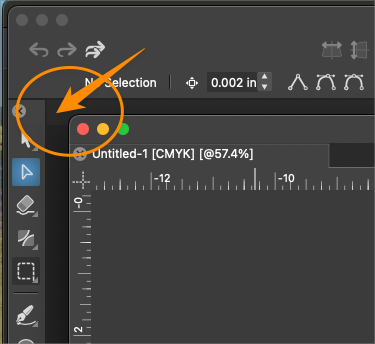
      0_1738431294514_bdf40407-2dea-478f-bf19-c765a74de380-BLD 2025-02-01 at 12.34.27.png

      🍎 macOS Tahoe 26.2, Mac mini (M1, 2020), Chip Apple M1, Memory 16 GB
      Cintiq 27QHD Display and LG Ultra HD Display

      VectorStylerV 1 Reply Last reply Reply Quote 0
      • VectorStylerV Offline
        VectorStyler @Boldline
        last edited by

        @Boldline Drag the detached document from its title leaf (the "Untitled..." text in the image) and drag it over the area where the attached title leafs supposed to be. There is a thin gray line indicating the area.


        1 Reply Last reply Reply Quote 1
        • First post
          Last post