VectorStyler
    • Categories
    • Unread
    • Recent
    • Tags
    • Popular
    • Register
    • Login

    Could edits to a gradient made in gradient panel and modified in repeater update the repeater result?
    Scheduled Pinned Locked Moved Questions and Support
    5 Posts 2 Posters 4.0k Views 1 Watching
    Loading More Posts
    • Oldest to Newest
    • Newest to Oldest
    • Most Votes
    Reply
    • Reply as topic
    Log in to reply
    This topic has been deleted. Only users with topic management privileges can see it.
    • BoldlineB Offline
      Boldline
      last edited by

      I know you've mentioned on the forum that you're working on updates eventually coming to the repeater functionality. If this is already addressed then disregard!

      Is it possible for the gradient the repeater is using as reference to be updated when the gradient panel is adjusted? - or is that not possible because their are modal panels?
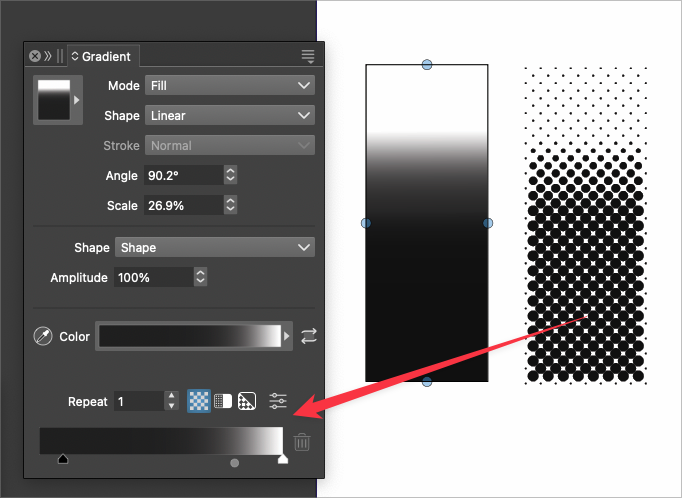
      Here is a video where I created a gradient and then applied the repeater to that gradient. When I went back to adjust the gradient with the gradient tool, it did not seem to have an effect.
      0_1738555696121_eebe8ba6-debb-4ba1-9031-dd40fbfc2e2f-BLD 2025-02-02 at 23.06.55.png

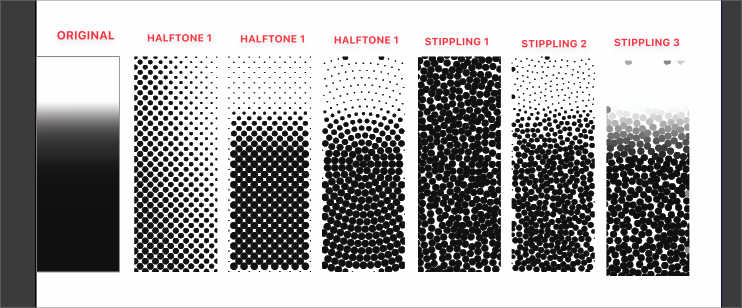
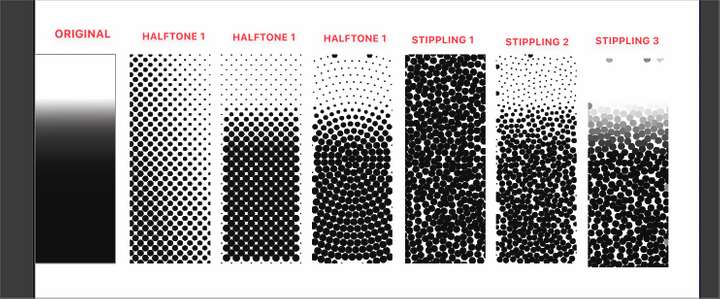
      I did a further test and made a gradient with an unusual end point and then applied to each copy of the gradient a different style in the repeater panel. Some of them resembled the original gradient more than others - is that intentional?
      0_1738555423154_7da8235e-c6c8-4557-9efb-2e28a6d57cee-BLD 2025-02-02 at 22.56.23.png

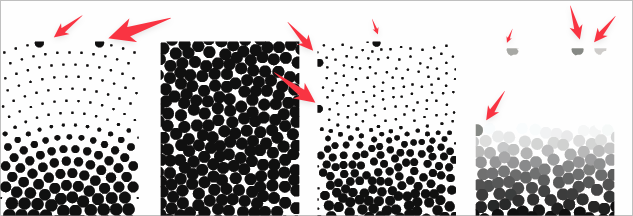
      On a different note: Are these random spots just anomalies? or is there a way to avoid this kind of result?
      0_1738555528218_b96846e1-949d-4543-aea6-5c02810875a2-BLD 2025-02-02 at 23.04.26.png

      🍎 macOS Tahoe 26.2, Mac mini (M1, 2020), Chip Apple M1, Memory 16 GB
      Cintiq 27QHD Display and LG Ultra HD Display

      VectorStylerV 1 Reply Last reply Reply Quote 1
      • VectorStylerV Offline
        VectorStyler @Boldline
        last edited by

        @Boldline It should update the gradient: https://share.cleanshot.com/yD4BjBNT

        Maybe in your example the change is too small to be visible.

        I will try to fix the large spots at the edge problem.

        1 Reply Last reply Reply Quote 1
        • BoldlineB Offline
          Boldline
          last edited by

          ok it works here to adjust the repeater with the gradient panel on the fly. Sounds like my original test was too small for me to see, as you mentioned - thanks for showing me

          🍎 macOS Tahoe 26.2, Mac mini (M1, 2020), Chip Apple M1, Memory 16 GB
          Cintiq 27QHD Display and LG Ultra HD Display

          1 Reply Last reply Reply Quote 1
          • BoldlineB Offline
            Boldline
            last edited by

            Do you have a thought about this part?
            The original gradient is on the far left and the different styles inside repeater were applied to it.
            I just realized I forgot to edit the numbers for halftone 2 and halftone 3 respectively... in the image
            I corrected it here
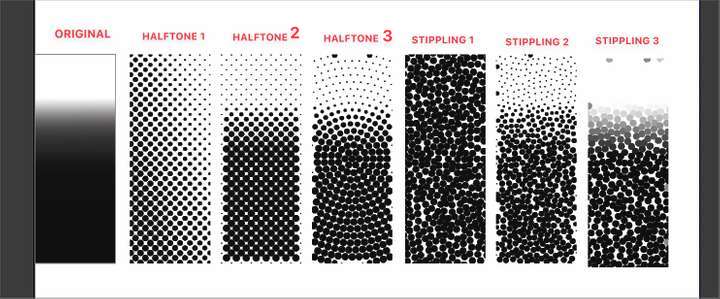
            0_1738561548175_ec8e9e43-30b5-4877-bf49-369c10bb9f83-BLD 2025-02-03 at 00.44.19.png

            It seems odd to me that halftone 1 does not resemble the original halftone it was based upon - but halftone 2 and halftone 3 do resemble it.

            in a similar way, stippling 1 does not resemble the original halftone it was supposed to be based on... stippling 2 is closer but still has a lot of larger dots at the top and stippling 3 seems more accurate

            🍎 macOS Tahoe 26.2, Mac mini (M1, 2020), Chip Apple M1, Memory 16 GB
            Cintiq 27QHD Display and LG Ultra HD Display

            VectorStylerV 1 Reply Last reply Reply Quote 1
            • VectorStylerV Offline
              VectorStyler @Boldline
              last edited by

              @Boldline I will test these presets.

              1 Reply Last reply Reply Quote 1
              • First post
                Last post
