Bezigon Tool
-
Hello! I'm returning again to VS to a much more smoother experience, and I am really happy. I'd like to make a feature request, which will make a substantial difference to the use of pen tool. The bezigon tool. The bezigon tool is one of the oldest pen tool modes, available in Freehand, and killed by Adobe. It is one of the easiest ways to draw smooth curves. It is a lot more intelligent than the cubic bezier (the normal pen mode in most software including VS). Please could you add it as a part of VS, and I'll be forever grateful. Only Gravit Designer has it, and Corel is in the process of killing it. Here is the video: https://www.youtube.com/watch?v=ofV0rnZT3lI of how it works.
Here is the freely available code: https://github.com/alvarogonzalezferrer/bezigon_cpp. I'm not a programmer but I reckon there must be something in here that can be reused. Please consider it.
It will make life for logo designers and illustrators so much more easier. Alongside spiro path, which is already requested, the pen tool will become unmatched!
Work: Windows 11 | Intel i9 14900HS (24 Cores/32 Threads) | GeForce RTX 4070 | 64 GB RAM
Personal: Windows 11 | Amd Ryzen 9 7950X (16 Core, 32 Threads) | GeForce RTX 3060 | 32 GB RAM -
@Daniel @VectorStyler I agree this would be a terrific addition to VS. I could see it being very useful when creating flourishes and also for designing letters for a font
-
@Daniel I will add this to the backlog.
-
Thank you very much. Hopefully, we can have Bezigon before V2.
 It is one of the main reasons I keep Freehand still installed on my PC.
 -
@Daniel @VectorStyler is this the same tool as the bezigon tool? Or close? https://www.instagram.com/reel/DHEbh9azL9C/?igsh=czRlMG9ucXhsY3dt
-
@Boldline: No. That is not the Bezigon tool. Here's the Bezigon tool: https://www.youtube.com/watch?v=WxUwPI_V1rk. Even within Gravit Designer, it is still too clumsy. Because you have to select the mode within the Bezigon tool. Just why?! Freehand has the best and simplest implementation.
If you merely click-click-click, you create straight line curves. But if you click-(click-drag)-click this creates two straight lines closed by a smooth curved segment. <) - like this. If you (click-drag)-(click-drag)-click, this creates a smooth curve with one cusped node. It is extremely simple.
Illustrator's implementation combines arc spline tool and polygonal segments - you can see that the consecutive curves are semi-circles. This is NOT Bezigon. Bezigon simply combines Bezier (as opposed to Spline) and Polygonal curves. There's some mathematical averaging going-on, I reckon. But I'm out of depth here.
Notice that whatever that tool is called in Illustrator also comes with additional contextual menu to choose the next segment. PLEASE can we not do that - Illustrator is singlehandedly responsible for enshittifying the whole trajectory of design software UI. You don't need contextual menus when you can change behaviour through modifiers and mouse clicks, or a combination of two. Aim for economy. Not brute power.
-
Adding further commentary to this after trying out the Quick Pen Tool in Illustrator.
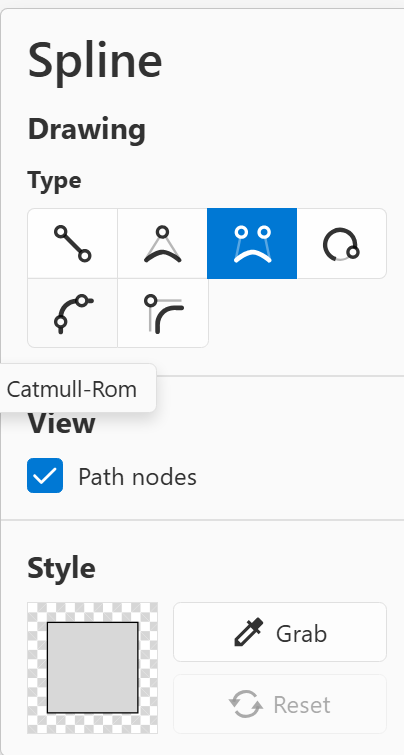
This is, like I've said in my earlier comment, a simple combination arc spline and polygonal segments. This is a useful addition, but does not warrant a separate tool. It is a pen tool mode. See Boxy SVG, which, of all the software out there, correctly categories it as one of the Splines. You have Quad Bezier, Cubic Bezier, Basis, Polygonal. The single most interesting mode of pen tool is catmull rom, which is used extensively in animation. Again, too out of depth to explain the mathematics of this.
In case you didn't realise, Catmull Rom is implemented in a modified form within Affinity Designer. It's the smart pen mode.
If @VectorStyler you want a perfect, simplified, intuitive view of how to create spline modes, please study Boxy SVG's free, web interface. It is a designer's dream come true. Notice the wonderful curve segment highlight you get when you hover over the curve, showing which part of the curve you're about manipulate. When you're dealing with complex curves (such as in fonts), this is useful to have as visual feedback. Notice also the Boxy SVG correctly and logically merges the Spline Tool and node-manipulation function. The only other software to do this is Xara Designer.
Now coming to Quick Pen Tool in illustrator. What does it actually do? It combines Arc Spline and Straight Line Splines, simple as that. Every consecutive segment you draw can either be a full circular arc, or, if you make a switch in the contextual menu, a straight line.
How is it different from Bezigon? Bezigon Tool combines Quad Bezier and Cubic Bezier with Polygonal Segments. This means that where you now click drag to create smooth curves, in Bezigon, this is achieved automatically.
In FreeHand, if remember correctly, if you simply click, you get straight lines. You hold down Alt and click, you get an averaged curve that connects two points, which is intelligently smooth. You don't need to change anything. Hope this adds more insight and help you get this right.
I would love for Boxy SVG/Xara's simplicity and logical coherence in VS, too.
-
@Daniel I added this to the backlog and will review if can be done by 1.3
-
Thank you so much! That would be amazing.
-
Further to our conversation on email, I agree with you @VectorStyler: the pen tool has actually made giant leaps over both Illy and Affinity Designer. Just a note. No need for response.
-
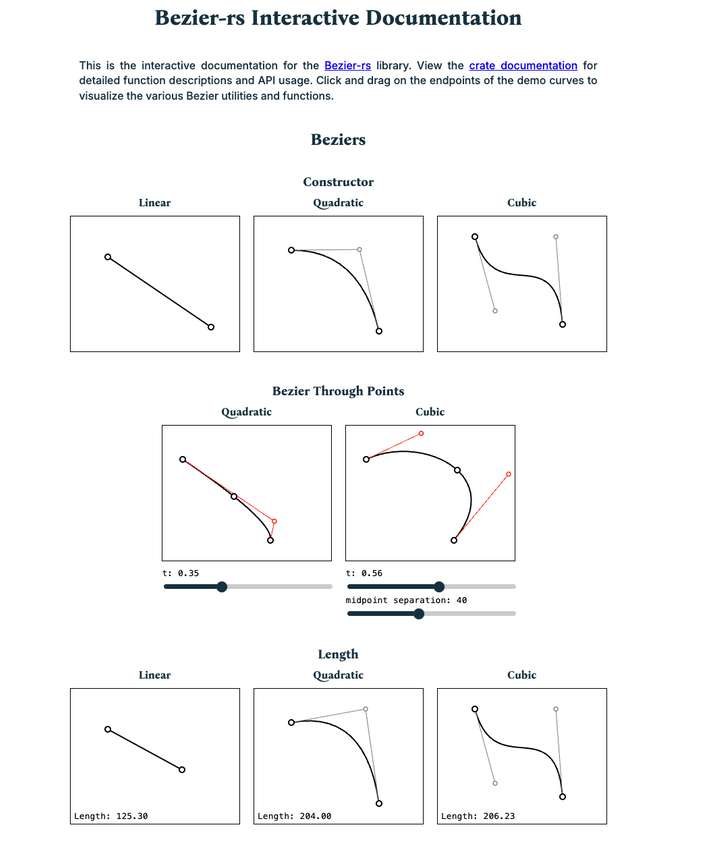
@Daniel @VectorStyler I found this website called, "Bezier-rs Interactive Documentation" today as part of the fast developing online open source graphite app. I love that it's interactive and explains through its ability to interact with. I thought you might appreciate it. Graphite has a lot of nice features that are worth checking out.
-
Now, we have a working Bezigon tool! Which is brilliant. Thank you @VectorStyler. I didn't want to split this conversation into multiple threads. Immediately upon using it, a number of things came to mind. But it is best illustrated with a gif.
Notice the difference between the Bezigon in FreeHand and Bezigon in VS.
https://imgbox.com/UCBeQoh3 - In the link there are two different gifs. So please click next to see the second gif too.
I might be missing something here, so please let me know if I am doing something wrong. Once again, thank you!
I also wanted to note that we need the concept of tangential node as a part of this tool. Tangential node essentially snaps the node handle parallel to the node. I can record a gif for this later.
This is an improvement that you can implement as a part of the node tool so that tangential nodes are available across all curve-making tools.
EDIT:
I think I know what's going on:
In FreeHand: Simple Click --> Cusp Node. Alt Click --> Smooth Node. So if I start like this:
Simple Click --> . Alt Click --> Smooth node. Simple Click --> This creates a perfect semi-circular curve. This is because the last simple click, makes the previous node perfectly symmetrical. I can do the same on the other side and create a perfect circle.
In VS, the behaviour seems slightly different. Wondering what I am missing.
-
@Daniel I added this to the backlog and will try to improve it.
-
My vociferous campaigning to get this tool into more apps has paid off in one more place: PhotoLine now has Bezigon as a subfunction of the curve creation tool!


