VectorStyler
    • Categories
    • Unread
    • Recent
    • Tags
    • Popular
    • Register
    • Login

    How to hide outline stroke segments?
    Scheduled Pinned Locked Moved Questions and Support
    5 Posts 2 Posters 4.3k Views 2 Watching
    Loading More Posts
    • Oldest to Newest
    • Newest to Oldest
    • Most Votes
    Reply
    • Reply as topic
    Log in to reply
    This topic has been deleted. Only users with topic management privileges can see it.
    • RaaskotR Offline
      Raaskot
      last edited by Raaskot

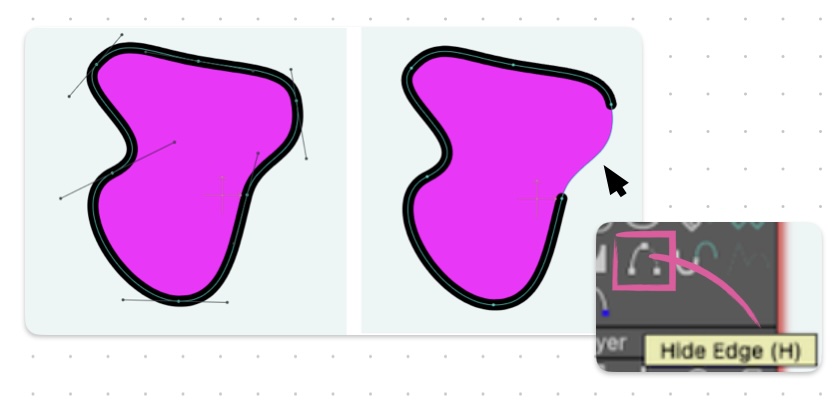
      In VS I very often miss an option to hide outline stroke segments. This make the fill more controlled in "open" shapes. I use VS together with Moho where I can hide strokes.

      Is there an alternative way but similar function i VS?
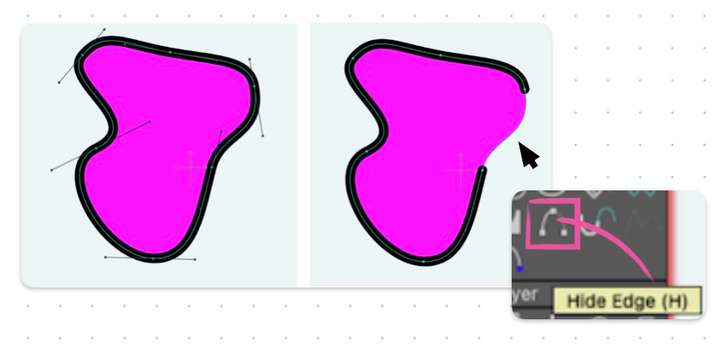
      0_1742555286423_6c9f9adc-78d5-49e7-8639-d0ba11000419-hide-edge.jpg Hide-edge in Moho

      VectorStylerV 1 Reply Last reply Reply Quote 0
      • VectorStylerV Offline
        VectorStyler @Raaskot
        last edited by

        @Raaskot said in How to hide outline stroke segments?:

        Is there an alternative way but similar function i VS?

        No such feature in VS.

        RaaskotR 1 Reply Last reply Reply Quote 1
        • RaaskotR Offline
          Raaskot @VectorStyler
          last edited by Raaskot

          @VectorStyler
          Neither such feature in Adobe Illustrator. Just a humble request: VS node editing will appear (even) more advanced compared to AI if so and very useful in the drawing proces.

          Please consider the feature in VS amongst ie. the node-tools.

          0_1742557954512_cd989b60-ced0-45b1-80e4-769f454ac8a7-image.png

          VectorStylerV 1 Reply Last reply Reply Quote 1
          • VectorStylerV Offline
            VectorStyler @Raaskot
            last edited by

            @Raaskot I added this to the backlog, but for 1.3 only.
            The feature might be different from what is in Moho.

            What I plan is a "shape effect" (accessible as an effect) that can cut out one or more sections from paths. These sections will be selected with the mouse.

            Then in order to achieve the above effect for the stroke only, you will need to add this shape effect in the Appearance panel to the stroke.

            This approach minimizes the effort / impact (shape effects are plugins).

            RaaskotR 1 Reply Last reply Reply Quote 1
            • RaaskotR Offline
              Raaskot @VectorStyler
              last edited by

              @VectorStyler
              Cool! Thanks 😊

              1 Reply Last reply Reply Quote 0
              • First post
                Last post
