XLS for features and ideas - Megathread
-
@Daniel This looks very good!
I have to check the single node duplication (with Alt+drag).
Currently, in VS if you have 2 nodes selected Alt+Drag will extract and duplicate the path between the two nodes. -
Thanks, and no problem. I will keep adding to this list and let you know when I do. Meanwhile, I'll continue working on the UI mock-up to show you what I mean. I recommend getting access to some of the software I've listed on there. Please don't waste money buying licenses. I usually have spare licenses for most tools. Just let DM me and let me know which tool you'd like to access and I can add you to my account or send license.

Let's kick some Adobe arse!
-
@VectorStyler 0_1742492855789_VS UI.pdf : Here is the mock UI. It suggests a number of improvements.
Curved edges for panels to visually separate items.
Curved corner so that panels don't completely merge into each other - another degree of visual separation.
Dockable horizontal panels with labels. These should be customisable. I'm talking about this one:

Accordion menu style toolbox (this can be added as a toolbox style, if users don't want to lose the traditional style)
Permanently present list of FX. This list does not distinguish between shape and image effects. This list can also be customised with custom categories. The default categories should be deleted if needed.
Menu items with icons and category
Properties panel that provides a tree view of object properties.
Clicking on each attribute, changes the tool settings underneath. Where there are multiple degrees of options for a given tool, they appear as buttons. See FH for this.
Slight bevel on main menu labels.
All text fields are fully white for instant recognition.
Should you resize panels, the labels lose vowels and become consonants only.
You should also be able appear-on-hover option for collapsed panels.
Instead of panels becoming just icons as it is now when collapsed, it's useful to have labels and icons.
You should be able to allow exceptions for certain panels to stay on screen when hiding all panels. This is the lock icon. Toggled on means, it always stays fully open at all times.
Those are the ideas for UI in broad brush strokes, to globally improve navigation. I want to spend some time over the weekend and do the Properties panel and show you what I'm specifically looking for.
I also think you should have a simple toggle to switch to light UI right on the screen without the need for restarting the program or going into program properties. This is invaluable!
The idea is to reduce the number of times people to click and access menus. Keep things completely visible without the need for too many panels. At the same time, I've also tried to reduce the implicit flatness of modern design by use of subtle bevels and curvature. Credit where it's due. None of these ideas are original: They come from.
Xara Designer Pro
FreeHand
PhotoLine
PhotoDemon
PhotoScape
Inkscape
Zoner Photo
Paintstorm Studio
Gimp
Scribus
Maxon Cinema4D
Corel Draw
and others. -
"Export again" or "Continuous Export" added as a possible feature. Exists in FreeHand and Affinity. I haven't checked if it exists in VS. If it does, ignore.
-
export again exist and even an incremental export
-
@Daniel said in XLS for features and ideas:
"Continuous Export" added as a possible feature
Continuous Export might slow things down.
-
@VectorStyler: Continuous export is just another instance of Affinity's confusing UX copy. They of course mean Export Again.
They replaced Mode with Persona, too. It's one of the wierdest things I've known. How much clearer to simply call it Vector Draw Mode, Photo Edit Mode, and DTP Mode.
I also think Affinity is just a single software. And they split it into three for commercialising it. If you knew DrawPlus by Serif, you'll see that it had the photo edit studio built into it. In fact, if you knew the old Plus line of software, you'll know that Serif has not innovated, at all. Instead, they've repackaged their old suite, and actually stripped back some vital functions.
-
@Daniel said in XLS for features and ideas:
They of course mean Export Again.
One thing with the Export Again in VectorStyler: the last export settings are saved with the file, and Export Again works also when later reopening the file.
-
This post is deleted! -
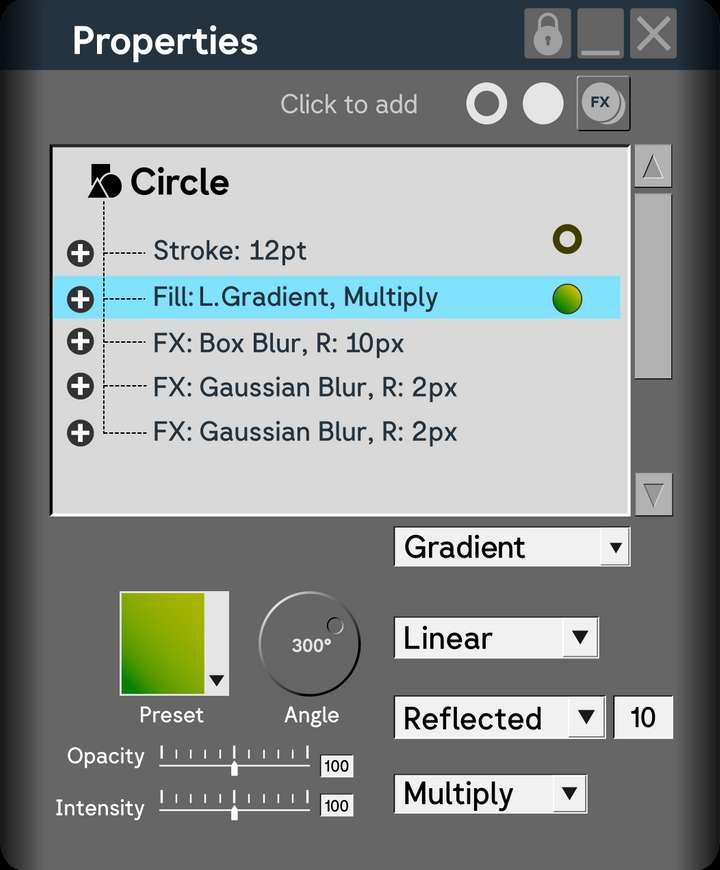
There's the properties panel I had in mind. A completely contextual panel that brings together attributes and their corresponding settings in one place. All dropdowns to a side. All tactile controls to another. Easy to add, remove and change. How would it work for complex effects? Such as curves? Based on where it is docked, the curves adjustment panel appear on right or left. It is a completely workable solution for literally every single situation. Please consider it.
It would make navigation in VS a dream.Now in VS, if I want to apply effect, I have choose from an extensive list. Instead, have an ever-present, iconised, customisable list of effects screen. Like any other tool. Select the object, click on the effect. Or select the effect, click on the object. Make changes in the properties panel. Close. Don't like it? Click on the FX in the tree, and you instantly have the properties open. Or select the effect in the list, and click on the object, properties open.
To get a feel for what I mean, please, please try using Xara and see how instant, intuitive and tactile the experience is. I also think VS should ditch the flat look, and tap into some of the old, tactile feeling bevels and interactive controls.
The tree view, uniquely will let you turn-off stroke and fill if you include the eye icon in the panel. Imagine adding a series of fills to a single object and turning them on and off like FX?!
I further have feedback about the on-canvas interactive controls themselves. They can be far more unintrusive and direct. Again, refer Xara for this.
I don't know how much refactoring this would involve. Perhaps, it is not worth it. But I dream. Thanks for all your work @VectorStyler!
P.S.: I think the Properties Panel in VS already has the fundamental blocks of it.
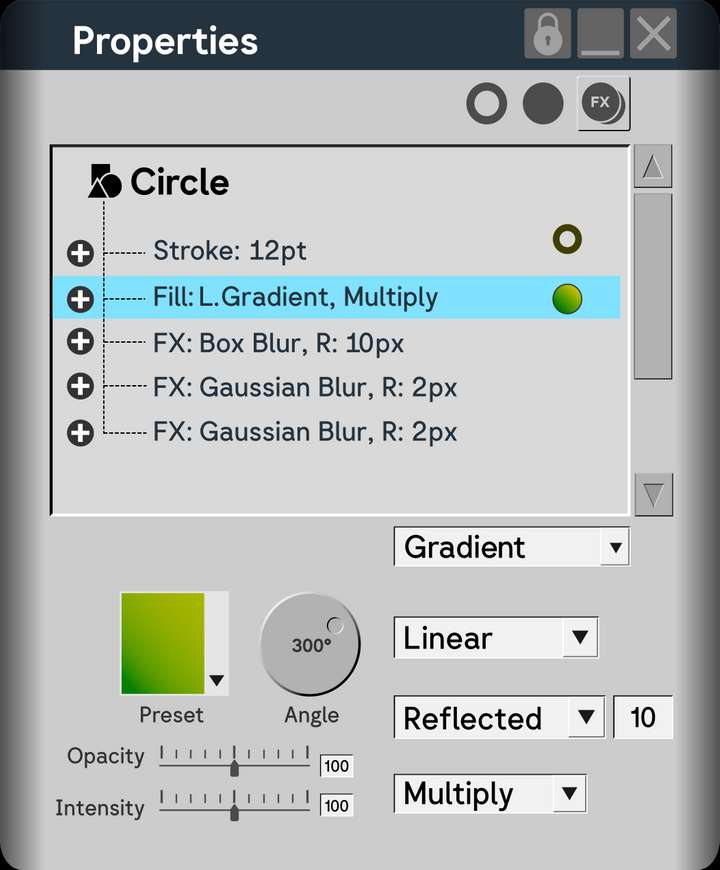
P.P.S: Take further note how easily the whole thing translates to Light mode, thanks to the bevels:
A final sneak in of idea that you might miss: 100% opacity shouldn't be the maximum possible. The opacity range can and should go from -200 to +200%. This opens up marvelous possibilites when working with blend modes. For proof of concept, see PhotoLine.
-
@Daniel I have been thinking of some improvement to the Properties panel.
In VS, all these things (effects, panels, interactive editors) are plugins, so there is not much refactoring required.
From the design I understand that this looks to be an enhanced Appearance panel, with the selected item properties editable at the lower part of the panel.
The main issue is, what effects to pick for special treatment. When pressing the FX button, what effects would be listed?
Also, it would be difficult to mix shape and image effects. When having multiple image effects, the order defines the final effect. Same for shape effects. But there is no order between shape and image effects as a combined list.
I further have feedback about the on-canvas interactive controls themselves. They can be far more unintrusive and direct
Let me know about this.
-
@Daniel said in XLS for features and ideas - Mega Thread:
100% opacity shouldn't be the maximum possible
I have known about this in Photoline. This is a great feature, but it is a bit difficult to use it.
I think this is doable. -
@VectorStyler: That's a good question about what to list: Two solutions:
-
Either completely remove the FX button and just retain stroke and fill because as I said FX should be a non-modal, dockable, panel. See the pdf I attached previously. (There should also be an option to completely delete the branch.)
-
Allow customisation of the list that shows up when clicking FX. For my workflow, I would need even for the most complex projects only the following: 4 point and mesh warp, inner, outer shadow and glow, box and gaussian blur, noise, bevel, contour, blend, and extrude. That's it. That's a 10 item list. Others might want to add more to this list.
I will do the panel for a large image effect like curves adjustment and show how the panel can double up.
What do you mean by it would be difficult to combine shape and image effects?
I understand the final effect depends on the order of effects. This can be defined and factored at the branch level. The branch I've drawn is merely a placeholder and does not accurately reflect how effects will actually appear in a design program.
An extra aside:
- FX ought to behave like any other tool. Principle Even: Make different tools behave similarly to decrease cognitive load. What I mean is this. Say I have the curves adjustment panel open. I click on image, apply adjustments. Now, without closing the curves panel, I should be allowed to simply click on a second object, and apply curves a second time. In other words, FX should behave exactly like say, the colour editor. Please check Xara for what I mean.
Interactive control: The controls in VS are not intuitive. The large circles with controls are intrusive. Imagine this scenario. Say, I want to change the bevels of multiple objects. How would do it? They might not all have the same bevel size. Instead of the large, intrusive circles, they should be arrows (as in Xara) or a change in cursor (as in FH and Affinity).
-
-
@VectorStyler: It's difficult to use only for certain things. But in PL, you can create powerful liquify layers and set their opacity to more than 100% and create incredible distortions that would be otherwise impossible. It's also useful for certain blend modes.
-
@Daniel said in XLS for features and ideas - Mega Thread:
powerful liquify layers and set their opacity to more than 100%
I have to test this more. I hope it works at individual pixel level.
-
Out of curiosity, could you tell me what the benefit
of an opacity of -200 to +200 % is?
i did not know what thats good for and I can't imagine what it means. -
@Subpath: what it essentially does is to change the interaction of blend modes and gives you greater control. In some FX, for instance blurs, it lets you invert the blur by setting it to negative opacity and produce sharpening for specific areas of the image, combined with masking.
In photo editing, negative opacities are useful for producing sharpening effects too. In liquify layers, it allows you to create very fine displacements. These are just some of the ways I use it.
The potential is endless. PL is a vastly superior program compared to PS. Consider for instance that entire portable app is just 70 odd MB. But the trade off in flexibility is somewhat less user friendly experience.
-
@Daniel said in XLS for features and ideas - Mega Thread:
negative
I also think gradients should have an intensity slider alongside opacity. Opacity controls the transparency of individual stop. Intensity controls the transparency of the gradient as whole. This is completely independent of layer opacity.
So there are three levels of transparency: stop transparency, gradient opacity, layer opacity.
-
@Subpath @VectorStyler: https://imgur.com/a/9b5I2DS - Here's just a very simple example. The liquify layer can have overset opacity. Invert the liquify effect in both directions. +/- 100. Not only can you liquify it this way, you can even nest liquify layers into liquify layers. This is just one example how over setting opacity helps.
-
@Daniel, thank you
I feel a little more enlightened



