VectorStyler
    • Categories
    • Unread
    • Recent
    • Tags
    • Popular
    • Register
    • Login

    What tools are efficient for drawing curves In one step?

    Scheduled Pinned Locked Moved General Discussion
    25 Posts 5 Posters 38.0k Views 4 Watching
    Loading More Posts
    • Oldest to Newest
    • Newest to Oldest
    • Most Votes
    Reply
    • Reply as topic
    Log in to reply
    This topic has been deleted. Only users with topic management privileges can see it.
    • DanielD Offline
      Daniel
      last edited by

      There's one missing here: Catmull Rom. Which is one of the ways in which splines are averaged. It's a very intuitive way to draw complex curves. It is not a Bezier spline. You can try it in Boxy SVG if you want.

      Work: Windows 11 | Intel i9 14900HS (24 Cores/32 Threads) | GeForce RTX 4070 | 64 GB RAM
      Personal: Windows 11 | Amd Ryzen 9 7950X (16 Core, 32 Threads) | GeForce RTX 3060 | 32 GB RAM

      1 Reply Last reply Reply Quote 2
      • VectorStylerV Offline
        VectorStyler @lilith
        last edited by

        @lilith None of those tools from the are available yet in VS.

        L 1 Reply Last reply Reply Quote 0
        • L Offline
          lilith @VectorStyler
          last edited by

          @VectorStyler said in What tools are efficient for drawing curves In one step?:

          @lilith None of those tools from the are available yet in VS.

          Which are on the roadmap

          1 Reply Last reply Reply Quote 0
          • L Offline
            lilith @lilith
            last edited by lilith

            @lilith Although I don't understand these mathematical formulas either, they may be helpful to some smart people
            Splines in 5 minutes: Part 1 -- cubic curves:https://youtu.be/YMl25iCCRew?
            Splines in 5 Minutes: Part 2 -- Catmull-Rom and Natural Cubic Splines:https://youtu.be/DLsqkWV6Cag?
            Splines in 5 minutes: Part 3 -- B-splines and 2D: https://youtu.be/JwN43QAlF50?
            The Beauty of Bézier Curves:https://youtu.be/aVwxzDHniEw?
            The Continuity of Splines:https://youtu.be/jvPPXbo87ds?
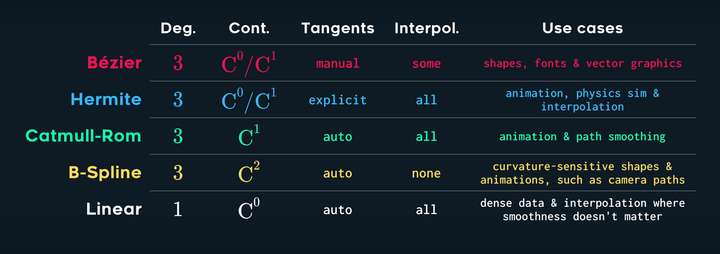
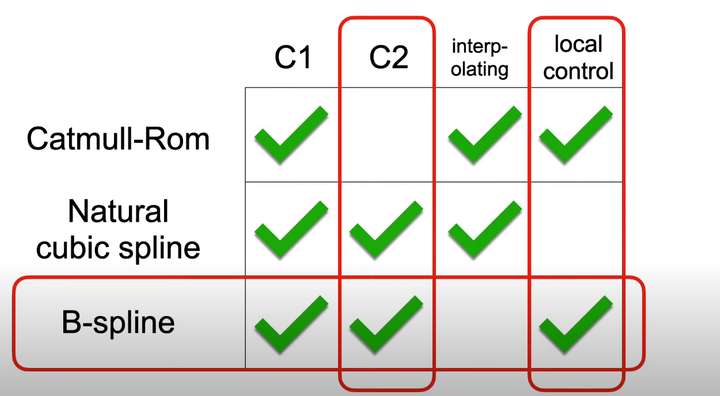
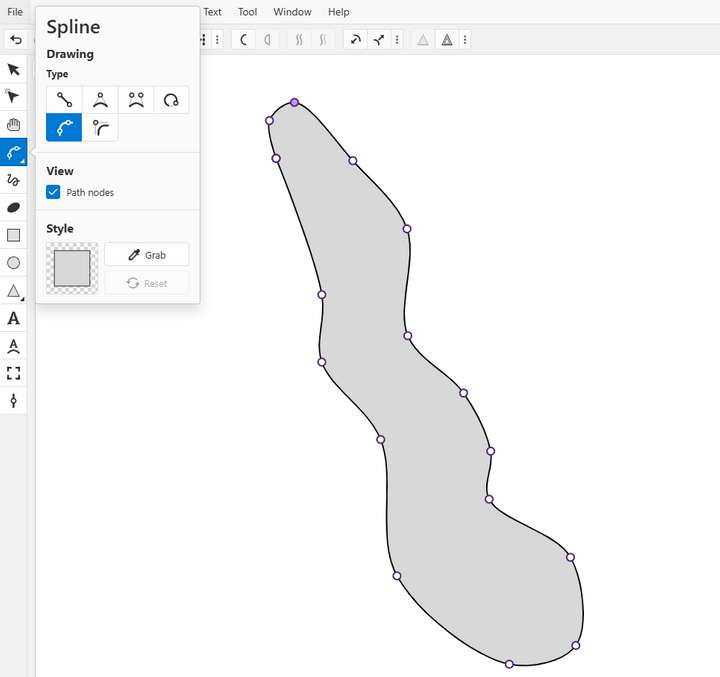
            0_1743051054610_Snipaste_2025-03-27_12-39-45.png
            0_1743051061692_Snipaste_2025-03-27_12-41-05.png

            1 Reply Last reply Reply Quote 1
            • DanielD Offline
              Daniel
              last edited by Daniel

              Splines:
              Arc - Useful for continuous, flowing, circular segments.
              Quad bezier - Has three points, start, end, control point: Useful for a series of smooth, but not necessarily circular segments.
              Cubic bezier - Has two points, start and end, and four control handles, 2 each. The so called "pen tool".
              Catmull Rom - Has no handles. A series of nodes, averaged automatically based on the preceding node.
              Polygonal - Simple straight line curves with sharp corner points.

              Not really a spline, but a way of drawing splines:
              Bezigon tool - Combines bezier and polygonal segments in an intelligent and inutive way. Combines three kinds of nodes, corner, tangential and smooth nodes. Series of corner nodes produces straight line segments. Series of smooth nodes produces smooth segments, with control handles automatically balanced to create a smooth curve. Series of tangential nodes really produces straight line segments.

              Corner, smooth, tangent and corner produces - a Semicircle joined to a straightline smoothly.

              Verdict: Bezigon is the most efficient, intelligent for drawing smooth curves easily. By efficiency I mean, the least number of nodes.

              Work: Windows 11 | Intel i9 14900HS (24 Cores/32 Threads) | GeForce RTX 4070 | 64 GB RAM
              Personal: Windows 11 | Amd Ryzen 9 7950X (16 Core, 32 Threads) | GeForce RTX 3060 | 32 GB RAM

              L F 3 Replies Last reply Reply Quote 2
              • L Offline
                lilith @lilith
                last edited by lilith

                @lilith well, thank you for Daniel his reminder. You can try to use Catmull Rom splines it for free here:
                https://boxy-svg.com/app
                https://boxy-svg.com/ideas/244/catmull-rom-splines
                https://boxy-svg.com/blog/17/catmull-rom-and-basis-splines
                Conversion Between Cubic Bezier Curves and Catmull–Rom Splines:
                https://link.springer.com/article/10.1007/s42979-021-00770-x

                DanielD 1 Reply Last reply Reply Quote 2
                • DanielD Offline
                  Daniel
                  last edited by

                  0_1742994139673_bf066255-f1ed-41f2-bb0c-38f01b378ae6-image.png

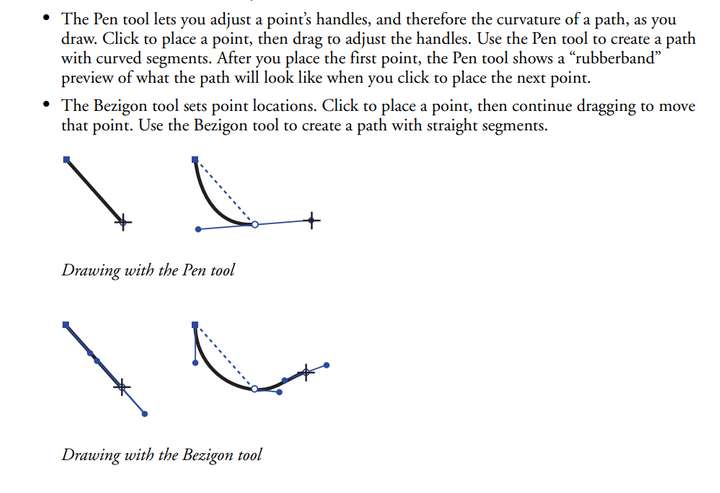
                  Found this from the old FreeHand manual. Can you believe I still have it!

                  Anyway, that shows you clearly what's happening. The handles of the previous are balanced based on the location of the next node. Thus creating smooth curves easily.

                  Work: Windows 11 | Intel i9 14900HS (24 Cores/32 Threads) | GeForce RTX 4070 | 64 GB RAM
                  Personal: Windows 11 | Amd Ryzen 9 7950X (16 Core, 32 Threads) | GeForce RTX 3060 | 32 GB RAM

                  1 Reply Last reply Reply Quote 0
                  • DanielD Offline
                    Daniel @lilith
                    last edited by

                    @lilith: 0_1742994329853_ee8966f0-140b-4715-9586-92831f9c9423-image.png

                    Catmull Rom is indeed very, very intuitive. If it were up to me, I'd just add CR and Bezigon as two modes. Between Cubic, Quad, CR and Bezigon, you need no other tool for drawing vector curves.

                    Work: Windows 11 | Intel i9 14900HS (24 Cores/32 Threads) | GeForce RTX 4070 | 64 GB RAM
                    Personal: Windows 11 | Amd Ryzen 9 7950X (16 Core, 32 Threads) | GeForce RTX 3060 | 32 GB RAM

                    1 Reply Last reply Reply Quote 2
                    • L Offline
                      lilith @Daniel
                      last edited by

                      This post is deleted!
                      1 Reply Last reply Reply Quote 0
                      • L Offline
                        lilith @Daniel
                        last edited by

                        @Daniel I still don't understand the difference between Adobe Illustrator Curvature and Catmull Rom, and what is the mathematical principle behind Adobe Illustrator Curvature?

                        DanielD L 2 Replies Last reply Reply Quote 0
                        • DanielD Offline
                          Daniel @lilith
                          last edited by

                          @lilith: Curvature and Catmull Rom have nothing to do with each other. Curvature tool is a simple combination of bezier and polgyonal segment. Catmull Rom is a way of drawing splines. Two things here: One is a tool, the other is a spline (involving it's own maths).

                          I'm out of depth to explain the maths to you. As far as I can I understand as a non-technical person, Catmull Rom simply and very usefully by interpolating nodes smoothly.

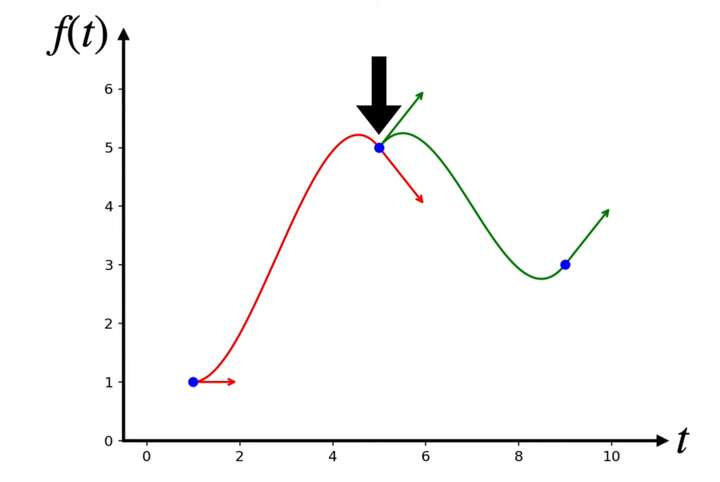
                          This is what happens when tangents don't match. You get a cusp node.
                          0_1743007366181_fd06ecc8-43f0-4bbc-90ae-b1b263560ba9-image.png

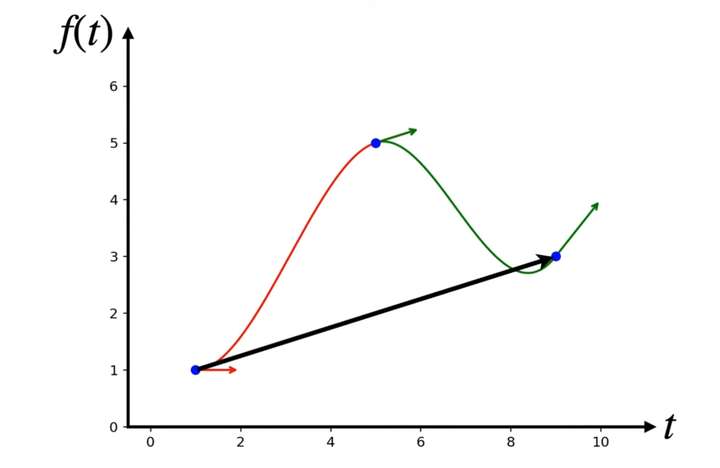
                          With Catmull Rom equation, the tangents are smoothed out automatically without you having to do anything like in Bezier splines. Like this.
                          0_1743007489473_8969fbbe-5baf-4a1b-ba31-1b10f1ba918c-image.png

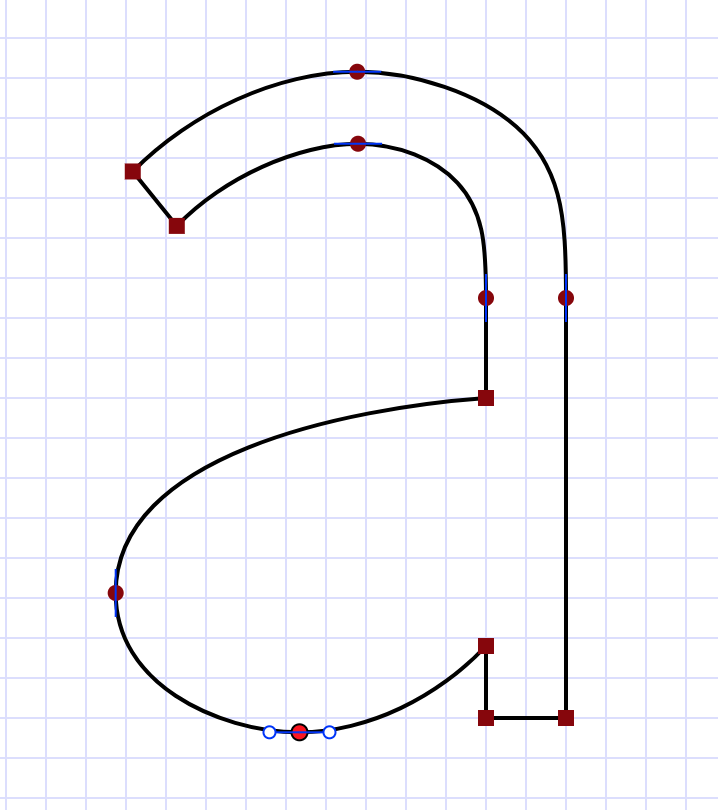
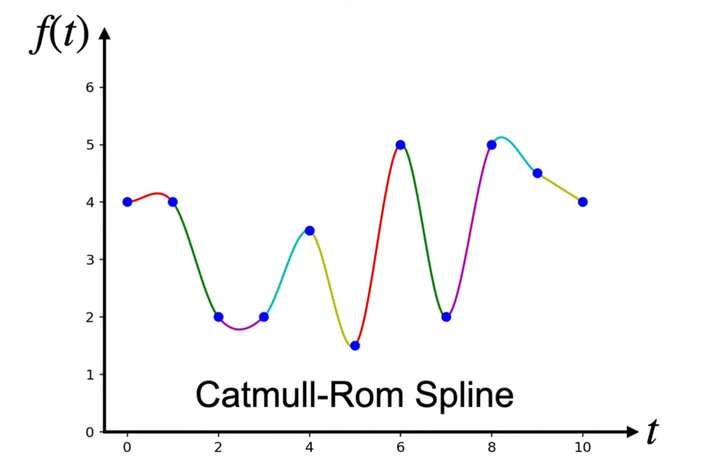
                          You can now continuously and seamlessly join as many segments as you want and the nodes will ALWAYS be smoothly joined without cusp nodes or knots. That tells you what is for and what it is NOT for. It is FOR tracing complex, organic shapes. It is NOT for tracing simple geometric shapes. That's why I've been asking (campaigning) for Bezigon, which is a different TOOL, specifically meant for technical drawing (FreeHand excels here). Technical drawings as well typeface design both rely on geometric shapes. With Catmull Rom, you get this:
                          0_1743007700499_d16d4129-c430-497b-a498-e26509a502a1-image.png

                          Historical aside: Illustrator is NOT the first commercially available vector program that made Bezier curve available to everyday users. Until then you had to spend hundreds of thousands of dollars to get fully capable vector software.

                          The first program was: Fontographer by Altsys, the parent company of FreeHand. Which was then sold to Aldus, then acquired by Macromedia, and murdered by Adobe. Fontographer introduced the concept of tangent, corner and smooth nodes. Suddenly, everyone could design typefaces. Thousands of typefaces were built on it.

                          Work: Windows 11 | Intel i9 14900HS (24 Cores/32 Threads) | GeForce RTX 4070 | 64 GB RAM
                          Personal: Windows 11 | Amd Ryzen 9 7950X (16 Core, 32 Threads) | GeForce RTX 3060 | 32 GB RAM

                          1 Reply Last reply Reply Quote 2
                          • DanielD Offline
                            Daniel
                            last edited by Daniel

                            Curvature tool combines simply coverts corner to smooth and smooth to corner nodes. That's it. That's all it is good for. You can't do much else with it. And it does so in a very unintelligent way, hence it's appeal to beginners in vector. No offense!

                            I'm a copywriter by trade, and had to learn vector design from a designer. And she illustrated to me how Curvature Tool reverses the logic of Bezier pen tool and makes it easy for people to imagine the next steps. Essentially, you place your next nodes for simple, smooth segments at the "next 45 degree point". You draw straightlines between all these 45 degree points and then click to convert the nodes. That's it.

                            In bezier pen tool, you do the same, but you drag the point to balance the handles. https://bezier.method.ac - this is where I finally got it.

                            Work: Windows 11 | Intel i9 14900HS (24 Cores/32 Threads) | GeForce RTX 4070 | 64 GB RAM
                            Personal: Windows 11 | Amd Ryzen 9 7950X (16 Core, 32 Threads) | GeForce RTX 3060 | 32 GB RAM

                            1 Reply Last reply Reply Quote 1
                            • S Offline
                              Subpath
                              last edited by Subpath

                              @Daniel , @lilith

                              And for anyone interested: I posted a video in the forum a while ago,
                              which I'm not sure if it's helpful here. But it's beautiful to watch.
                              It's called "The Beauty of Splines." Where some concepts are shown

                              Here's the video.

                              Win 11
                              CPU: AMD Ryzen 5 9600X, 6-core.
                              GPU: Nvidia Geforce RTX 5070.

                              DanielD L 2 Replies Last reply Reply Quote 3
                              • DanielD Offline
                                Daniel @Subpath
                                last edited by Daniel

                                @Subpath: it is beautiful. Thank you. The idea of smooth curves is so ancient. As in literally thousands of years old. If you'd like to see fascinating study of how curves were used across cultures, get a used copy of Designa by Wooden Books. And get Helicon to go with it.

                                https://woodenbooks.com/index.php?id_product=203&controller=product

                                Every page is packed with information.

                                Work: Windows 11 | Intel i9 14900HS (24 Cores/32 Threads) | GeForce RTX 4070 | 64 GB RAM
                                Personal: Windows 11 | Amd Ryzen 9 7950X (16 Core, 32 Threads) | GeForce RTX 3060 | 32 GB RAM

                                1 Reply Last reply Reply Quote 1
                                • L Offline
                                  lilith @lilith
                                  last edited by

                                  @lilith Adobe Illustrator Curvature mathematical principle(maybe):
                                  https://people.engr.tamu.edu/schaefer/research/kcurves.pdf

                                  L 1 Reply Last reply Reply Quote 0
                                  • L Offline
                                    lilith @lilith
                                    last edited by

                                    @lilith A new spline:
                                    https://raphlinus.github.io/curves/2018/12/21/new-spline.html
                                    https://github.com/raphlinus/spiro
                                    https://github.com/raphlinus/spline-research
                                    alt text

                                    1 Reply Last reply Reply Quote 1
                                    • L Offline
                                      lilith @Subpath
                                      last edited by lilith

                                      @Subpath @VectorStyler look this :https://raphlinus.github.io/curves/2018/12/21/new-spline.html
                                      try it :https://spline.technology/demo/

                                      S 1 Reply Last reply Reply Quote 1
                                      • S Offline
                                        Subpath @lilith
                                        last edited by

                                        @lilith

                                        Thanks, a great find. I like it and found it interesting
                                        to play with the demo. Seems like an easy way for
                                        nice curves.

                                        Win 11
                                        CPU: AMD Ryzen 5 9600X, 6-core.
                                        GPU: Nvidia Geforce RTX 5070.

                                        DanielD 1 Reply Last reply Reply Quote 1
                                        • DanielD Offline
                                          Daniel @Subpath
                                          last edited by Daniel

                                          @lilith that's the hyperbezier combining three types of splines.

                                          Work: Windows 11 | Intel i9 14900HS (24 Cores/32 Threads) | GeForce RTX 4070 | 64 GB RAM
                                          Personal: Windows 11 | Amd Ryzen 9 7950X (16 Core, 32 Threads) | GeForce RTX 3060 | 32 GB RAM

                                          1 Reply Last reply Reply Quote 1
                                          • DanielD Offline
                                            Daniel
                                            last edited by

                                            @VectorStyler: Have you ever used something all your life before you suddenly realised how it actually works? And you feel stupid for never noticing? Well, I just had that moment. Xara's Shape Tool (the alternative to pen tool) is actually a modified Catmull Rom Spline! DOH!!! It has existed for 3 decades. The cubic bezier pen tool is cleverly and poorly hidden away within the button palette as a separate icon that you can pull into your interface. That's just stupid.


                                            Work: Windows 11 | Intel i9 14900HS (24 Cores/32 Threads) | GeForce RTX 4070 | 64 GB RAM
                                            Personal: Windows 11 | Amd Ryzen 9 7950X (16 Core, 32 Threads) | GeForce RTX 3060 | 32 GB RAM

                                            VectorStylerV 1 Reply Last reply Reply Quote 0
                                            • First post
                                              Last post