VectorStyler
    • Categories
    • Unread
    • Recent
    • Tags
    • Popular
    • Register
    • Login

    Improvements for "Replace Color" panel
    Scheduled Pinned Locked Moved Features and Ideas
    3 Posts 2 Posters 2.6k Views 1 Watching
    Loading More Posts
    • Oldest to Newest
    • Newest to Oldest
    • Most Votes
    Reply
    • Reply as topic
    Log in to reply
    This topic has been deleted. Only users with topic management privileges can see it.
    • BoldlineB Offline
      Boldline
      last edited by

      The "replace color" panel is really coming along. Using it today I saw a few things that might help it be more useful:

      If I hover over the current color, could it highlight that color in whatever color profile it is? Could a right-click copy the current color profile and a right click on the "new color" box offer the option to paste that saved color information? If not this option, maybe allow it with a modifier key ?

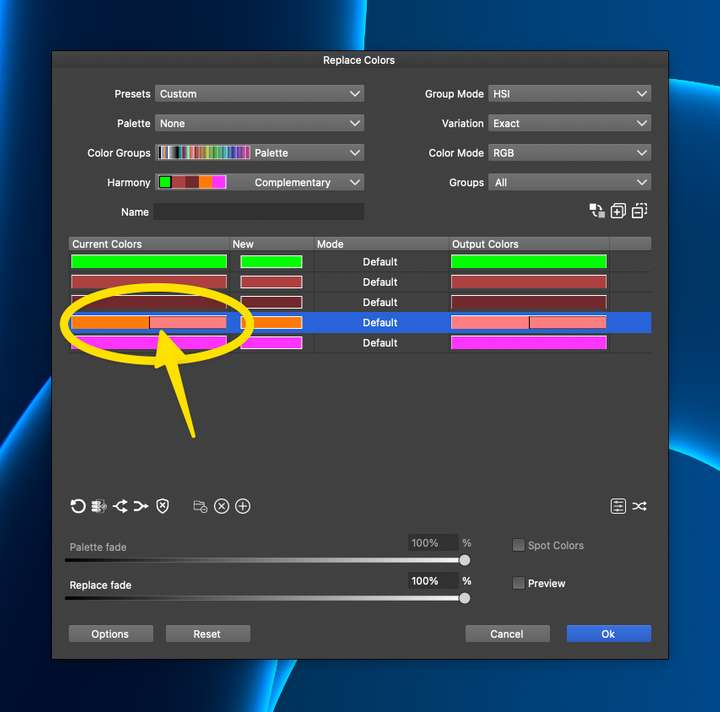
      Extrapolating on this topic - if I hover over a specific color in a grouping of colors like in the example below, could that info show in the hover? Could I also right-click or use a modifier key when clicking on it to have the option to copy the color profile of that specific color in the grouping?
      0_1743520670232_9faa2664-bf8e-4aff-b59f-245d03d3295b-CleanShot 2025-04-01 at 11.15.55.png

      🍎 macOS Tahoe 26.2, Mac mini (M1, 2020), Chip Apple M1, Memory 16 GB
      Cintiq 27QHD Display and LG Ultra HD Display

      VectorStylerV 1 Reply Last reply Reply Quote 1
      • VectorStylerV Offline
        VectorStyler @Boldline
        last edited by

        @Boldline Added to the feature backlog.

        1 Reply Last reply Reply Quote 1
        • BoldlineB Offline
          Boldline
          last edited by

          @VectorStyler thanks! Also, sometimes when I am selecting colors on the left side, VS does not always let me select them - they don't always get highlighted, I think in part because some might have multiple colors inside the grouping? Would it make sense to add a button on the left side of the colors that could be clicked on or off to highlight the color?


          🍎 macOS Tahoe 26.2, Mac mini (M1, 2020), Chip Apple M1, Memory 16 GB
          Cintiq 27QHD Display and LG Ultra HD Display

          1 Reply Last reply Reply Quote 0
          • First post
            Last post