VectorStyler
    • Categories
    • Unread
    • Recent
    • Tags
    • Popular
    • Register
    • Login

    update 1.2.067

    Scheduled Pinned Locked Moved Release notes of past builds
    15 Posts 4 Posters 8.3k Views 4 Watching
    Loading More Posts
    • Oldest to Newest
    • Newest to Oldest
    • Most Votes
    Reply
    • Reply as topic
    Log in to reply
    This topic has been deleted. Only users with topic management privileges can see it.
    • VectorStylerV Offline
      VectorStyler @Subpath
      last edited by

      @Subpath I recommend to remove and reinstall. Probably the MSI installer did not update all files correctly.

      S 1 Reply Last reply Reply Quote 0
      • S Offline
        Subpath @VectorStyler
        last edited by Subpath

        @VectorStyler said in update 1.2.067:

        @Subpath I recommend to remove and reinstall. Probably the MSI installer did not update all files correctly.

        Everything seems fine, its only that Version difference
        in the Start up screen.

        The About Panel is ok.

        Btw. if i would like to reinstall where can i download
        the latest Vectorstyler Version ?
        ( Edited: Found it at your HomePage > Releases )
        .
        .
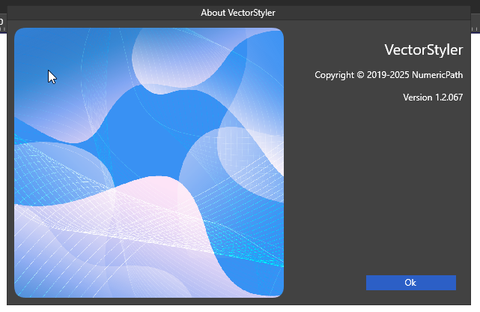
        0_1744049181211_about screen.png

        Win 11
        CPU: AMD Ryzen 5 9600X, 6-core.
        GPU: Nvidia Geforce RTX 5070.

        VectorStylerV 1 Reply Last reply Reply Quote 0
        • VectorStylerV Offline
          VectorStyler @Subpath
          last edited by

          @Subpath said in update 1.2.067:

          Btw. if i would like to reinstall where can i download
          the latest Vectorstyler Version ?

          https://vectorstyler.com/try/

          S 1 Reply Last reply Reply Quote 1
          • S Offline
            Subpath @VectorStyler
            last edited by

            @VectorStyler

            Thank you
            But as i wrote above i found it already under
            your HomePage > Releases

            Win 11
            CPU: AMD Ryzen 5 9600X, 6-core.
            GPU: Nvidia Geforce RTX 5070.

            1 Reply Last reply Reply Quote 1
            • AyoA Offline
              Ayo
              last edited by Ayo

              @VectorStyler said in update 1.2.067:

              Retract handle command to work for the first node of open paths also.

              Almost there. The end node does not fully retract handles (outgoing handle).

              VectorStylerV 1 Reply Last reply Reply Quote 1
              • VectorStylerV Offline
                VectorStyler @Ayo
                last edited by

                @Ayo said in update 1.2.067:

                Almost there. The end node does not fully retract handles (outgoing handle).

                I will fix this.

                1 Reply Last reply Reply Quote 1
                • H Offline
                  Harry @VectorStyler
                  last edited by

                  @VectorStyler said in update 1.2.067:

                  Symbol stamp tool to use the scaling set in the tool options for the first symbol also.

                  Thanks for the quick fix! It works now!

                  Win 11, XP Pen Deco 01 V2 graphic tablet

                  1 Reply Last reply Reply Quote 0
                  • H Offline
                    Harry @VectorStyler
                    last edited by

                    @VectorStyler said in update 1.2.067:

                    Copy SVG to clipboard so it can be pasted correctly by other apps.

                    Unfortunately I still can't paste SVGs to Cavalry and Inkscape ...

                    Win 11, XP Pen Deco 01 V2 graphic tablet

                    VectorStylerV 1 Reply Last reply Reply Quote 1
                    • VectorStylerV Offline
                      VectorStyler @Harry
                      last edited by

                      @Harry tested now with both Cavalry and Inkscape and it works.
                      Is "Copy as SVG" enabled in preferences?

                      S 1 Reply Last reply Reply Quote 0
                      • S Offline
                        Subpath @VectorStyler
                        last edited by

                        @VectorStyler

                        i did also a test, it didnt work her too

                        inkscape to vs
                        yes

                        vs to inkscape
                        no

                        cavalry to vs
                        svg came as text

                        vs to cavalry
                        no

                        “Copy as SVG” in the settings was enabled
                        tried different settings too, nothing works
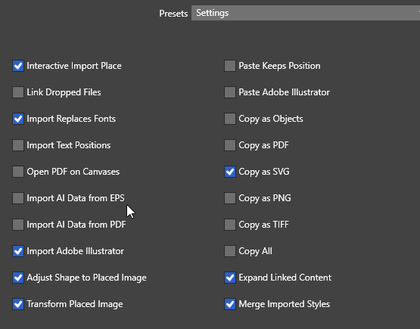
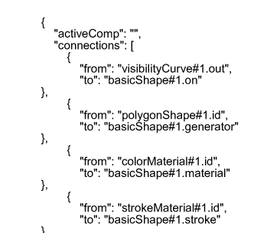
                        0_1744114360793_svg-settings.png

                        0_1744114369499_svg-as-text.png

                        Win 11
                        CPU: AMD Ryzen 5 9600X, 6-core.
                        GPU: Nvidia Geforce RTX 5070.

                        VectorStylerV 1 Reply Last reply Reply Quote 2
                        • VectorStylerV Offline
                          VectorStyler @Subpath
                          last edited by

                          @Subpath I will test this more on Windows.

                          1 Reply Last reply Reply Quote 1
                          • H Offline
                            Harry
                            last edited by

                            I have the same problems as @Subpath

                            Win 11, XP Pen Deco 01 V2 graphic tablet

                            1 Reply Last reply Reply Quote 1
                            • S Offline
                              Subpath
                              last edited by

                              @VectorStyler

                              I just want to say that the Extend Path tool works
                              much better now. I had a project where I used it.

                              Win 11
                              CPU: AMD Ryzen 5 9600X, 6-core.
                              GPU: Nvidia Geforce RTX 5070.

                              1 Reply Last reply Reply Quote 1
                              • First post
                                Last post