Reverse Transformation
-
Since this operation is frequently used in my work, could you add an inverse transform function to the menu?
For example:
- If one shape is rotated 50 degrees clockwise, selecting another shape and applying this function would rotate it 50 degrees counterclockwise.
- If an object is moved forward by 30 units, the corresponding function would move it backward by 30 units.
This function would be based on the previous transform operation but perform its inverse.
I’ve considered a special case (e.g., if an object moves to the upper-right, should its inverse be moving to the lower-left?). In this scenario, I think there should be a rule—perhaps moving to the upper-left would be more reasonable.
I hope this feature can be added in the future. Thank you.
-
@monsterfox Would this work as a separate action? The transform changes are already accumulated, and used for Duplicate.
The new action would only need to take these transforms and apply in inverse.
I think this would be easy to add, I added it to the 1.3 backlog. -
@VectorStyler My suggestion is to add an option called "Reverse Transformation" in the transform menu, with customizable shortcut keys for quick access. Thanks for adding this feature!
-
@VectorStyler
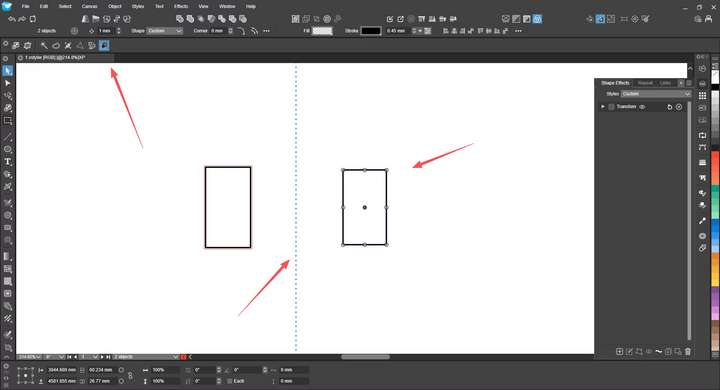
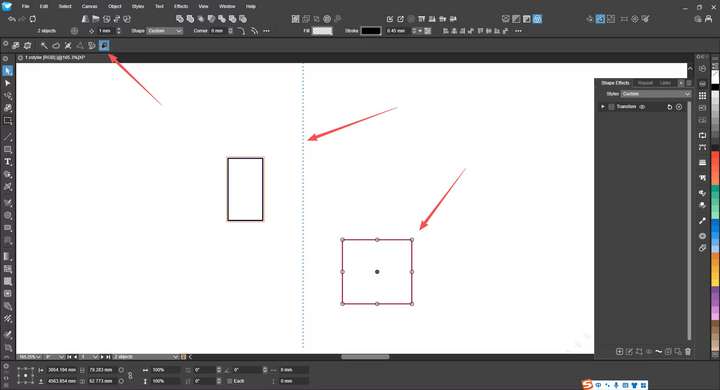 After some time, I found that the previous function is not sufficient. Now I think using a feature similar to "Transform Each" would be more sophisticated. First select the shape on the left, then the one on the right, and click the function (tentatively named: Mirror Transform). At this point, transforming and controlling the right shape will manipulate the left shape: moving the right shape to the left will make the left shape move to the right; rotating the right shape clockwise will make the left shape rotate counterclockwise; scaling up the right shape will make the left shape scale up in the opposite direction. This operation feels more reasonable and mature. A dotted line in the middle indicates that the function is activated and in symmetric transformation mode. I hope this feature can be added. Thank you.
 -
@monsterfox Would a mirror tool solve all this?
-
@VectorStyler No, the figures here are not symmetric
