VectorStyler
    • Categories
    • Unread
    • Recent
    • Tags
    • Popular
    • Register
    • Login

    open recent Help

    Scheduled Pinned Locked Moved Questions and Support
    18 Posts 3 Posters 9.8k Views 3 Watching
    Loading More Posts
    • Oldest to Newest
    • Newest to Oldest
    • Most Votes
    Reply
    • Reply as topic
    Log in to reply
    This topic has been deleted. Only users with topic management privileges can see it.
    • VectorStylerV Offline
      VectorStyler @asan
      last edited by

      @asan

      correction: ~/Library/Application Support/NumericPath/VectorStyler1.2/vector/data/resources/

      1 Reply Last reply Reply Quote 0
      • A Offline
        asan
        last edited by

        from this path: /Library/Application Support/NumericPath/VectorStyler1.2/vector/data/resources/
        from the resources folder I sent the files to the trash.
        Same thing, can not find the open recent files.

        VectorStylerV 1 Reply Last reply Reply Quote 1
        • VectorStylerV Offline
          VectorStyler @asan
          last edited by

          @asan said in open recent Help:

          Same thing, can not find the open recent files.

          Not clear why this happens. It seems that VectorStyler cannot access files in the /Desktop folder.
          I will try to find out more on this.

          1 Reply Last reply Reply Quote 0
          • R Offline
            Reyder
            last edited by

            I am having the same issue. Open recent menu lists recent files, and will open them as long as I don't quit VS. If I quit, relaunch and try to open any saved file listed in Open recent, I get the attached error message.
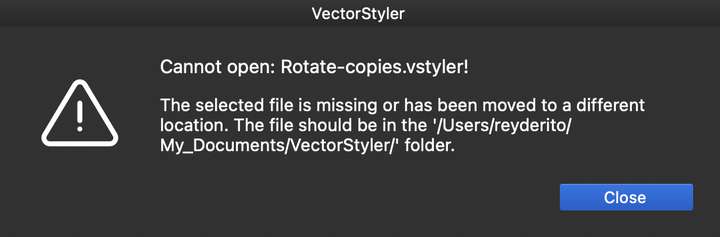
            0_1747893875308_Screenshot 2025-05-22 at 1.56.33 AM.png

            I am using VS Version 1.2.071 on Mac OS Sequoia 15.5

            VectorStylerV 1 Reply Last reply Reply Quote 1
            • VectorStylerV Offline
              VectorStyler @Reyder
              last edited by

              @Reyder I have a bug opened on this issue. It looks like some sort of permission issue (new MacOS versions introduced a lot of permission blocks). I will try to replicate it.

              1 Reply Last reply Reply Quote 1
              • VectorStylerV Offline
                VectorStyler @asan
                last edited by

                @asan A question: are you using the Mac App store version of VectorStyler or the one downloaded from our webpage?

                1 Reply Last reply Reply Quote 0
                • A Offline
                  asan
                  last edited by

                  I am using the Mac app store version

                  VectorStylerV 1 Reply Last reply Reply Quote 1
                  • VectorStylerV Offline
                    VectorStyler @asan
                    last edited by

                    @asan said in open recent Help:

                    I am using the Mac app store version

                    That explains the issue. The Mac App store runs apps in a mode that cannot access files in folders, unless manually opened.

                    1 Reply Last reply Reply Quote 0
                    • A Offline
                      asan
                      last edited by

                      can I change from app store download to your website download?

                      VectorStylerV 1 Reply Last reply Reply Quote 0
                      • VectorStylerV Offline
                        VectorStyler @asan
                        last edited by

                        @asan

                        Yes, at no cost.

                        Can the email from the forum registration be used for the license?

                        A 1 Reply Last reply Reply Quote 0
                        • A Offline
                          asan @VectorStyler
                          last edited by

                          @VectorStyler
                          yes it can

                          VectorStylerV 1 Reply Last reply Reply Quote 1
                          • VectorStylerV Offline
                            VectorStyler @asan
                            last edited by

                            @asan It should be in your mailbox.

                            A 1 Reply Last reply Reply Quote 0
                            • A Offline
                              asan @VectorStyler
                              last edited by

                              @VectorStyler
                              Thank you, everything is working!! thank you

                              1 Reply Last reply Reply Quote 1
                              • First post
                                Last post