Text rotate center by default?
-
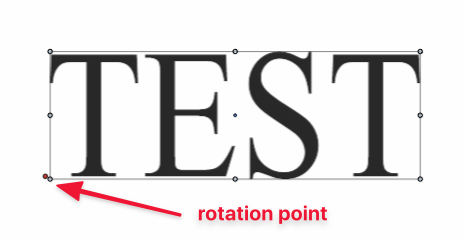
Would it make sense for the rotation of text to automatically start in the very center?
🍎 macOS Tahoe 26.2, Mac mini (M1, 2020), Chip Apple M1, Memory 16 GB
Cintiq 27QHD Display and LG Ultra HD Display -
When I do move the red dot rotation indicator to the center - the middle dot does not show red, but it does on the other rotational optional points. Would it make sense this is would show red?
-
@Boldline I added this to the backlog. The problem is that for text, the origin point is at the bottom left (mostly).
Changing this at this time is not possible as it would change existing documents.
I still have to study a bit this one to see if there is a good solution for it. -
@vectoradmin I get it. No problem. I love the control VS offers in choosing the rotation point location - and I "can" move the rotation point manually to the center if I want to.... I don't know if others have a strong opinion on where the default rotation begins. It's not a deal-breaker by any means. What is Illustrator doing with their text that differs in VS? They have the center rotate by default - but they lack (in CS6 anyway) the hands on easy flexibility to rotate it from another location.
How is this handled in CorelDraw @Vector-Rock ? -
@Boldline, @vectoradmin,
CorelDRAW rotates from the Center by default. The anchor (rotation point) can be moved.
To rotate individual Characters, use the Shape Tool.Here is a fast paced "partial" overview of manipulating text (official CorelDRAW video). It doesn't cover things like text on a path and the like, but it's professional.
https://learn.corel.com/tutorials/manipulating-text-with-the-shape-tool-in-coreldraw/If you want to specifically just see rotation and changing the rotation point, you can see it in this video ("Mastering the Artistic Text Tool in CorelDRAW"). It's long (30+ minutes) with computer voice, so just skip to just past the 3:00 minute mark to see rotation.
https://www.youtube.com/watch?v=wx6nIJ-9sZY -
Thank you for fixing this! I will test it out more but I'm liking that it's right in the center by default now

