VectorStyler
    • Categories
    • Unread
    • Recent
    • Tags
    • Popular
    • Register
    • Login

    How do I remove a brush from the brush preset list?

    Scheduled Pinned Locked Moved Questions and Support
    7 Posts 3 Posters 4.9k Views 3 Watching
    Loading More Posts
    • Oldest to Newest
    • Newest to Oldest
    • Most Votes
    Reply
    • Reply as topic
    Log in to reply
    This topic has been deleted. Only users with topic management privileges can see it.
    • RaaskotR Offline
      Raaskot
      last edited by Raaskot

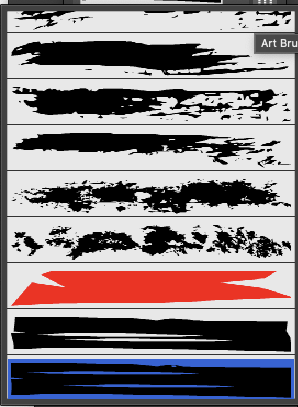
      How do I remove an artistic brush preset from the brush preset list?
      0_1750338886105_bfaf191f-fc65-4259-9e32-a457aa05663d-image.png

      S VectorStylerV 2 Replies Last reply Reply Quote 0
      • S Offline
        Subpath @Raaskot
        last edited by

        @Raaskot

        Menu > Window > Presets > Brush Presets

        0_1750347492073_Brush Presets.png

        Win 11
        CPU: AMD Ryzen 5 9600X, 6-core.
        GPU: Nvidia Geforce RTX 5070.

        1 Reply Last reply Reply Quote 2
        • VectorStylerV Offline
          VectorStyler @Raaskot
          last edited by

          @Raaskot Also: the Styles -> Preset Manager can be used to manage any of the presets.

          RaaskotR 1 Reply Last reply Reply Quote 1
          • RaaskotR Offline
            Raaskot @VectorStyler
            last edited by Raaskot

            @VectorStyler
            @subpath

            Very good, thanks.😊

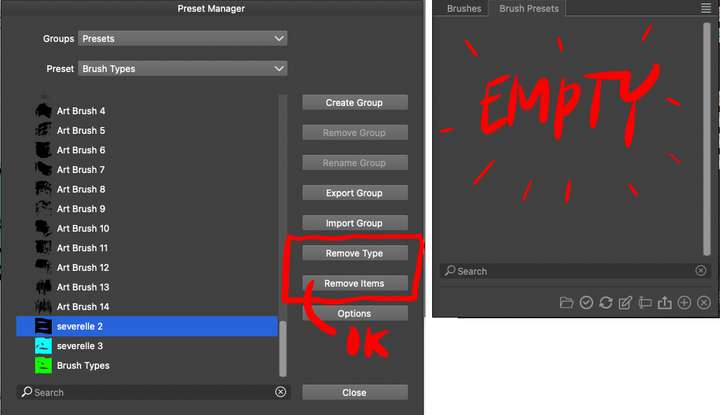
            1. Preset Manager is available, but I wonder the difference between "Remove Type" and "Remove Item" (the latter works)?
            2. For my part the Brush Presets list is empty. How comes?
            0_1750391060156_7b2d668d-88d6-4f28-ac12-63134d76decb-image.png

            VectorStylerV 2 Replies Last reply Reply Quote 0
            • VectorStylerV Offline
              VectorStyler @Raaskot
              last edited by

              @Raaskot said in How do I remove a brush from the brush preset list?:

              Remove Type

              Removes the whole preset collection.

              RaaskotR 1 Reply Last reply Reply Quote 1
              • RaaskotR Offline
                Raaskot @VectorStyler
                last edited by

                @VectorStyler
                Thanks.
                Any idea about question 2?

                1 Reply Last reply Reply Quote 0
                • VectorStylerV Offline
                  VectorStyler @Raaskot
                  last edited by

                  @Raaskot said in How do I remove a brush from the brush preset list?:

                  For my part the Brush Presets list is empty. How comes?

                  This may depend on the current workspace state, there can be multiple brush presets panels and some may end up empty of the associated group is removed.

                  Is there a "Reveal Hidden Presets" in the panel menu? If so, select it.
                  Otherwise, see what panel gets opened with the Panels -> Presets -> Brush Presets command.

                  1 Reply Last reply Reply Quote 1
                  • First post
                    Last post