How should position adjustment in the Repeater work ?
-
I don't understand how the position adjustment works
in the Repeater. When using a gradient, I expect the
distance of objects to be controlled in a defined direction.Instead, the objects move in a direction for which I have
no explanation.For example, when using the gradient for scaling, the object
is scaled along the gradient. But with position, the objects
don't seem to follow the gradient. -
@Subpath You have to set the Position values and the movement direction is determined by the direction of that point.
-
@VectorStyler said in How should position adjustment in the Repeater work ?:
@Subpath You have to set the Position values and the movement direction is determined by the direction of that point.
Sorry, I'm still not clear about this.
What does the position value do or what the position for?
Its set a position thats clear. Based from the Origin Point ?What is the purpose of Movement? Direction ? In what Direction.
.
.
But the most unclear to me is:
Using Gradient with Movement and Direction with Adjust Position.
Perhaps I may have a wrong thinking of what's possible with a
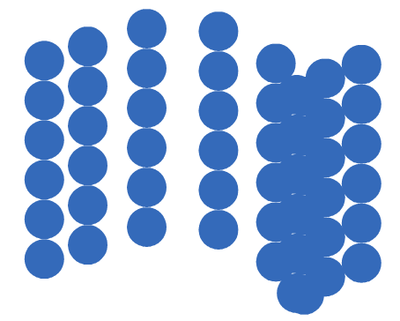
gradient in this case. Because using a gradient didn't work as expected.I'm using a linear gradient here in both Movement and Direction
and expect the shapes to move linearly. But they behave
unpredictably and certainly not linearly.
.
.
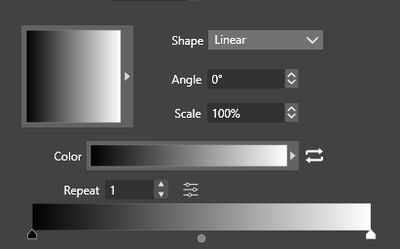
This is the Gradient i use in both Movement and Direction.
.
.
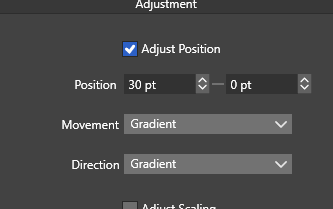
The Value i used
.
.
The Result
.
.
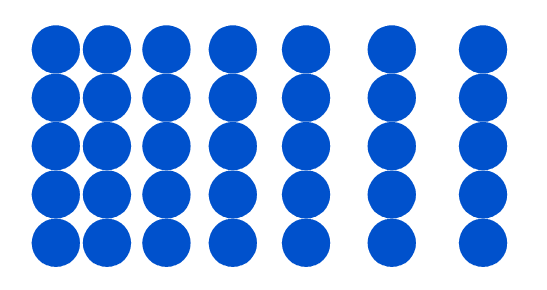
I expected something in this direction
-
@Subpath Repeater does not currently support moving positions based on grayscale values, but it can be achieved for your needs. I have recorded a video for you to reference.
https://youtu.be/mj7o5Thbe2Y -
Lee, thank you so much for your video. I really appreciate it,
and I'm sure other VectorStyler users do too.I also found it very interesting and inspiring how you used
shape effects in combination with the Repeater.In this case, I was and still am more surprised by the behavior of the Repeater
when using linear gradients with "Adjust Position." And I would never have
expected such a result when using a linear gradient. (see above post)"Adjust Scale" with a linear gradient works as expected.
.
.
Here a Video with adjust scale
.
.

-
@Subpath
You're welcome.Adjust Position
"Adjust Position" is my favorite feature. It can create moiré patterns and work well with transparent or black lenticular to produce dynamic effects. I have recorded a video to demonstrate the gradient dynamic effect for your reference.
-
Wow, pretty pretty cool. I need still a few more tries to figure out how
"Adjust Position" works. It's still unpredictable for me at the moment.By the way, since I used to work as a screen printer for a few years,
I'm familiar with moiré patterns that can occur with halftone printing
or overlapping Screen folie. Always found them interesting.I had a few ideas after watching your video. One was that if you use red
and green dots and some of the old 3D red-green glasses, you might be
able to see a 3D effect.
But I've also seen many other uses.
Again, thank you very much for your help and the insights you've given
me and I'm sure other users will be grateful to you for that too.
