VectorStyler
    • Categories
    • Unread
    • Recent
    • Tags
    • Popular
    • Register
    • Login

    Feature Request: Rotate Object About Arbitrary Point

    Scheduled Pinned Locked Moved Features and Ideas
    7 Posts 2 Posters 3.9k Views 2 Watching
    Loading More Posts
    • Oldest to Newest
    • Newest to Oldest
    • Most Votes
    Reply
    • Reply as topic
    Log in to reply
    This topic has been deleted. Only users with topic management privileges can see it.
    • J Offline
      jpsimmons
      last edited by

      Rotate Object About an Arbitrary Point

      When rotating an object about a remote point r, the correct transformation can be computed using the rotation matrix R (which you're already using for in-place rotation). After rotating, apply a translation by:

      (I - R) * r

      Where:

      I is the identity matrix

      R is the 2×2 rotation matrix

      r is the point (in global coordinates) that you want to rotate around

      This results in the correct affine transformation for rotation about a fixed external point, not just the object’s center.

      It would be very useful to support this natively for tasks like pattern replication, mechanical design, and geometry scripting.

      Thanks for considering it!

      VectorStylerV 1 Reply Last reply Reply Quote 1
      • VectorStylerV Offline
        VectorStyler @jpsimmons
        last edited by

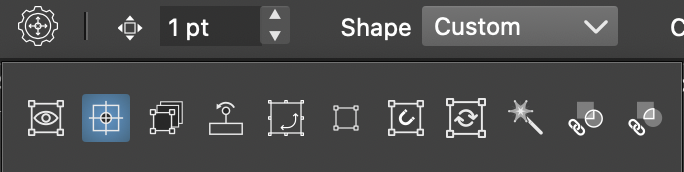
        @jpsimmons When the transform tool is active (first icon in the toolbox), the context panel will have this button.
        0_1750880525044_button.png

        This opens the transform options:
        0_1750880568377_options.png
        The second icon can enable or disable the center offset.

        1 Reply Last reply Reply Quote 0
        • J Offline
          jpsimmons
          last edited by

          The tooltips say to enable or disable the transform pivot point editing, which sounds like the right thing. I click on it and nothing happens, but it is highlighted in blue. How do I set the point of rotation and how do I rotate about it?

          VectorStylerV 1 Reply Last reply Reply Quote 1
          • VectorStylerV Offline
            VectorStyler @jpsimmons
            last edited by

            @jpsimmons Once it is enabled, when an object is selected a red dot appears at the center. This can be dragged to set the center.

            J 1 Reply Last reply Reply Quote 0
            • J Offline
              jpsimmons @VectorStyler
              last edited by

              @VectorStyler That works. Well. Can I set this to be default behavior? Like in "settings"?

              VectorStylerV 1 Reply Last reply Reply Quote 0
              • VectorStylerV Offline
                VectorStyler @jpsimmons
                last edited by

                @jpsimmons That is the settings. Once turned on, it should stay on even after restart.

                J 1 Reply Last reply Reply Quote 0
                • J Offline
                  jpsimmons @VectorStyler
                  last edited by

                  @VectorStyler It does. And the pivot point snaps to gridlines if you set it to. Nice!

                  1 Reply Last reply Reply Quote 1
                  • First post
                    Last post