In isolation mode the path appears non-edible. What to do?
-
I've tried searching the online guide but found no answer: Opposite the guide I experience in isolation mode the path seems non-edible like if they are locked. But they are not.
Am I missing something?
https://go.screenpal.com/watch/cTjjjCnI9KX
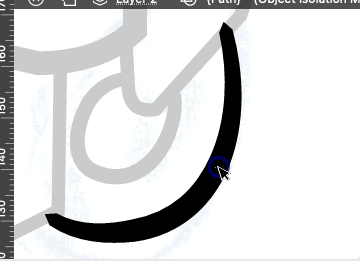
-
@Raaskot said in In isolation mode the path appears non-edible. What to do?:
Am I missing something?
There are two isolation modes: "Isolate Inside" and "Isolate Selected"
Double click will isolate inside the path, so anything that is inside (clipped) can be edited. This also means that after this mode of isolation you can start drawing new things inside the path (and these will be clipped).
But the path itself is not accessible in this isolation mode.There is an other isolation mode "Select -> Isolated Selected", where the selected objects are isolated from other objects. This isolates the objects, not their content.
BTW: this isolation mode is specific to VS and it is to make it easier creating clipped content.
-
@VectorStyler said in In isolation mode the path appears non-edible. What to do?:
his isolation mode is specific to VS
Very good, thanks

Is there any way to swap the 2*click from Isolate Inside to just Isolate Selection i VS?I constantly end up having to esc-exit the former while drawing ...
-
@Raaskot said in In isolation mode the path appears non-edible. What to do?:
Is there any way to swap the 2*click from Isolate Inside to just Isolate Selection i VS?
Settings -> Document Editor -> Double Click (first column)
-
@VectorStyler
Cool!

