Snap to Self option
-
Title: Add “Snap to Self” Option
Description:
Currently, snapping behavior in VectorStyler includes “Snap to Objects,” which attempts to snap to many different points (centers, edges, corners, etc.) and can also include the current object. However, this is overloaded and unpredictable when you only want to snap an object to its own geometry.Proposed change:
Add a “Snap to Self” option that restricts snapping targets to the currently selected object(s) original positions.Benefits:
Allows precise constrained movement and alignment based on the object’s own features.
Reduces interference from other nearby objects when editing in dense drawings.
Provides predictable snapping behavior for adjustments like straightening, aligning to original positions, or moving nodes relative to the object’s own geometry.
Use case:
When adjusting a node or segment in a complex document with many overlapping shapes, “Snap to Objects” often locks onto other objects, making precise edits tedious. “Snap to Self” would ensure the snap behavior is entirely within the active selection, allowing smoother and more accurate adjustments. -
@jpsimmons There is an option to restrict snapping to a set of objects only.
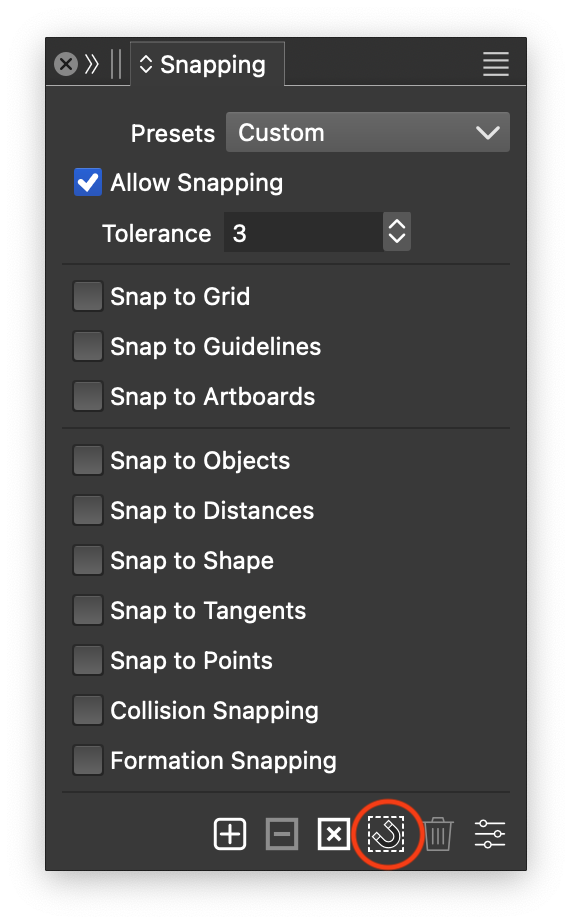
Select the objects and use the 4th button in the Snapping panel to limit snapping to the selected objects. -
@VectorStyler That's in the menu? I'm in 1.2.073. There's not a button for it. If this has been fixed, good job!
-
-
@jpsimmons Also in the context panel: