VectorStyler
    • Categories
    • Unread
    • Recent
    • Tags
    • Popular
    • Register
    • Login

    Appearance panel behaviour

    Scheduled Pinned Locked Moved Features and Ideas
    3 Posts 2 Posters 1.8k Views 1 Watching
    Loading More Posts
    • Oldest to Newest
    • Newest to Oldest
    • Most Votes
    Reply
    • Reply as topic
    Log in to reply
    This topic has been deleted. Only users with topic management privileges can see it.
    • W Offline
      William Kansepa
      last edited by William Kansepa

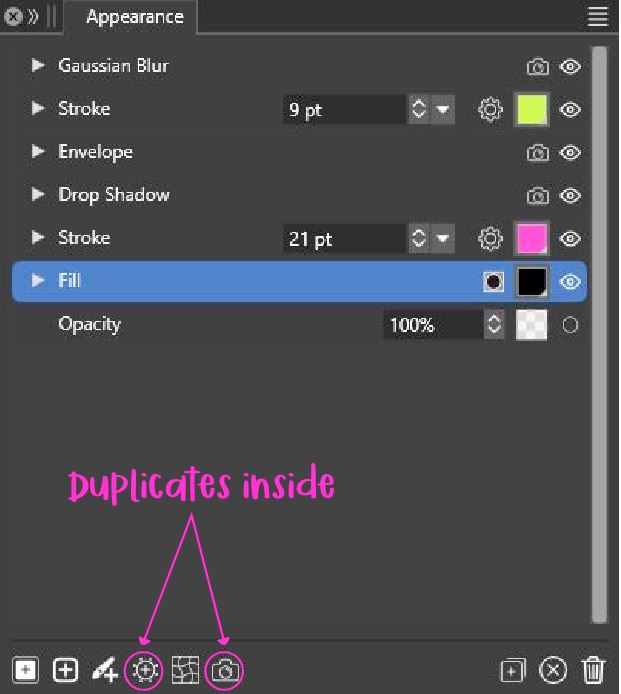
      Suppose I have artwork with two strokes and I need to apply some effects (Shape or Image effect) using the buttons at the bottom of the Appearance panel onto the uppermost stroke ONLY. I have tried doing this without any success.
      In Illustrator this is achievable. Is this yet feasible in VS?

      Also note this:

      1. Some of the effects if selected will not even display e.g., Envelope, Warp etc...
      2. Image effects have been duplicated. (Refer to attached image)
        0_1755877312512_Appearance_panel.jpg

      HP•Windows 11 Pro•11th Gen Intel(R) Core(TM) i7-1165G7 @ 2.80GHz 2.70 GHz• RAM: 16.0 GB (DDR4)

      VectorStylerV 1 Reply Last reply Reply Quote 1
      • VectorStylerV Offline
        VectorStyler @William Kansepa
        last edited by

        @William-Kansepa This seems to be a bug. I will try to fix it as soon as possible.

        1 Reply Last reply Reply Quote 1
        • W Offline
          William Kansepa
          last edited by

          The Appearance panel is now working as expected. Thank you!

          HP•Windows 11 Pro•11th Gen Intel(R) Core(TM) i7-1165G7 @ 2.80GHz 2.70 GHz• RAM: 16.0 GB (DDR4)

          1 Reply Last reply Reply Quote 0
          • First post
            Last post